Product Classification
Overview
This template ranks your products by annual revenue (ABC) and by how steady their weekly demand is (XYZ). It then gives each product a review frequency from its combined class, such as AX or CZ. Use it to see where planning attention belongs: the few products that earn most of the revenue, and which of the rest have demand steady enough to run on simple rules.
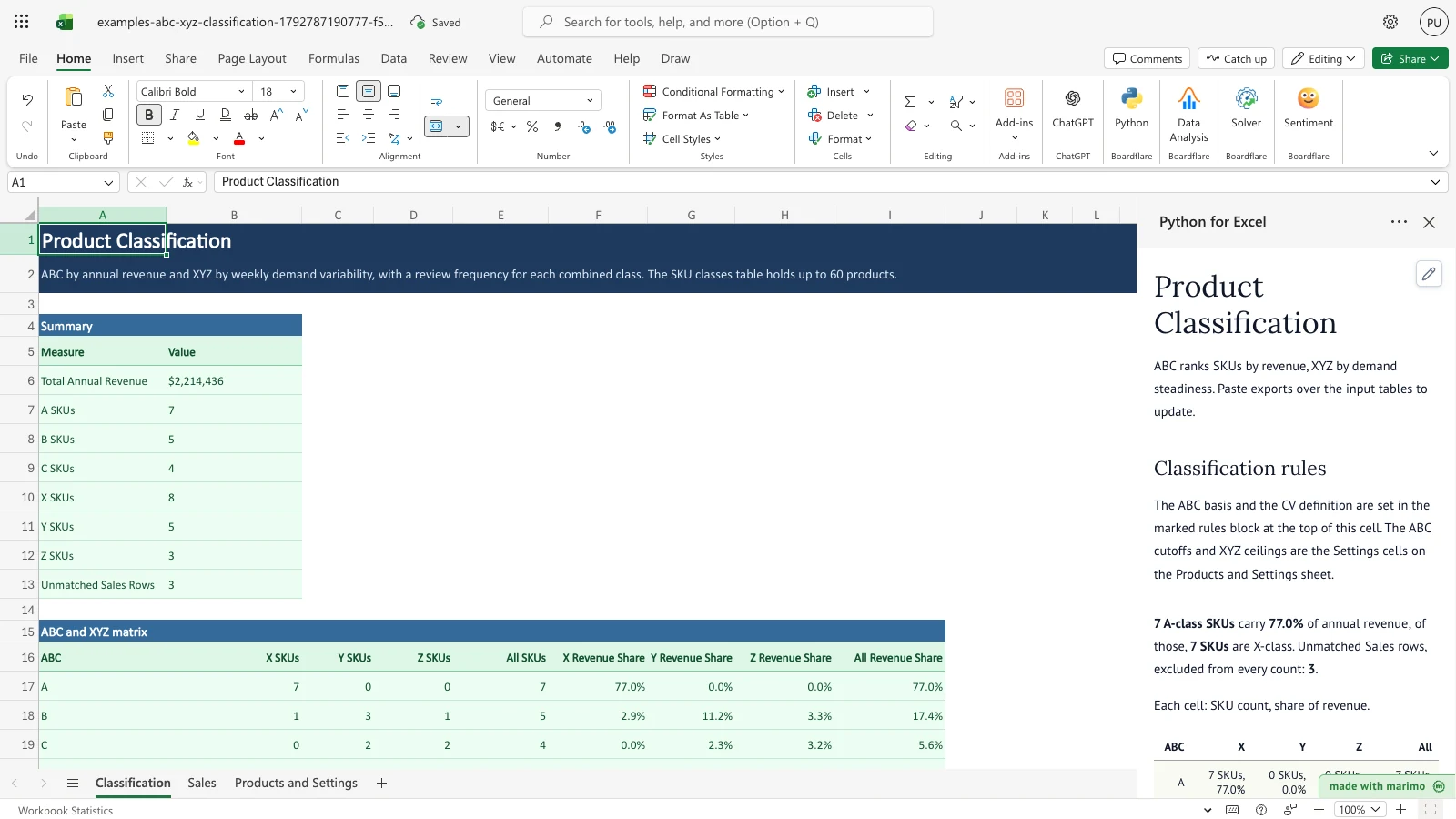
The Classification sheet shows a summary, a 3 by 3 matrix of ABC and XYZ classes, and one row per product with its class and review frequency. The notebook also draws a Pareto chart of products ranked by annual revenue.
Before you start
- Requirements: Excel with Python for Excel. For installing the add-in, opening the task pane and running the notebook, see the Boardflare Notebook Reference. The template needs no sign-in of its own.
- Data shape: Two tables are needed. Sales holds one row per SKU per week, with Week Start (the week’s date), SKU (text) and Units (a number of units sold). Products holds one row per SKU, with SKU, Product, Category and Unit Price (a price per unit). The Products table holds up to 60 products. SKU values must be unique in Products.
- Sample data: The workbook includes sample data on the Sales and Products and Settings sheets: 16 products over 52 weeks, plus three Sales rows for a SKU (XX-999) that is not in the product list, so you can see how unmatched rows are reported.
- Roles: The technical author maintains the Python source (
notebook.py) and the workbook builder (workbook.py). The workbook user edits the sales, product, setting and policy cells and reads the results without changing any Python.
Workbook tour
| Sheet and range | Contents | Type |
|---|---|---|
Sales, table Sales (A4:C4 headers, data from row 5) |
Week Start, SKU and Units, one row per SKU per week | Editable input |
Products and Settings, table Products (A5:D5 headers, data from row 6) |
SKU, Product, Category and Unit Price for up to 60 products | Editable input |
| Products and Settings, F5:G9 | Settings: ABC A cutoff (G6), ABC B cutoff (G7), XYZ X ceiling CV (G8), XYZ Y ceiling CV (G9) | Editable input |
Products and Settings, table Policy (I5:J5 headers, rows 6 to 14) |
Class (AX to CZ) and Review Frequency for each of the nine combined classes | Editable input |
| Classification, A4:B13 | Summary: total annual revenue, SKU counts by ABC and XYZ class, and unmatched Sales rows | Output |
| Classification, A15:E20 | ABC and XYZ matrix: SKU counts for each ABC row (A, B, C, Total) and XYZ column (X, Y, Z, All) | Output |
| Classification, A22:N83 | SKU classes table, one row per product, up to 60 products | Output |
The Classification sheet is the output sheet. Do not type over its cells: the notebook writes the summary, the matrix and the SKU classes table each time it recalculates.
Using the template
Change an ABC cutoff
- On the Products and Settings sheet, select G6 (ABC A cutoff, 0.8) and enter 0.72.
- The notebook recalculates. Classification shows the new result: CV-08 moves from AX to BX, and the summary shows six A-class SKUs instead of seven.
The new cutoff is saved when you save the workbook.
Replace the sample sales with your own export
Clear the sample rows before you paste, so none are left behind when a new export is shorter.
- On the Sales sheet, select the data rows under the
Salesheader, right-click, and choose Delete > Table Rows. - Paste the export (Week Start, SKU, Units) starting at cell A5.
- On the Products and Settings sheet, delete the rows of the
Productstable the same way, then paste the product list (SKU, Product, Category, Unit Price) starting at cell A6.
Classification recalculates after the paste. Each product’s annual revenue and weekly units come from the rows that match its SKU.
Remove a product’s sales
To see how a product with no sales is classed, clear the Units for PS-220 in Sales C5 to C56, which are its 52 weekly rows.
- Select Sales C5 to C56 and press Delete.
- PS-220 shows an annual revenue of 0, class CZ and review frequency Quarterly. SN-40 moves from BY to AY, because the remaining revenue is re-ranked and its cumulative share now falls within the A cutoff.
Change the XYZ Y ceiling
- On the Products and Settings sheet, select G9 (XYZ Y ceiling CV, 1) and enter 1.5.
- The notebook recalculates. No product is Z-class any more. EN-17 moves from BZ to BY, and SP-88 and TP-2 move from CZ to CY.
Change a review frequency
- On the Products and Settings sheet, in the
Policytable, select J6 (the review frequency for class AX, Weekly) and enter Monthly. - Each product in class AX now shows Monthly in the Review Frequency column of the SKU classes table. No product changes class.
Add a sale for an unknown SKU
- On the Sales sheet, in the first empty row under the data, enter a Week Start, the SKU XX-999 and a Units value.
- The row is counted as unmatched. The summary’s Unmatched Sales Rows count rises by one, and no product’s class changes.
Clear a product’s whole year of sales
- On the Sales sheet, clear the Units for all 52 weeks of BR-6204 (rows 57 to 108).
- BR-6204 moves to class CZ, and the summary’s total annual revenue falls to $1,893,792.
Inputs and settings
Sales (table Sales)
- Week Start: the start date of the week, one per row. Each distinct date counts as one week when weekly units and the standard deviation are calculated. A product with no row in a week counts zero units for that week.
- SKU: the product code. A row whose SKU is not in Products is unmatched: it is left out of every class and counted in Unmatched Sales Rows.
- Units: the units sold in that week for that SKU. Use a number; it is summed over the year.
Products (table Products)
- SKU: the product code. Must be unique.
- Product: the product name, shown in the SKU classes table.
- Category: kept with the product for your reference. The classes do not use it.
- Unit Price: the price per unit. Annual Revenue is Annual Units times Unit Price, so a price change applies to the whole year.
Settings (Products and Settings, F5:G9)
- ABC A cutoff (G6, default 0.8): products whose cumulative revenue share is at or below this value are A-class. Must be greater than 0 and no more than the B cutoff. Raising it puts more products in A.
- ABC B cutoff (G7, default 0.95): products above the A cutoff and at or below this value are B-class; the rest are C-class. Must be at or below 1.
- XYZ X ceiling CV (G8, default 0.5): products with a coefficient of variation at or below this value are X-class (steady demand). Must be zero or more and no more than the Y ceiling.
- XYZ Y ceiling CV (G9, default 1): products above the X ceiling and at or below this value are Y-class; higher values are Z-class (erratic demand).
Policy (table Policy, I5:J14)
- Class: one of the nine combined classes, AX, AY, AZ, BX, BY, BZ, CX, CY and CZ.
- Review Frequency: the review cadence for products in that class, such as Weekly, Monthly or Quarterly. The sample values are Weekly for AX, AY and BX; Monthly for AZ, BY, BZ and CX; and Quarterly for CY and CZ. Every class present in the product list needs a row here.
How results are calculated
The rules, in the order the template applies them:
- Annual units and revenue. Annual Units is the sum of a product’s Units over all weeks. Annual Revenue is Annual Units times Unit Price. Revenue Share is its revenue divided by total annual revenue across matched products.
- Ranking. Products are ranked by Annual Revenue, highest first. Cumulative Share is the running total of revenue share in that order, and it includes the product’s own share.
- ABC class. A if Cumulative Share is at or below the A cutoff; B if at or below the B cutoff; otherwise C. A product with zero revenue is C.
- Weekly demand. Mean Weekly Units and Std Dev are calculated across every week in the matched Sales rows. The standard deviation is the sample standard deviation. CV is Std Dev divided by Mean Weekly Units.
- XYZ class. X if CV is at or below the X ceiling; Y if at or below the Y ceiling; otherwise Z. A product with a mean of zero has no CV and is Z.
- Combined class and review. The Class is the ABC letter followed by the XYZ letter, for example AX. Review Frequency is looked up from the Policy table for that class.
Worked example: PS-220 Pump Seal Kit in the sample data.
- Annual Units is 2,015 and Unit Price is $185, so Annual Revenue is $372,775.
- The total annual revenue of all matched products is $2,214,436, so Revenue Share is 16.8%. It is the largest share, so its Cumulative Share is also 16.8%. That is at or below 80%, so ABC is A.
- Its mean weekly units are 38.75, with a standard deviation of 3.35, so CV is 0.086. That is at or below 0.5, so XYZ is X.
- Its Class is AX, and the Policy table gives Weekly.
Reading the results
Classification, A4:B13 (summary)
- Total Annual Revenue: the revenue of all matched products, in dollars.
- A SKUs, B SKUs, C SKUs: the number of products in each ABC class.
- X SKUs, Y SKUs, Z SKUs: the number of products in each XYZ class.
- Unmatched Sales Rows: the number of Sales rows whose SKU is not in Products. These rows are excluded from every other result. If this count is higher than you expect, check the SKU spelling in Sales against Products.
Classification, A15:I20 (ABC and XYZ matrix)
The matrix has these columns exactly as they appear in the workbook: ABC, X SKUs, Y SKUs, Z SKUs, All SKUs, X Revenue Share, Y Revenue Share, Z Revenue Share and All Revenue Share.
- Each count cell counts the products in one ABC row and one XYZ column. The Total row and the All SKUs column add them up, so cell E20 equals the number of products.
- The Revenue Share columns give each cell’s share of annual revenue. Cell I20 is 100%.
Classification, A23:N83 (SKU classes)
The table has one row per product, with these columns exactly as they appear in the workbook: SKU, Product, Unit Price, Annual Units, Annual Revenue, Revenue Share, Cumulative Share, ABC, Mean Weekly Units, Std Dev, CV, XYZ, Class and Review Frequency.
- Revenue Share and Cumulative Share are shown as percentages. Use them to see how far down the list the A cutoff falls.
- CV is blank for a product with a mean of zero.
- Review Frequency comes from the Policy table.
The notebook also draws a Pareto chart of products ranked by annual revenue, with the cumulative share line and the A and B cutoffs marked.
If a value looks wrong: check Unmatched Sales Rows first. Then check that the Week Start dates are real dates, that Units are numbers, and that the Settings cutoffs and ceilings are in the ranges given under Inputs and settings.
Saving, sharing and App mode
- What persists: the Sales, Products, Settings and Policy values, and the Classification results as of the last recalculation, are saved with the workbook and are there when you reopen it.
- Per-user and shared: the workbook has no per-user state. Anyone who opens the file sees the same inputs and results.
- App mode: this template does not define its own App mode settings. The input cells listed above are the cells to make editable for an operator. App mode changes presentation rather than permissions, source access, or workbook trust. For how App mode works, see the Boardflare Notebook Reference.
Errors, empty states and limits
| Message or limit | Cause | Fix |
|---|---|---|
| Cutoffs need 0 < A <= B <= 1, and CV ceilings need 0 <= X <= Y. | The ABC cutoffs or XYZ ceilings on Products and Settings are out of order or out of range. | Correct the Settings cells G6 to G9 so that the A cutoff is no more than the B cutoff and the X ceiling is no more than the Y ceiling. |
| Products SKUs must be unique. | Two rows in the Products table have the same SKU. | Remove or correct the duplicate row. |
| Policy has no review frequency for: followed by the missing classes | A product’s combined class has no row in the Policy table. | Add a row for that class to the Policy table with its review frequency. |
- Empty state: the sample data fills every input, so results appear when you open the file. This template has no separate empty-state message of its own. Other runtime messages are described in the Boardflare Notebook Reference.
- Product limit: the SKU classes table holds up to 60 products.
- Input rules: Units must be numbers, Unit Price must be a number, and Week Start must be a date. Rows with a blank SKU or Week Start are ignored.
Limitations and when to use this
- Scope: the classes come from history only. A product with a short sales record, or a recent change in demand, is classed on data that may no longer describe it.
- Price: revenue uses one unit price per product for the whole year, so price changes within the year are not reflected.
- Sample data: the sample data is illustrative. The thresholds and review frequencies are starting points for your business.
- Not for: reorder points and safety stock. This template does not calculate them; use the Inventory Planner template for that.
Developer reference
Notebook implementation
The notebook reads four bound names from the workbook, applies the rules described above, and publishes three outputs to the Classification sheet.
inputs = bf.inputs(
    sales=bf.ref("Sales", headers=True),
    products=bf.ref("Products", headers=True),
    settings=bf.ref("Products and Settings!F5:G9", headers=True),
    policy=bf.ref("Policy", headers=True),
)- Rules block: the cell above the classify cell, marked “Edit these rules.”, sets
ABC_BASIS = "revenue"andCV_DDOF = 1.ABC_BASIS = "units"ranks products by Annual Units instead of Annual Revenue, andCV_DDOF = 0uses the population standard deviation. The sample workbook uses the defaults, which are the rules described in How results are calculated. AnABC_BASISvalue other than “revenue” or “units” raises an error.CV_DDOFis not checked, so any other value runs without an error and is used as the standard deviation’s degrees-of-freedom divisor. - Validation: the classify step rejects cutoffs and ceilings out of range, duplicate SKUs, and any class without a Policy row, with the messages listed under Errors, empty states and limits.
- Classification: Sales rows are matched to Products by SKU. Weekly units are pivoted by SKU and Week Start across every matched week, with missing weeks filled as zero. Revenue is ranked, and ABC and XYZ are assigned with
np.selectover the cutoffs and ceilings. - Publish: the three outputs are sent to the Classification sheet at the positions set in
workbook.py.
publication = bf.publish(outputs={"classes": out["classes"], "matrix": out["matrix"], "summary": out["summary"]})- Chart: the Pareto chart is drawn from the same per-product results, with the A and B cutoffs as horizontal reference lines.
How the calculation/model works
The ABC step is a Pareto split on annual revenue. With the default cutoffs, the top products whose cumulative share is at or below 80% are A, products up to 95% are B, and the rest are C. The XYZ step is a relative-variability split on weekly units: CV is the sample standard deviation divided by the mean, so a product with steady weekly demand has a low CV. The combined class is a 3 by 3 grid. An AX product is high revenue and steady, so it is the natural candidate for simple, frequent review; a CZ product is low revenue and erratic, so a longer review cycle is usually enough.
Validation / expected results
| Check | Expected outcome |
|---|---|
| Products classified | 16 |
| ABC classes (A / B / C) | 7 / 5 / 4 |
| XYZ classes (X / Y / Z) | 8 / 5 / 3 |
| Products in class AX | 7 |
| Total Annual Revenue | $2,214,436 |
| Revenue share of A-class products | 77.0% |
| Unmatched Sales rows | 3 |
The following edits produce these results from the sample workbook:
- Setting the ABC A cutoff to 0.72 leaves six A-class SKUs. CV-08 moves from AX to BX.
- Clearing all 52 weeks of PS-220 sales makes PS-220 CZ with review frequency Quarterly and annual revenue of 0. SN-40 moves from BY to AY.
- Setting the XYZ Y ceiling to 1.5 leaves no Z-class SKUs. EN-17 moves from BZ to BY, and SP-88 and TP-2 move from CZ to CY.
- Setting the AX review frequency to Monthly changes the review frequency of the seven AX products to Monthly, and changes no class.
- Adding a Sales row for XX-999 raises Unmatched Sales Rows from 3 to 4, and leaves PS-220 as AX.
- Clearing all 52 weeks of BR-6204 sales makes BR-6204 CZ and reduces Total Annual Revenue to $1,893,792.
Changelog
2026-10-23
- Standards review and documentation audit: corrected developer reference heading hierarchy to H3, escaped currency symbols in text and tables, and refreshed gate release artifacts.
2026-10-22 (#143)
- Corrected the rules block description: only an unknown
ABC_BASISraises an error, andCV_DDOFis not checked. Corrected the matrix and SKU class ranges and the matrix column names. The workbook and the calculations are unchanged.
2026-10-21
- Rewrote this page in the user-guide layout (Issue #143). The workbook and the calculations are unchanged.
2026-10-19
- Initial release (Issue #116).