Cash Flow Forecast & Liquidity Outlook
Overview
Cash Flow Forecast & Liquidity Outlook turns recent weekly receipts and payments into a forward cash outlook. It fits a straight-line trend to inflows and to outflows, applies the scenario growth you set in the workbook, and shows whether cash would fall below a liquidity threshold. The forecast covers 1 to 16 weeks, and the outlook includes an uncertainty band around the base path.
With the sample data and the default controls, starting cash of $275,000 becomes an ending forecast cash of $485,793.25 after 8 weeks. The lowest base cash is $299,502.43 and the lowest downside cash is $288,556.39. Both stay above the $200,000 threshold, so no breach week is reported.
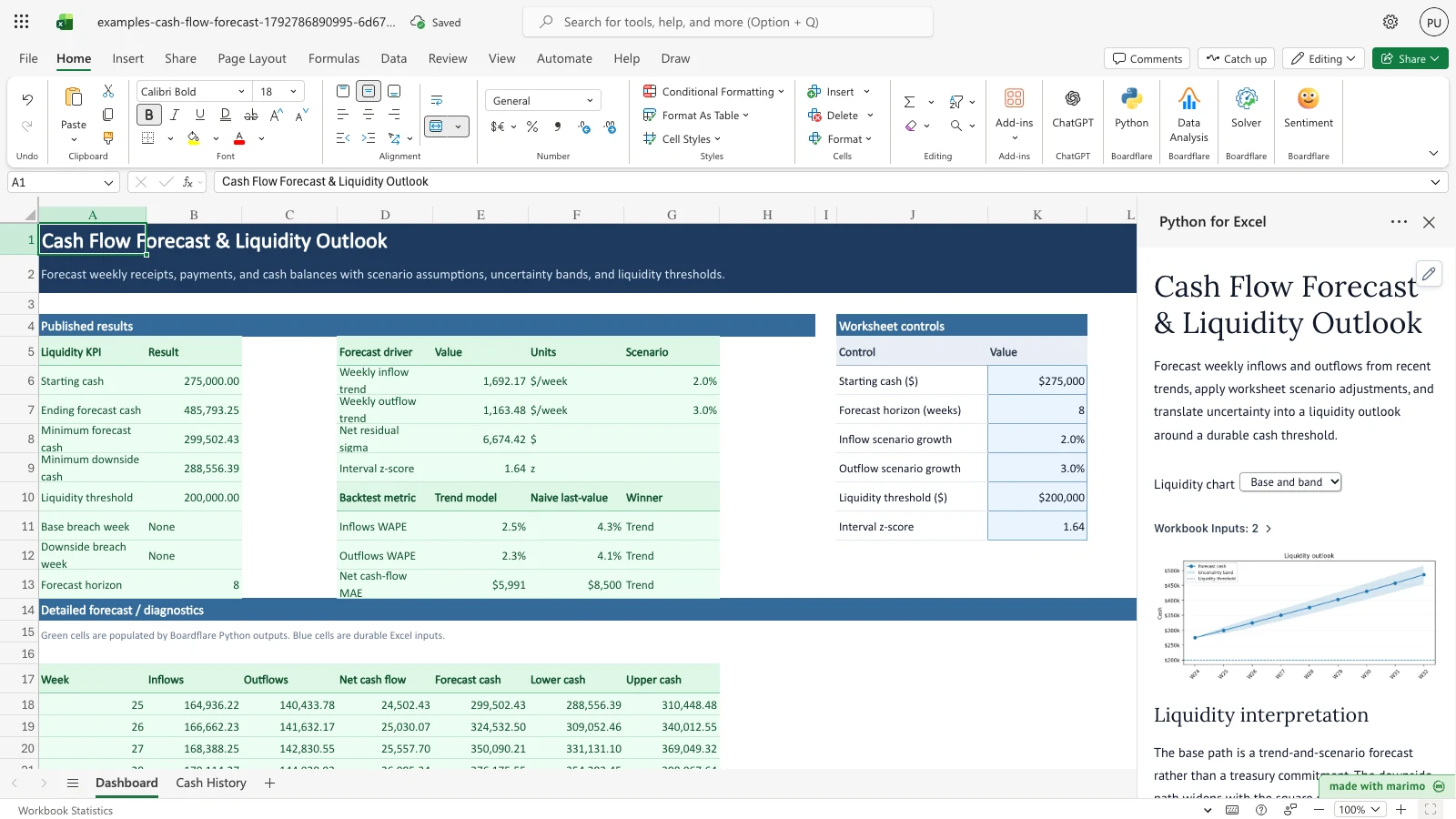
Before you start
Requirements. Excel with Python for Excel. The template reads only the sheets in this workbook, so it needs no sign-in and no external data. To install the add-in and open the task pane, see the Boardflare Notebook Reference.
Data shape. The sample data is included on the Cash History sheet and in the Dashboard controls. To use your own history, replace the values in rows 6 to 29 of Cash History and keep the headers in row 5.
| Column | Type and rule |
|---|---|
| Week | Whole number, 1 or more, unique in the history. It is a week number, not a calendar date. The sample uses weeks 1 to 24. |
| Inflows ($) | Amount, zero or more. Cash received in the week. |
| Outflows ($) | Amount, zero or more. Cash paid out in the week. |
The history needs at least 12 weeks. The template reads rows 6 to 29 only, so weeks entered below row 29 are not used. Each row is treated as one week in order, so keep the weeks consecutive.
Sample data. The Cash History sheet holds 24 weeks of sample inflows and outflows, and the Dashboard holds the default controls.
Roles. The technical author maintains the Python source and the generated workbook package. The workbook user edits the Cash History values and the controls in Dashboard K6:K11, then reviews the forecast and the liquidity results. The workbook user does not change the Python source.
Workbook tour
| Sheet and range | What it holds | Kind |
|---|---|---|
| Dashboard, A5:B13 | The Liquidity KPI table: starting cash, ending and minimum forecast cash, minimum downside cash, the liquidity threshold, the base and downside breach weeks, and the forecast horizon | Output |
| Dashboard, D5:G9 | Forecast drivers: the weekly inflow and outflow trend, the net residual sigma and the interval z-score | Output |
| Dashboard, D10:G13 | The backtest: inflows WAPE, outflows WAPE and net cash-flow MAE for the trend model and the naive last-value baseline, with the winner for each | Output |
| Dashboard, A17:G33 | The forecast by week: Week, Inflows, Outflows, Net cash flow, Forecast cash, Lower cash and Upper cash, for up to 16 weeks | Output |
| Dashboard, J5:K11 | The worksheet controls, with a Control and Value header. The values in K6:K11 are editable. | Editable input |
| Cash History, A5:C29 | Week, Inflows ($) and Outflows ($), one row per week, with the headers in row 5. Rows 6 to 29 are editable. | Editable input |
On the Dashboard, the output ranges are green and are filled by the Python outputs, and the controls are blue. Do not type over the output cells. The headings “Published results” and “Detailed forecast / diagnostics” mark the output areas.
Using the template
Lower the starting cash
- On the Dashboard sheet, select K6, Starting cash ($), and type 150000.
- The notebook recalculates. The Liquidity KPI table and the Forecast by week table update, and the base and downside breach weeks both change to 25. The drivers and the backtest do not change, because they do not depend on starting cash.
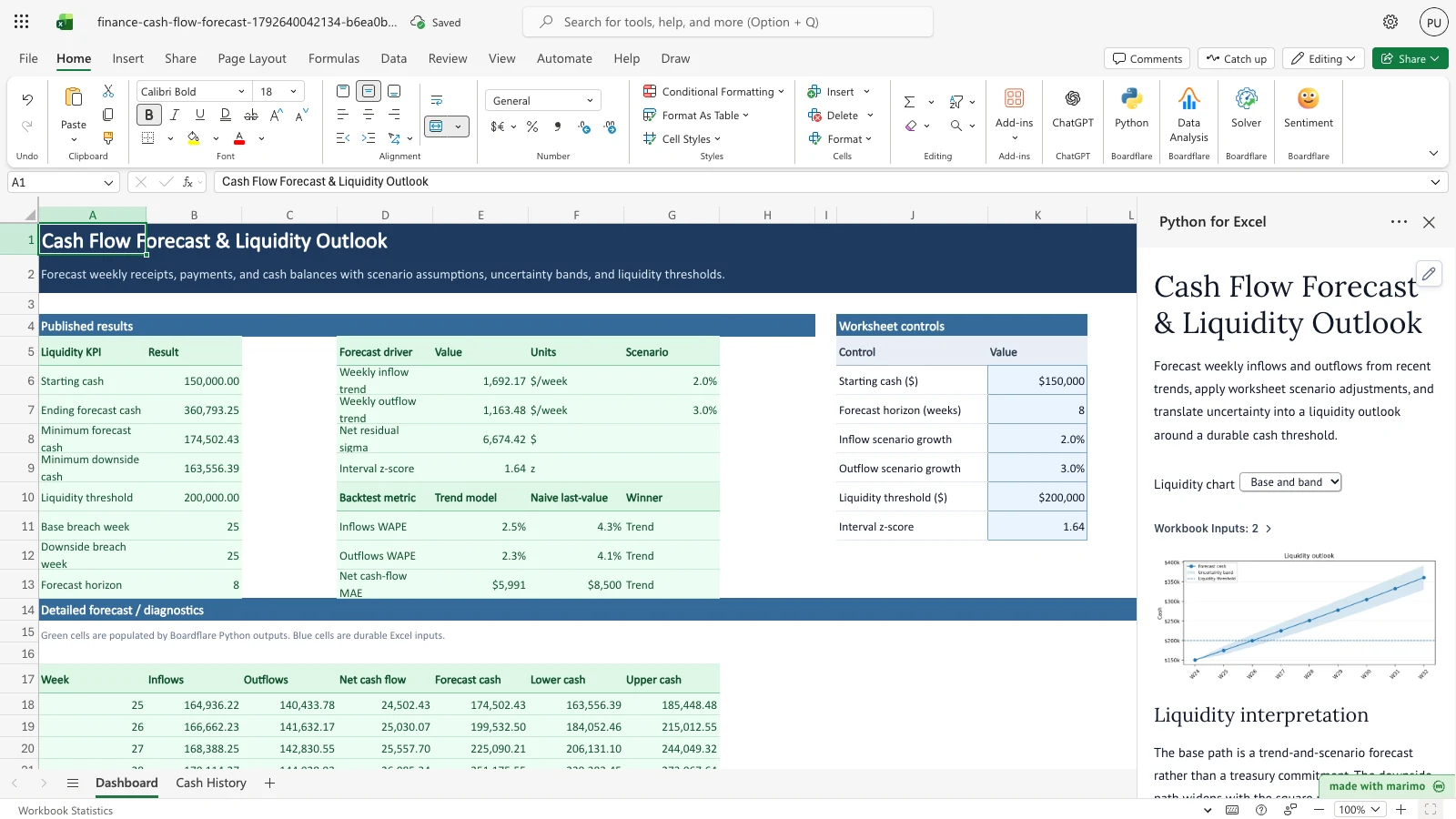
Notice that Ending forecast cash falls to $360,793.25, and both breach weeks now read 25, the first forecast week.
Change the forecast horizon
- Select K7, Forecast horizon (weeks), and type a whole number from 1 to 16. Type 1 for the shortest outlook or 16 for the longest.
- The Forecast by week table shows that many weeks, and the Forecast horizon in the Liquidity KPI table matches. Ending forecast cash is the cash at the last week shown.
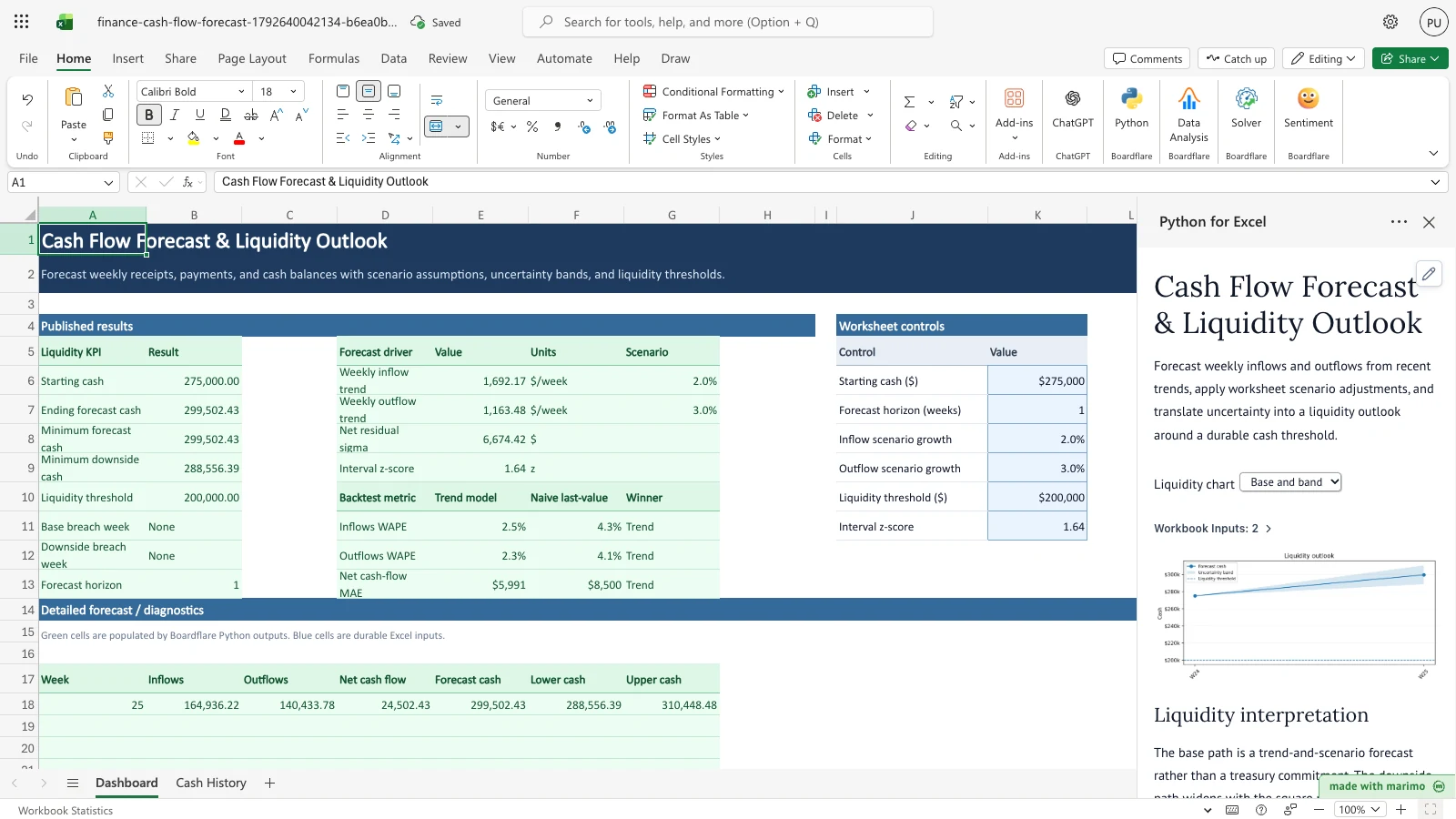
Notice that the Forecast by week table has a single row, and the ending and minimum cash both read $299,502.43.
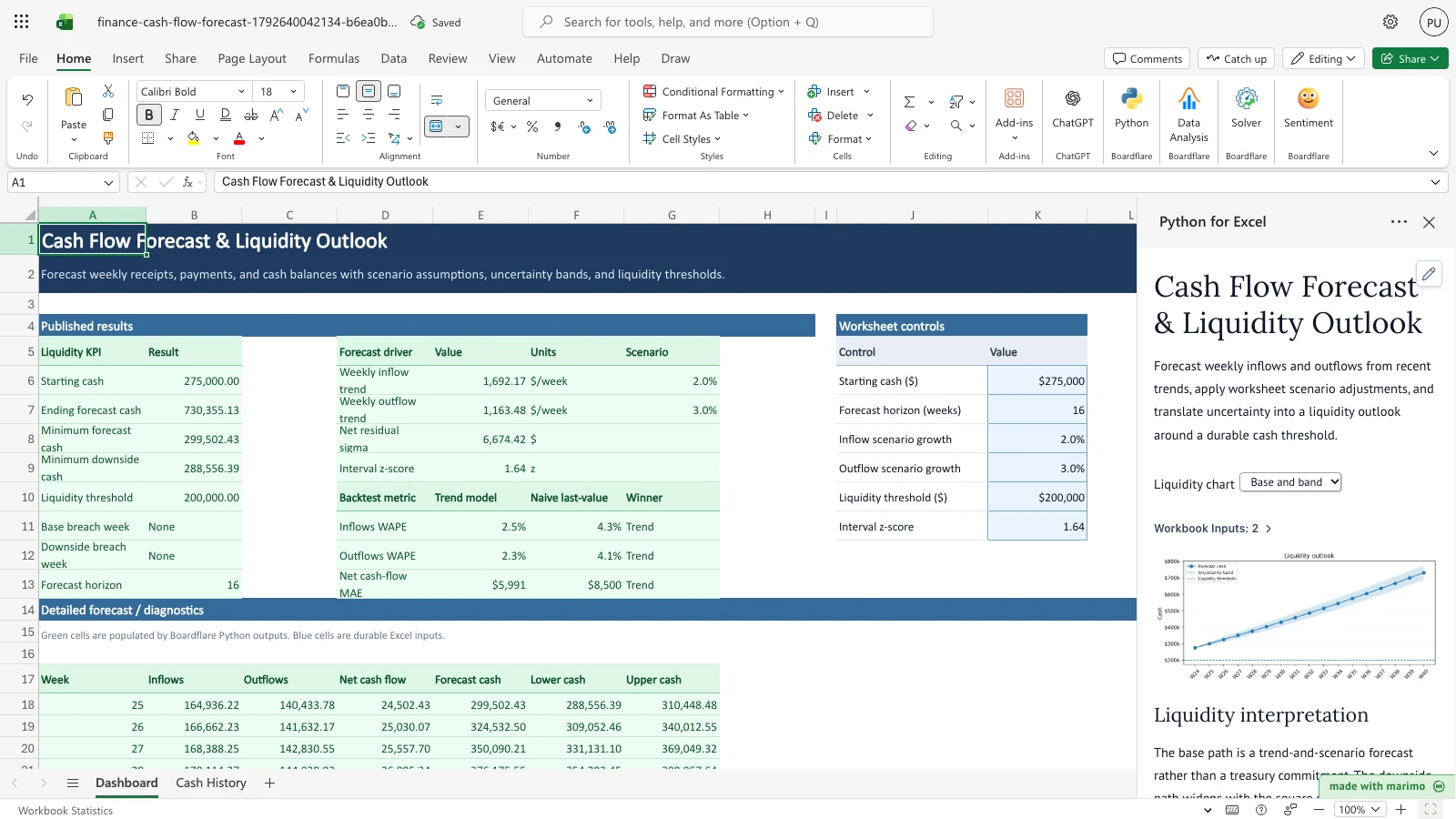
Notice that Forecast horizon reads 16 and ending forecast cash reads $730,355.13, and the chart line extends across the longer horizon.
Remove the scenario growth
- Select K8, Inflow scenario growth, and K9, Outflow scenario growth, and type 0 in each.
- The forecast uses the trend without adjustment. The growth values in the drivers table, G6 and G7, read 0%, and the ending forecast cash changes accordingly.
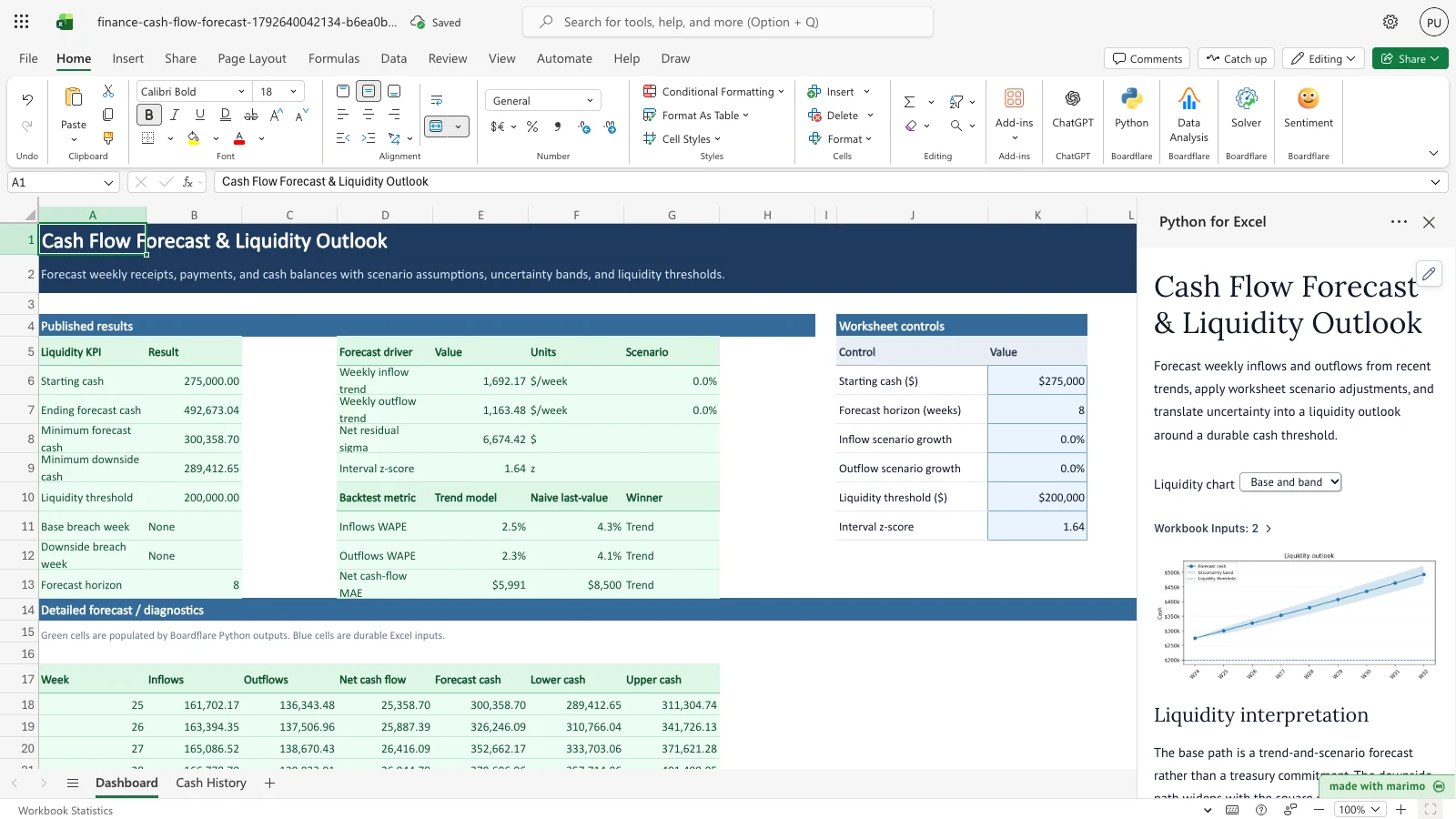
Notice that the drivers table shows 0% growth for inflows and outflows, and ending forecast cash reads $492,673.04.
Inputs and settings
Worksheet controls (Dashboard, J5:K11). Each value in K6:K11 is an editable input. Keep the labels in J6:J11 as they are. Labels are matched ignoring capitalization and extra spaces.
| Cell | Control | Meaning | Allowed values | Default | Effect |
|---|---|---|---|---|---|
| K6 | Starting cash ($) | Cash on hand before the first forecast week | Amount, zero or more | 275,000 | Moves every forecast cash value, the lower and upper values, and the breach weeks |
| K7 | Forecast horizon (weeks) | Number of weeks forecast after the last history week | Whole number, 1 to 16 | 8 | Sets how many rows the Forecast by week table shows and which week the ending cash is for |
| K8 | Inflow scenario growth | Adjustment to forecast inflows | Percent, above -100% | 2% | Multiplies each forecast inflow by 1 plus this value. The historical trend is not refitted. |
| K9 | Outflow scenario growth | Adjustment to forecast outflows | Percent, above -100% | 3% | Multiplies each forecast outflow by 1 plus this value. The historical trend is not refitted. |
| K10 | Liquidity threshold ($) | The cash level the forecast should stay above | Amount, zero or more | 200,000 | Sets the base and downside breach weeks and the dashed line on the chart |
| K11 | Interval z-score | Width of the uncertainty band | Positive number | 1.64 | Scales the band. The band is z times the residual sigma times the square root of the weeks ahead. |
Amounts and percents can be typed with a $ sign, a % sign or thousands commas. The template reads them as numbers.
Cash History (Cash History, A5:C29). Every column is editable.
| Column | Meaning | Allowed values | Effect |
|---|---|---|---|
| Week | The week number | Whole number, 1 or more, unique | The rows are sorted by Week. The highest week is the last history week, and forecast weeks are numbered after it. |
| Inflows ($) | Cash received in the week | Amount, zero or more | Sets the inflow trend and the inflow backtest |
| Outflows ($) | Cash paid out in the week | Amount, zero or more | Sets the outflow trend and the outflow backtest |
Liquidity chart (task pane). The task pane has a drop-down labelled Liquidity chart with two choices. Base and band, the default, draws the forecast cash line with the uncertainty band shaded around it. Base only draws the forecast cash line without the band. The dashed line is the liquidity threshold in either view. The chart is not a workbook input.
How results are calculated
The rules, in the order the template applies them:
- Check the inputs. The history and the controls are checked before anything is calculated. A failed check stops the calculation with a message. See Errors, empty states and limits.
- Fit trends. A straight-line trend is fitted to the inflows, and a separate one to the outflows, across the history rows in order.
- Backtest. For the last 8 history weeks, each week is predicted one week ahead from a trend fitted only to the weeks before it. The naive forecast is the previous week’s value. Inflows and outflows are scored with WAPE, which is the sum of absolute errors divided by the sum of the actual amounts. Net cash flow is scored with mean absolute error. The trend is the winner when its error is equal to or lower than the naive error.
- Forecast flows. For each forecast week, the trend value is multiplied by 1 plus the scenario growth for that flow. Forecast inflows and outflows are never below zero. Net cash flow is inflows minus outflows.
- Forecast cash. Forecast cash is starting cash plus the running total of net cash flow.
- Uncertainty band. The residual sigma is the standard deviation of the historical differences between actual and trend net cash flow, using n minus 2 as the divisor. For a week that is k weeks ahead, the band is the interval z-score times the residual sigma times the square root of k. Lower cash is forecast cash minus the band, and upper cash is forecast cash plus the band.
- Breach weeks. The base breach week is the first forecast week where forecast cash is below the threshold. The downside breach week is the first forecast week where lower cash is below the threshold. Both read None when no week falls below it.
Worked example: the first forecast week (week 25), with the sample data and default controls. The inflow forecast is $164,936.22 and the outflow forecast is $140,433.78, so net cash flow is $24,502.43. Forecast cash is $275,000 plus $24,502.43, which is $299,502.43. The residual sigma is $6,674.42, so the band for one week ahead is 1.64 times $6,674.42 times the square root of 1, or $10,946.05. Lower cash is $288,556.39 and upper cash is $310,448.48. Because $299,502.43 is above the $200,000 threshold, the base breach week is None.
Reading the results
Liquidity KPI (Dashboard, A5:B13). Starting cash, Ending forecast cash, Minimum forecast cash, Minimum downside cash, Liquidity threshold, Base breach week, Downside breach week and Forecast horizon. Amounts are in dollars with two decimals. Breach weeks are week numbers, not dates, and read None when there is no breach.
Forecast drivers (Dashboard, D5:G9). Weekly inflow trend and Weekly outflow trend, in $ per week, with the scenario growth in column G as a percent. Net residual sigma, in dollars, is the spread used for the band. Interval z-score is the value from K11.
Backtest (Dashboard, D10:G13). For each metric, the Trend model and Naive last-value columns show the error, and Winner shows which one is lower. Inflows WAPE and Outflows WAPE are percents. Net cash-flow MAE is in dollars.
Forecast by week (Dashboard, A17:G33). Week, Inflows, Outflows, Net cash flow, Forecast cash, Lower cash and Upper cash for each forecast week, with amounts in dollars. The band is the difference between the lower and upper values.
Task pane. The notebook also shows a short Liquidity interpretation, a chart of forecast cash against the threshold, and the Liquidity chart drop-down.
What to check if a value looks wrong.
- The breach week reads None but the chart looks close to the line: the base path may stay above the threshold while the band dips below it. Check the Downside breach week.
- The Forecast by week table has fewer rows than you expect: check that K7 is a whole number from 1 to 16.
- The backtest winner is Naive: over the last 8 weeks, the last-value forecast was no worse than the trend, so treat the trend forecast with more caution.
- A message appears instead of results: read the message in the task pane, fix the cell it names, and the calculation runs again.
Saving, sharing and App mode
What persists. The Cash History values and the controls in K6:K11, along with their labels, are stored in the workbook and kept when it is saved and reopened.
What is recalculated. The Liquidity KPI, the drivers, the backtest, the Forecast by week table and the chart are rebuilt from these values each time the notebook runs. None of them is stored as a typed value.
Shared or per-user. The history and the controls belong to the workbook. Anyone who opens the same copy sees the same values and the same results.
App mode. This template defines no App mode settings of its own. Its worksheet controls and the Liquidity chart drop-down are the parts a workbook user works with. App mode changes presentation rather than permissions, source access or workbook trust. For how App mode opens and runs the workbook, see the Boardflare Notebook Reference.
Errors, empty states and limits
Messages. Each message names the cell or control it refers to. The calculation stops when a message is shown, and no results are updated until the cell is fixed.
| Message | Cause | Fix |
|---|---|---|
Cash History row N, Week must be a number; the cell is blank. (and the same for Inflows ($) or Outflows ($)) |
A cell in rows 6 to 29 is empty | Enter a value, or correct the history so every row in 6 to 29 is filled |
Cash History row N, Week must be numeric; received ... |
The cell holds text that is not a number | Enter a number |
Cash History row N, Week must be a positive whole week number. |
The week is zero, negative or not a whole number | Enter a whole number of 1 or more |
Cash History Week numbers must be unique. |
Two rows have the same Week | Give each week its own number |
Cash History row N, Inflows ($) must be non-negative. (and the same for Outflows ($)) |
A receipt or payment is below zero | Enter the amount as zero or more |
Cash-flow history requires at least 12 weekly observations for the rolling backtest. |
Fewer than 12 weeks are available | Add weeks so the history has at least 12 rows |
Control 'label' must be a number; the cell is blank. (or must be numeric, or must be a finite number) |
A control value in K6:K11 is empty or not a number | Enter a number in the control |
Missing required Dashboard control: label. |
A control label in J6:J11 was changed or removed | Restore the label exactly as shown in the Workbook tour |
Dashboard controls contain duplicate label 'label'. or contain a blank control label. |
Two labels match, or a label in J6:J11 is empty | Give each control one label |
Starting cash ($) must be non-negative. |
K6 is below zero | Enter zero or a positive amount |
Liquidity threshold ($) must be non-negative. |
K10 is below zero | Enter zero or a positive amount |
Forecast horizon (weeks) must be a whole number from 1 to 16. or must be from 1 to 16. |
K7 is not a whole number, or is outside 1 to 16 | Enter a whole number from 1 to 16 |
Interval z-score must be positive. |
K11 is zero or below | Enter a positive number |
Inflow scenario growth must be greater than -100%. (or the same for Outflow scenario growth) |
K8 or K9 is -100% or lower | Enter a percent above -100% |
Empty state. The template has no empty state. With no weeks entered in rows 6 to 29, the history checks fail and the first message in the table above appears.
Limits.
- The history is read from rows 6 to 29 of Cash History. That is 24 weeks, and at least 12 are needed.
- The forecast horizon is 1 to 16 weeks. The Forecast by week table has room for 16 weeks.
- The Liquidity KPI table has 8 rows, and the drivers and backtest tables have fixed sizes.
Limitations and when to use this
This is a short-horizon planning model for a weekly liquidity outlook. It does not include invoice-level payment timing, known one-off transactions, revolving credit, restricted cash, bank-account structure, calendar effects, tax or financing events, or correlated inflow and outflow shocks.
The trends are straight lines fitted separately to inflows and outflows, so the two can diverge over a long horizon. The backtest predicts one week ahead, so its accuracy does not show how well a multi-week cumulative forecast will do. The uncertainty band is a planning guide built from historical residuals, not a formal confidence interval.
Use it when recent cash behavior is informative and you want transparent scenario controls for a weekly outlook. For treasury execution, replace or augment the trend with known transaction schedules and account-specific constraints.
Developer reference
Notebook implementation
The notebook reads two ranges from the workbook with bf.inputs. The history is Cash History!A5:C29 with its header row, and the controls are Dashboard!J5:K11 with its header row.
inputs = bf.inputs(
    history=bf.ref("Cash History!A5:C29", headers=True),
    controls=bf.ref("Dashboard!J5:K11", headers=True),
)
The notebook converts each history value to a number, requires unique whole week numbers, sorts the rows by Week, and needs at least 12 rows. Each control is read by its label, normalized for case and spacing, with a helper control("Starting cash ($)") for each of the six labels. The validation rules in the cell raise a ValueError with the messages listed in Errors, empty states and limits.
The trend cell fits np.linalg.lstsq on a column of ones and the row position for inflows and for outflows separately. The backtest loop refits each trend on the rows before each of the last eight weeks, and the forecast cell applies the growth values, the floor at zero and the band. The breach weeks use next(...) over the forecast weeks, with "None" when no week qualifies.
The Liquidity chart is a mo.ui.dropdown labelled “Liquidity chart” with the options “Base and band” and “Base only”. The chart cell fills the band only when the first option is selected.
The publish step is:
publication = bf.publish(outputs={"summary": summary, "drivers": drivers, "backtest": backtest, "forecast": forecast})The four outputs are written to the anchor cells in workbook.py, and each is a spill range: summary at Dashboard!A5 (A5:B13), drivers at D5 (D5:G9), backtest at D10 (D10:G13) and forecast at A17 (A17:G33).
How the calculation/model works
Each series is modelled as a line in time, value = intercept + slope × t, estimated by ordinary least squares. The time value is the row position in the sorted history, so the model assumes one row per week. The backtest uses the last eight rows as one-step-ahead targets, each predicted from a model fitted on the rows before it, and compares them with the previous row’s value.
Scenario growth multiplies the full trend forecast, not the fitted parameters, so the backtest measures the unadjusted model. Forecast cash is starting cash plus the cumulative sum of forecast net cash flow. The residual sigma is np.std of the historical net-cash residuals with ddof=2, and the band for step k is z × sigma × sqrt(k). The breach comparisons use a strict “less than” against the threshold.
Validation / expected results
These are the expected outcomes on the sample workbook. Each row changes only the stated input.
| Check | Expected outcome |
|---|---|
| Opening: Ending forecast cash | $485,793.25 |
| Opening: Minimum forecast cash | $299,502.43 |
| Opening: Minimum downside cash | $288,556.39 |
| Opening: Base and downside breach weeks | None and None |
| Opening: Inflows WAPE, trend and naive | 2.46% and 4.28% |
| Opening: Outflows WAPE, trend and naive | 2.30% and 4.07% |
| Opening: Net cash-flow MAE, trend and naive | $5,991 and $8,500 |
| Starting cash set to 150,000 | Ending $360,793.25; minimum $174,502.43; minimum downside $163,556.39; both breach weeks 25 |
| Forecast horizon set to 1 | Ending and minimum $299,502.43; minimum downside $288,556.39 |
| Forecast horizon set to 16 | Ending forecast cash $730,355.13, in the last row of the Forecast by week table |
| Both scenario growth values set to 0 | Ending $492,673.04; minimum $300,358.70; minimum downside $289,412.65 |
Architecture
- Fixed output blocks. The four outputs have fixed sizes: the summary at
A5:B13, the drivers atD5:G9, the backtest atD10:G13and the forecast atA17:G33. The forecast block holds 16 week rows, which matches the horizon limit in the notebook. A longer horizon needs a largerspillReffor the forecast inworkbook.py, together with a new limit in the notebook’s validation. - Trend and overlay are separate. Scenario growth in
Dashboard!K8:K9scales projected flows only. The trends are not refitted, which keeps the backtest on the unadjusted model.
Changelog
2026-10-23
- Completed standards review and heading hierarchy audit under developer reference.
- Verified dollar sign escaping in tables and confirmed absence of internal tooling jargon.
- Refreshed workbook release artifacts and thumbnail.
2026-10-21 (#143)
- Guide rewritten to the user guide layout: overview, workbook tour, inputs, calculation rules, results, errors and limits.
- Added screenshots for the four guided steps: lowering starting cash, setting the horizon to 1 and to 16 weeks, and removing scenario growth.