Custom Functions
Overview
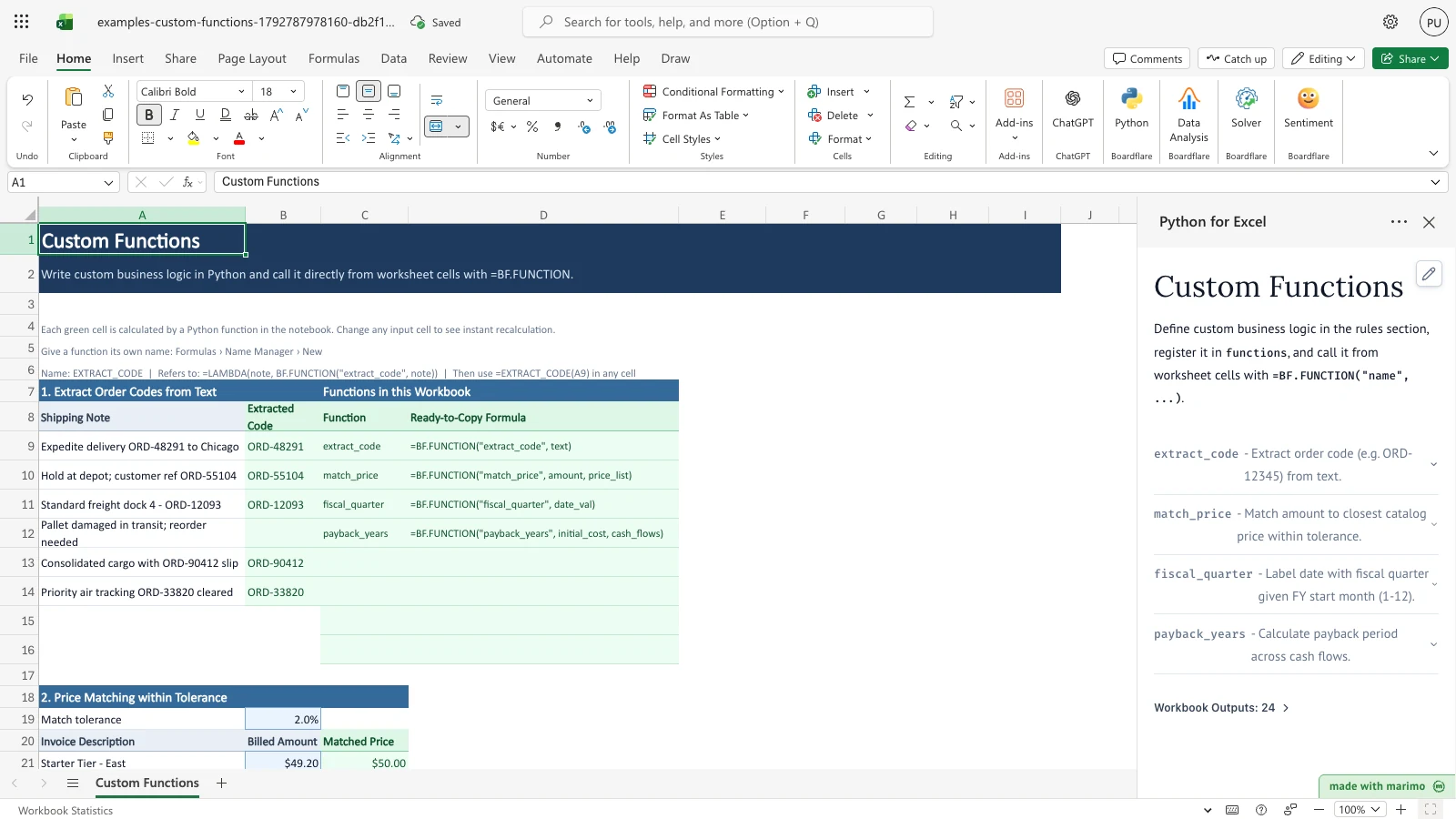
Custom Functions shows how a workbook can hold business logic written in Python and call it from ordinary cells. It handles four jobs that are fragile in standard formulas: pulling order codes out of free-text shipping notes, matching billed amounts to a price list within a tolerance, labelling dates with a fiscal quarter that starts in any month, and finding the payback period on cash flows that can go negative.
Each result is a formula of the form =BF.FUNCTION("function_name", arguments). When you change an input cell, the results that depend on it recalculate.
Before you start
- Requirements: Excel with Python for Excel. For installing the add-in and opening the task pane, see the Boardflare Notebook Reference. App mode is optional. See Saving, sharing and App mode.
- Sample data: The workbook includes sample data on the Custom Functions sheet: six shipping notes, six invoice lines, a five-item catalog price list, six project milestones, and five capital investments. Replace the sample values in the same cells.
- Data shape:
- Shipping notes are free text in
A9:A14. - Billed amounts are numbers in
B21:B26. Text that holds a number, such as$1,200, is read as a number. - Catalog list prices are numbers in
B30:B34. - Milestone dates are Excel dates, or text in the form
2026-05-10. - Cash flows are numbers in
E48:I52. Negative numbers are allowed, and a blank cell counts as zero.
- Shipping notes are free text in
- Roles: The technical author maintains the Python in the notebook and the functions it publishes. The workbook user edits the input cells and reads the results. The workbook user does not need to edit Python.
Workbook tour
The workbook has one sheet, Custom Functions. Its sections run from top to bottom:
| Range | Contents | Type |
|---|---|---|
| A4:I6 | Notes on how the functions are called and how to give one a short name in Name Manager. | Text |
| A8:B14 | Shipping Note (A9:A14) and Extracted Code (B9:B14). |
A9:A14 editable; B9:B14 formula |
| C8:D16 | Functions in this Workbook: each published function with a ready-to-copy formula. | Output written by the notebook |
| A19:B19 | Match tolerance (B19). |
Editable |
| A20:C26 | Invoice Description (A21:A26), Billed Amount (B21:B26), and Matched Price (C21:C26). |
A and B editable; C formula |
| A28:B34 | Catalog Price List: Catalog Item (A30:A34) and List Price (B30:B34). |
Editable; only B30:B34 is used in matching |
| A36:C44 | FY start month (1-12) (B37), Project Milestone (A39:A44), Completion Date (B39:B44), and Fiscal Quarter (C39:C44). |
A37, B37, A39:B44 editable; C39:C44 formula |
| A46:I52 | Capital Investment (A48:A52), Initial Cost (B48:B52), Payback (Years) (C48:C52), and Year 1 to Year 5 (E48:I52). |
A, B, and E:I editable; C formula |
Using the template
Extract order codes from shipping notes
- Read the shipping notes in
A9:A14. A note can contain an order code such asORD-48291. - Read Extracted Code in
B9:B14. Each cell shows the order code in its note, or stays blank if the note has none. - To test a note without a code, type a new note into
A9, such as “Delivery to warehouse with no order tag”.B9goes blank, and the other notes are unchanged.
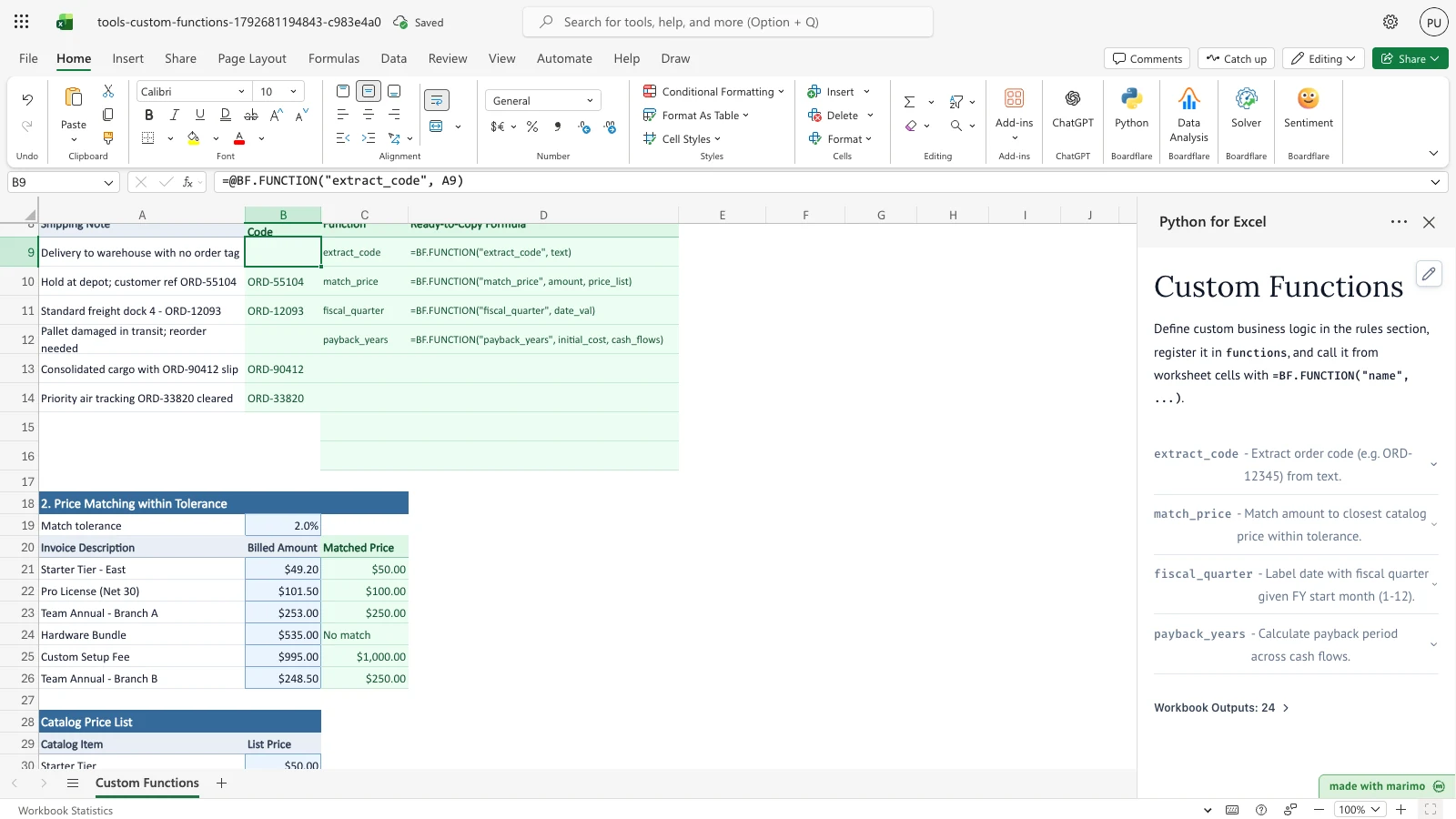
Notice that B9 is blank because the note no longer contains an order code.
To use a function under a short name, open Formulas > Name Manager > New and set the name to EXTRACT_CODE, with the refers-to formula =LAMBDA(note, BF.FUNCTION("extract_code", note)). Then enter =EXTRACT_CODE(A9) in any cell. The sheet shows these steps in A5:A6.
Match billed amounts to the catalog
- Enter a billed amount in
B21:B26, or change the match tolerance inB19. - Matched Price in
C21:C26shows the catalog list price fromB30:B34that the billed amount is within the tolerance of. If no list price is within the tolerance, it shows No match. - To test an amount outside the tolerance, enter 75 in
B21. Matched Price for that line changes to No match, because 75 is 25% above the Pro License price of 100 and 50% above the Starter Tier price of 50. - To tighten the tolerance, set
B19to 1%. The Starter Tier line, billed at 49.20, is 1.6% below 50.00, so it no longer matches and shows No match.
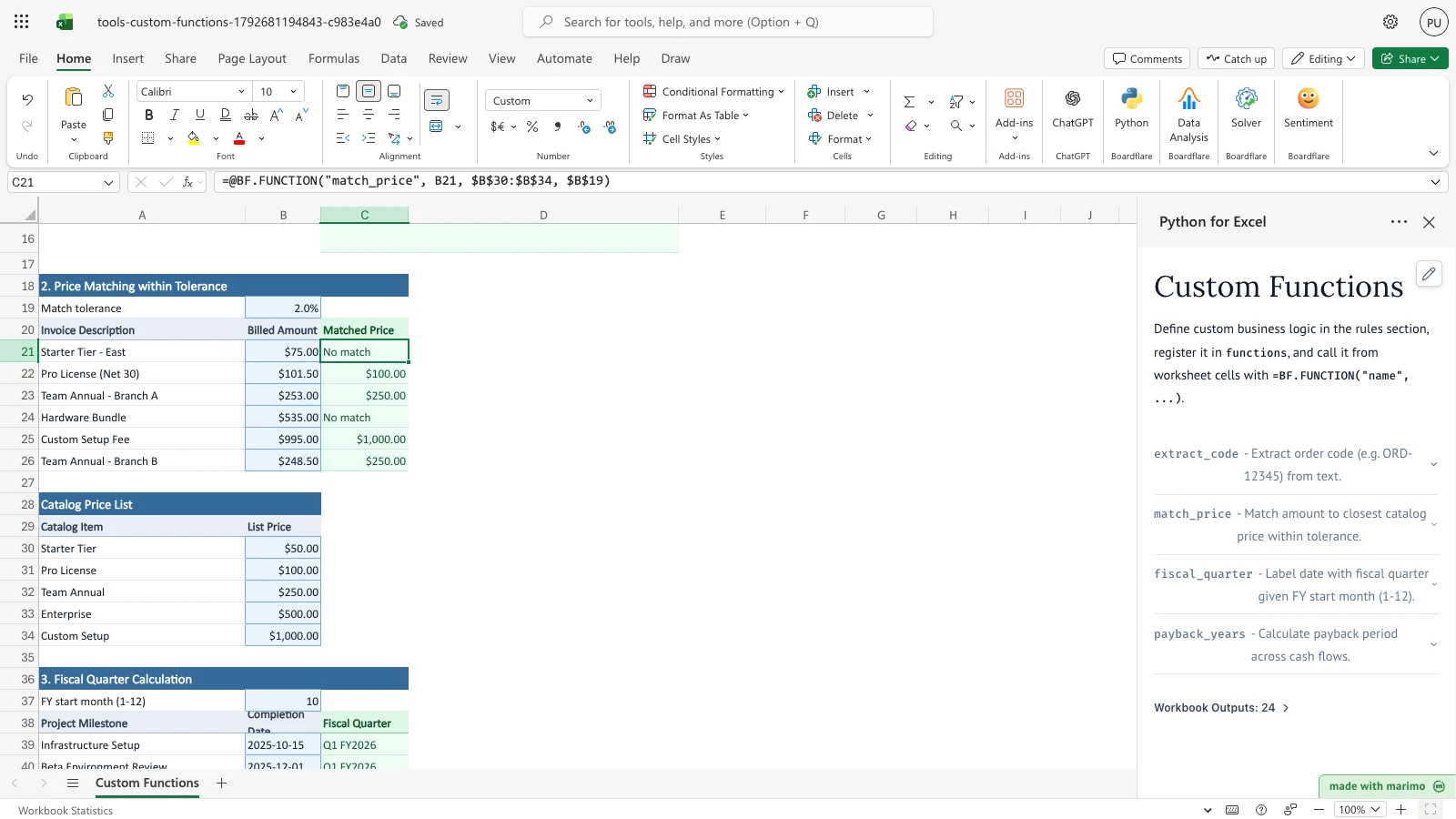
Notice that C21 reads No match. The other invoice lines keep their matches.
Set the fiscal year start month
- Enter the month your fiscal year starts in
B37, as a whole number from 1 (January) to 12 (December). The default is 10 (October). For example, enter 1 to start the fiscal year in January, as in the screenshot below. - Fiscal Quarter in
C39:C44updates. Each label is a quarter from Q1 to Q4 followed by FY and the fiscal year. The fiscal year is named for the calendar year in which it ends. - A milestone date that is not an Excel date or
yyyy-mm-ddtext, such as15/10/2025, shows Check date in its row. A month outside 1 to 12 shows Check FY month in every row.
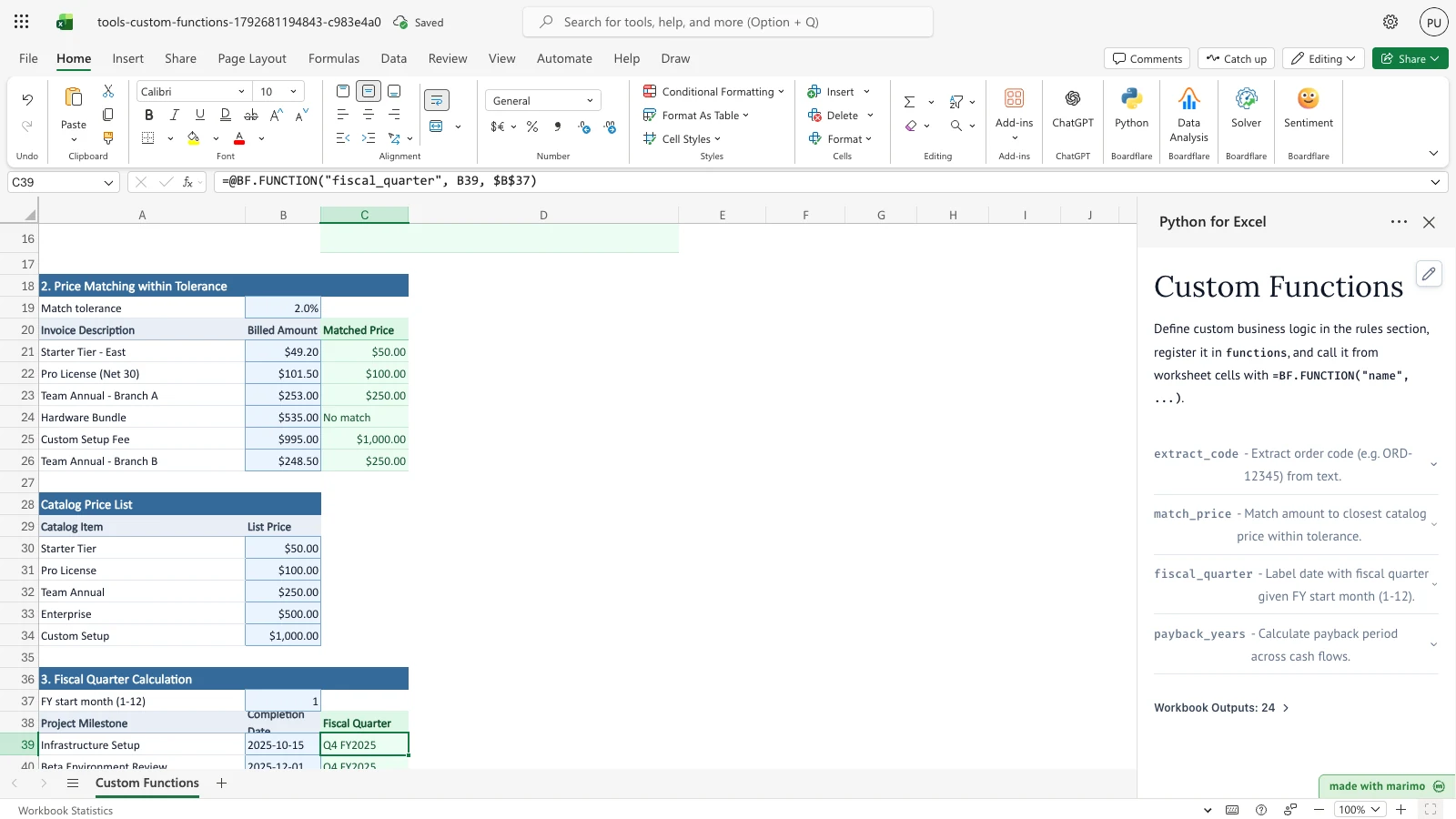
Notice that C39 now reads Q4 FY2025. With the default October start, it reads Q1 FY2026.
Find the payback period for an investment
- Enter the up-front cost in
B48:B52, and the net cash flow for each of the five years inE48:I52. Use a negative number for a year with a net outflow. A blank cash flow counts as zero. - Payback (Years) in
C48:C52shows the time to recover the initial cost, in years to two decimal places. It shows Never if the cost is not recovered within five years. - Changing Year 2 for Solar Roof Installation (
F49) from -10,000 to 15,000 shortens its payback from 3.75 years to 3.12 years.
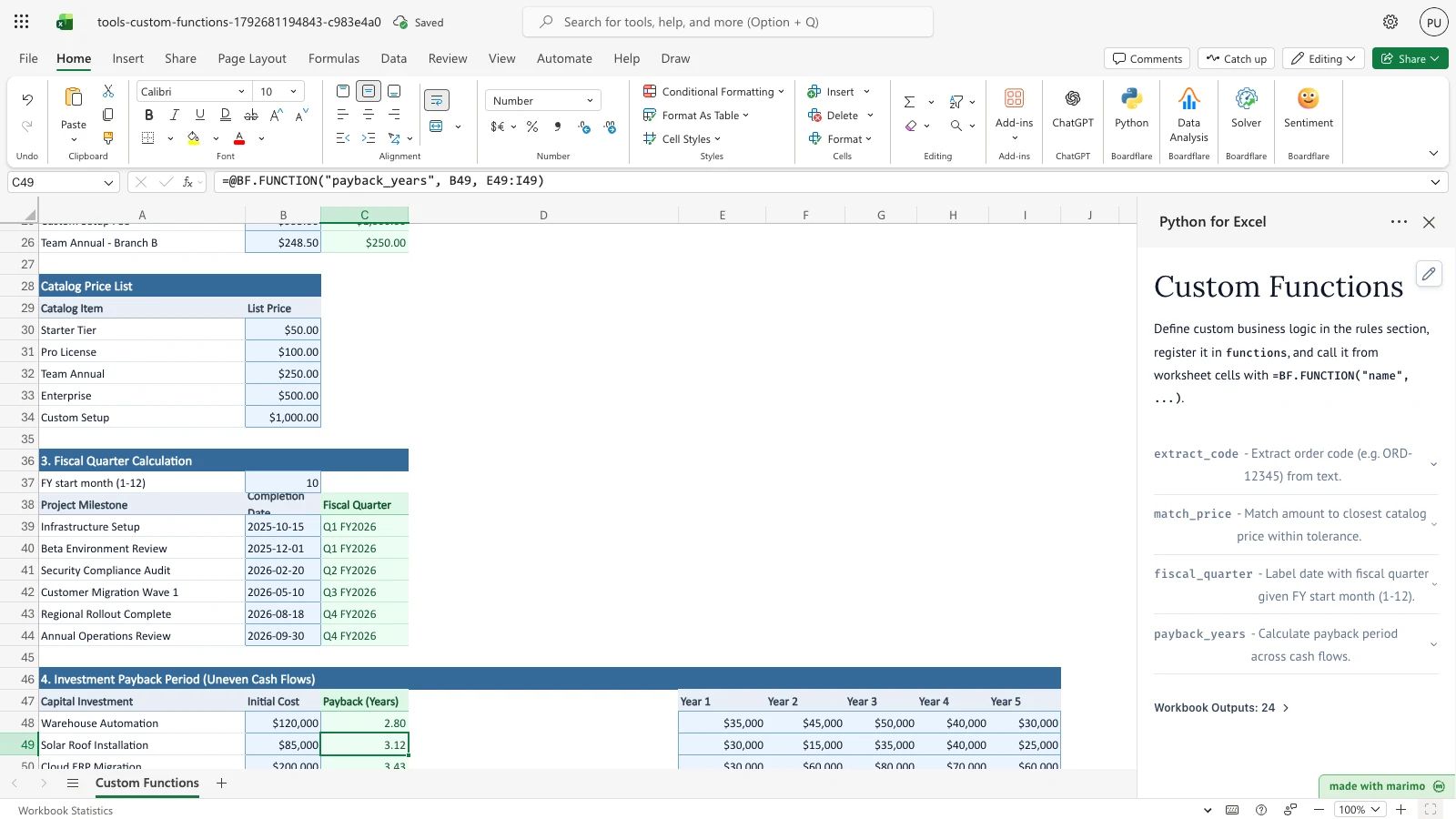
Notice that C49 now reads 3.12, down from 3.75 with the negative Year 2.
Two other inputs behave as follows. Clearing Year 2 for Warehouse Automation (F48) makes the blank year count as zero, so later years keep their position and the payback moves from 2.80 to 3.88 years. Typing text such as n/a into a cash-flow cell shows Check input in that row’s Payback.
Inputs and settings
| Input | Cells | Meaning | Allowed values | Default | Effect on results |
|---|---|---|---|---|---|
| Match tolerance | B19 |
How far a billed amount may differ from a list price, as a fraction of that list price. | A number. 0.02 means 2%. | 2.0% | A larger tolerance matches more lines. A smaller one produces more No match results. |
| FY start month (1-12) | B37 |
The month the fiscal year starts. | A whole number from 1 to 12. | 10 (October) | Changes every label in Fiscal Quarter (C39:C44). |
| Billed Amount | B21:B26 |
The amount billed for each invoice line. | A number, or text that holds a number, such as $1,200. A blank amount gives No match. |
Sample amounts | Changes Matched Price (C21:C26). |
| List Price | B30:B34 |
The catalog price each item should bill at. | A positive number. Zero or negative prices are skipped. | 50, 100, 250, 500, 1000 | Only these five prices are matched. Item names in A30:A34 are labels. |
| Completion Date | B39:B44 |
The date a milestone was completed. | An Excel date, or text in yyyy-mm-dd form. |
Sample dates | Changes Fiscal Quarter (C39:C44). |
| Shipping Note | A9:A14 |
Free text that may contain an order code. | Any text. | Sample notes | Changes Extracted Code (B9:B14). |
| Initial Cost | B48:B52 |
The money spent up front on the investment. | A number. | Sample costs | Changes Payback (Years). A blank or non-numeric cost gives Never. A zero or negative cost gives 0. |
| Year 1 to Year 5 | E48:I52 |
The net cash flow in each year. | A number. Negative numbers are allowed, and blank counts as zero. | Sample flows | Changes Payback (Years). Text that is not a number gives Check input. |
How results are calculated
The rules apply in this order:
- Order code. The first order code in the note is returned. An order code is two to four capital letters, a hyphen, and four to six digits, as a whole word, such as
ORD-48291. The match is case-sensitive. If the note has no order code, the cell is blank. - Price match. For each billed amount, the difference from each positive list price in
B30:B34is divided by that list price. A list price is a candidate when the result is at or below the tolerance inB19. The closest candidate is shown. If there is none, the result is No match. - Fiscal quarter. The month is counted from the fiscal start month in
B37, so the first three months of the fiscal year are Q1 and the last three are Q4. The fiscal year is named for the calendar year it ends in. - Payback. The remaining balance starts at the initial cost. For each year in order, that year’s cash flow is subtracted from the balance. The first year with a positive cash flow that is at least the remaining balance ends the search. The payback is the number of full years before that year, plus the remaining balance divided by that year’s cash flow, rounded to two decimal places. If the balance is never recovered, the result is Never.
Worked examples with the sample data:
- Starter Tier - East (
B21) is billed at 49.20. The nearest list price is Starter Tier at 50.00. The difference is 0.80, which is 1.6% of 50.00. That is within 2%, so Matched Price is 50.00. - Hardware Bundle (
B24) is billed at 535.00. The nearest list price is Enterprise at 500.00, which is 7.0% away. Nothing is within 2%, so the result is No match. - Warehouse Automation costs 120,000. Year 1 brings in 35,000, which leaves 85,000. Year 2 brings in 45,000, which leaves 40,000. Year 3 brings in 50,000, which covers the remaining 40,000. The payback is 2 + 40,000 / 50,000 = 2.80 years.
- Fleet Electrification Pilot costs 150,000, and its five years of cash flow total 115,000. The result is Never.
Reading the results
- Extracted Code (
B9:B14): the order code from each shipping note, or blank if the note has none. A code written in lowercase, or with a different number of digits, is not found. See Limitations. - Matched Price (
C21:C26): the list price the billed amount matched, shown as currency, or No match. If the result is unexpected, check the billed amount inB21:B26, the tolerance inB19, and the list prices inB30:B34. - Fiscal Quarter (
C39:C44): a label such asQ1 FY2026, Check date, or Check FY month. The cell is blank when the milestone date is blank. If the result is unexpected, checkB37and whether the date is an Excel date oryyyy-mm-ddtext. - Payback (Years) (
C48:C52): years to two decimal places, Never, or Check input. A zero or negative initial cost shows 0. If a result is unexpected, check whether a cash-flow cell holds text. - Functions in this Workbook (
C8:D16): each published function with a formula to copy, such as=BF.FUNCTION("extract_code", text). The argument names come from the function definitions in the notebook. This table is an output, so do not type in it.
Saving, sharing and App mode
- Saved with the workbook: the sample inputs, the formulas, and the notebook that publishes the functions. When the workbook opens, the formulas calculate from the saved inputs.
- Per user: the template has no settings beyond the input cells on the sheet.
- Sharing: a shared copy includes the notebook, so recipients calculate with the same functions. For sharing rules, see the Boardflare Notebook Reference.
- App mode: the notebook editor is hidden, and operators work in the input cells listed in Inputs and settings. App mode changes presentation rather than permissions, source access, or workbook trust.
Errors, empty states and limits
| Message | Where it shows | Cause | Fix |
|---|---|---|---|
| No match | Matched Price (C21:C26) |
The billed amount is not within the tolerance of any positive list price, or the amount is blank or not a number. | Check the amount in B21:B26, the tolerance in B19, and the list prices in B30:B34. |
| Check date | Fiscal Quarter (C39:C44) |
The milestone date is text that is not in yyyy-mm-dd form. |
Enter an Excel date, or text such as 2026-05-10. |
| Check FY month | Fiscal Quarter (C39:C44) |
The FY start month is not a whole number from 1 to 12. | Enter a whole number from 1 to 12 in B37. |
| Never | Payback (Years) (C48:C52) |
The cash flows do not recover the initial cost within five years, or the initial cost is blank or not a number. | Check the cost in B48:B52 and the cash flows in E48:I52. |
| Check input | Payback (Years) (C48:C52) |
A cash-flow cell holds text that is not a number. | Replace the text with a number, or clear the cell to count it as zero. |
| Blank | Extracted Code (B9:B14) |
The shipping note has no order code. | Expected for notes without a code. |
Empty states: the sample data fills every result when the workbook opens. Blank inputs produce blanks or the messages above. The workbook has no separate empty-state message.
Limits:
- Six shipping notes (
A9:A14). - Six invoice lines (rows 21 to 26).
- Five catalog list prices (
B30:B34). - Six milestones (rows 39 to 44).
- Five investments, each with five years of cash flow (rows 48 to 52, columns
EtoI). - Up to eight functions in Functions in this Workbook (
C8:D16).
The formulas refer to fixed ranges. To add rows, copy the formula down and extend the references, including the list price range $B$30:$B$34. For runtime errors and platform limits, see the Boardflare Notebook Reference.
Limitations and when to use this
Limitations
- Order codes are matched only as two to four capital letters, a hyphen, and four to six digits, as a whole word. Lowercase or differently formatted codes are not found, and only the first code in a note is returned.
- Matching compares each billed amount with the five catalog prices and shows the closest one. It does not add up or split amounts.
- Payback uses five years of cash flow. A recovery after year five shows Never.
- Payback values are not discounted.
- Payback is rounded with Python’s
round, which rounds an exact half to the nearest even value. For example, 3.125 becomes 3.12. - Each function returns one value to the cell that calls it. The functions do not change other cells or their formatting.
- Each formula cell makes its own function call, so a large table makes many calls.
Use this approach when:
- Extracting codes or other structured text from free text needs a pattern.
- Matching depends on a tolerance or on rules beyond an exact lookup.
- Dates must follow a custom calendar, such as a fiscal year that starts in a month other than January.
- A calculation needs iteration, such as a payback period on uneven cash flows.
Simple arithmetic and exact lookups belong in standard spreadsheet formulas.
Developer reference
Notebook implementation
The notebook defines four functions in its # --- Edit these rules --- cell: extract_code, match_price, fiscal_quarter, and payback_years. Two helpers, _to_floats and _cash_flows, turn each argument into a flat list of numbers, so each function accepts a single cell or a range. The notebook does not call bf.inputs. Every workbook input reaches the functions as an argument in a BF.FUNCTION formula, so the cells are the only input path.
The summary cell builds the ready-to-copy formulas from each function’s required parameters. It pads the table to nine rows, which is a header and eight function slots. The publish step passes that table and the functions to bf.publish:
functions = {
    "extract_code": extract_code,
    "match_price": match_price,
    "fiscal_quarter": fiscal_quarter,
    "payback_years": payback_years,
}

# Publish the functions by name, plus the catalog table
publication = bf.publish(
    outputs={"summary": summary},
    functions=functions,
)
How the calculation/model works
BF.FUNCTIONcalls the named function with the cell values as arguments and returns the result to the calling cell. Ranges arrive as nested lists._to_floatstreatsNoneand an empty string as no numbers. It reads numbers directly, removes$and,from text before converting, and flattens lists. Unconvertible text gives no numbers.fiscal_quarteraccepts dates, date-times, Excel date serial numbers (days since 1899-12-30), and ISO text. The quarter is((month - start) mod 12) // 3 + 1. The fiscal year is the calendar year, plus one when the start month is not January and the month is at or after the start month.payback_yearsreads the cost from its first value. Cash flows go through_cash_flows, where blank cells become 0.0 and a non-numeric cell returns"Check input". The loop subtracts each year’s flow from the remaining balance. When the recovery year is reached, the result is the full years before it, plus the remaining balance divided by that year’s flow, rounded to two decimals.- The payback assumes each year’s cash flow arrives evenly through that year. The calculation does not discount cash flows.
Validation / expected results
With the sample data, the workbook shows:
| Cell | Expected outcome |
|---|---|
B9 |
ORD-48291 |
B12 |
Blank |
C21 |
50.00 |
C24 |
No match |
C39 |
Q1 FY2026 |
C42 |
Q3 FY2026 |
C48 |
2.80 |
C49 |
3.75 |
C51 |
Never |
When an input changes, the workbook shows:
| Change | Result |
|---|---|
FY start month B37 from 10 to 1 |
C39 Q4 FY2025; C41 Q1 FY2026; C42 Q2 FY2026 |
Billed Amount B21 to 75 |
C21 No match |
Match tolerance B19 to 1% |
C21 No match |
Year 1 for Warehouse Automation E48 to 75,000 |
C48 2.00 |
Year 2 for Solar Roof Installation F49 to 15,000 |
C49 3.12 |
Year 2 for Warehouse Automation F48 cleared |
C48 3.88 |
Year 2 for Warehouse Automation F48 set to n/a |
C48 Check input |
FY start month B37 to 13 |
C39 and C42 Check FY month |
Milestone date B39 set to 15/10/2025 |
C39 Check date |
Shipping note A9 with no order code |
B9 blank |
Architecture
- Function-only input model. The workbook’s cells reach the functions only as arguments in
BF.FUNCTIONformulas. The notebook does not callbf.inputs. - Registration. A function is published by adding it to the
functionsdictionary. The summary table and the accordion pick it up. - Catalog spill sizing. In
workbook.py, the summary spill is anchored atC8withspillRefset toC8:D16. Innotebook.py, the summary is padded to nine rows (while len(summary) < 9). Publishing more than eight functions requires a largerspillRefinworkbook.pyand a larger padding target innotebook.py.
Changelog
2026-10-23
- Standards audit and documentation remediation: corrected developer reference heading hierarchy, verified table currency escaping, and refreshed workbook release artifacts.
2026-10-22 (#143)
- Rewrote the guide: overview, workbook tour, step-by-step use with screenshots, inputs and settings, calculation rules, and error messages (Issue #143).