Forecast
Overview
A planner or finance analyst has a few years of monthly sales and needs a forecast for the coming months that they can trust. Excel’s forecasting functions give a line but do not say how wrong that line tends to be. This template forecasts the monthly series with three simple methods, tests each method on past months it was not shown, keeps the method with the lowest average error, and draws a low-to-high range around each forecast month.
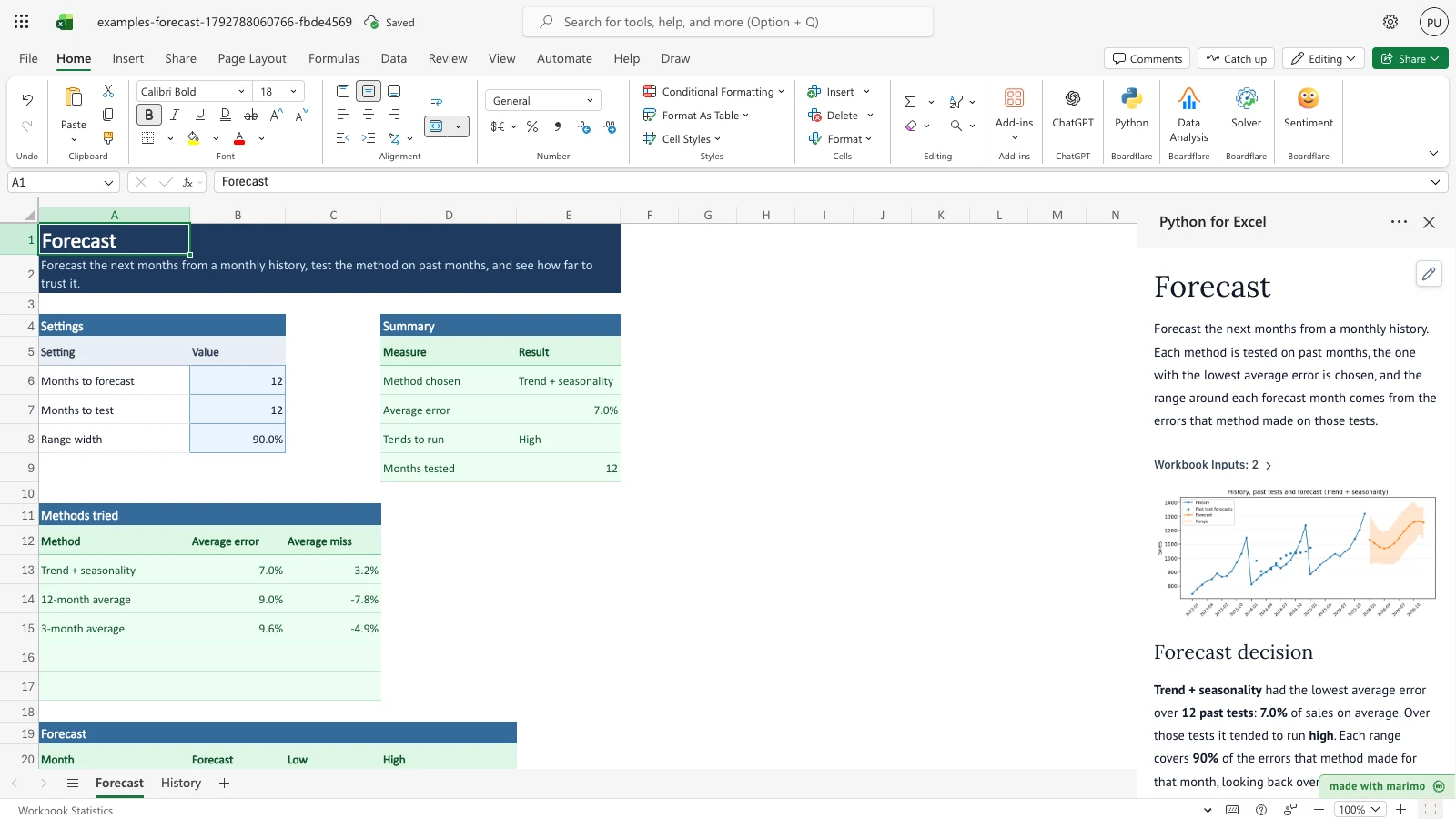
The sample history covers 36 months, January 2023 to December 2025. The Forecast sheet shows the method chosen, its average error, whether it tended to run high or low, and a forecast for each of the next 12 months with its low and high range.
Before you start
- Requirements: Excel with Python for Excel. For installing and opening the add-in, see the Boardflare Notebook Reference. This template does not run as an app and needs no sign-in.
- Data shape: one row per calendar month in
History!A6:B200, with Month and Sales in columns A and B. Month is text inyyyy-mmform, such as2026-01. Sales is a number of zero or more, in whatever unit you track. Months must run in one unbroken sequence with no gaps and no repeats. The history needs at least 13 rows plus the number of months you forecast, so 25 rows for the default 12-month forecast. - Sample data: the workbook includes 36 months of sample sales, from 2023-01 to 2025-12, in
History!A6:B41. Replace them with your own series. - Roles: the technical author maintains the three methods and the rules in the Python source. The workbook user pastes the monthly series, sets three values on the Forecast sheet, and reads the results. The workbook user does not need to change the Python source.
Workbook tour
| Sheet and range | What it holds | Type |
|---|---|---|
Forecast!A5:B8 |
The settings table: Setting and Value. Only the values in Forecast!B6:B8 are edited. |
Editable input |
Forecast!D5:E9 |
Summary: Method chosen, Average error, Tends to run, and Months tested. | Output |
Forecast!A12:C15 |
Methods tried: each method’s Average error and Average miss, lowest error first. | Output |
Forecast!A20:D32 |
Forecast: Month, Forecast, Low, and High, one row per forecast month, up to 12 rows. | Output |
History!A5:B41 |
The monthly history table: Month and Sales. Edit the values in rows 6 onward. | Editable input |
Using the template
Replace the monthly history
- Select the History sheet. Paste your monthly series over Month and Sales, starting at row 6, oldest month first.
- Clear any sample rows left below your last month. Blank rows are skipped, but a gap between two months is an error.
- Return to the Forecast sheet. The notebook runs again and the Summary, Methods tried, and Forecast blocks update.
The history rows you type are saved with the workbook. The results are recalculated from them when the workbook opens.
Change recent sales
- On the History sheet, change Sales for 2025-10, 2025-11, and 2025-12 (cells
B39:B41) to 1800 each. - The Average error in the Summary rises, and the first forecast month, 2026-01, moves up from 1134.97 to 1351.84.
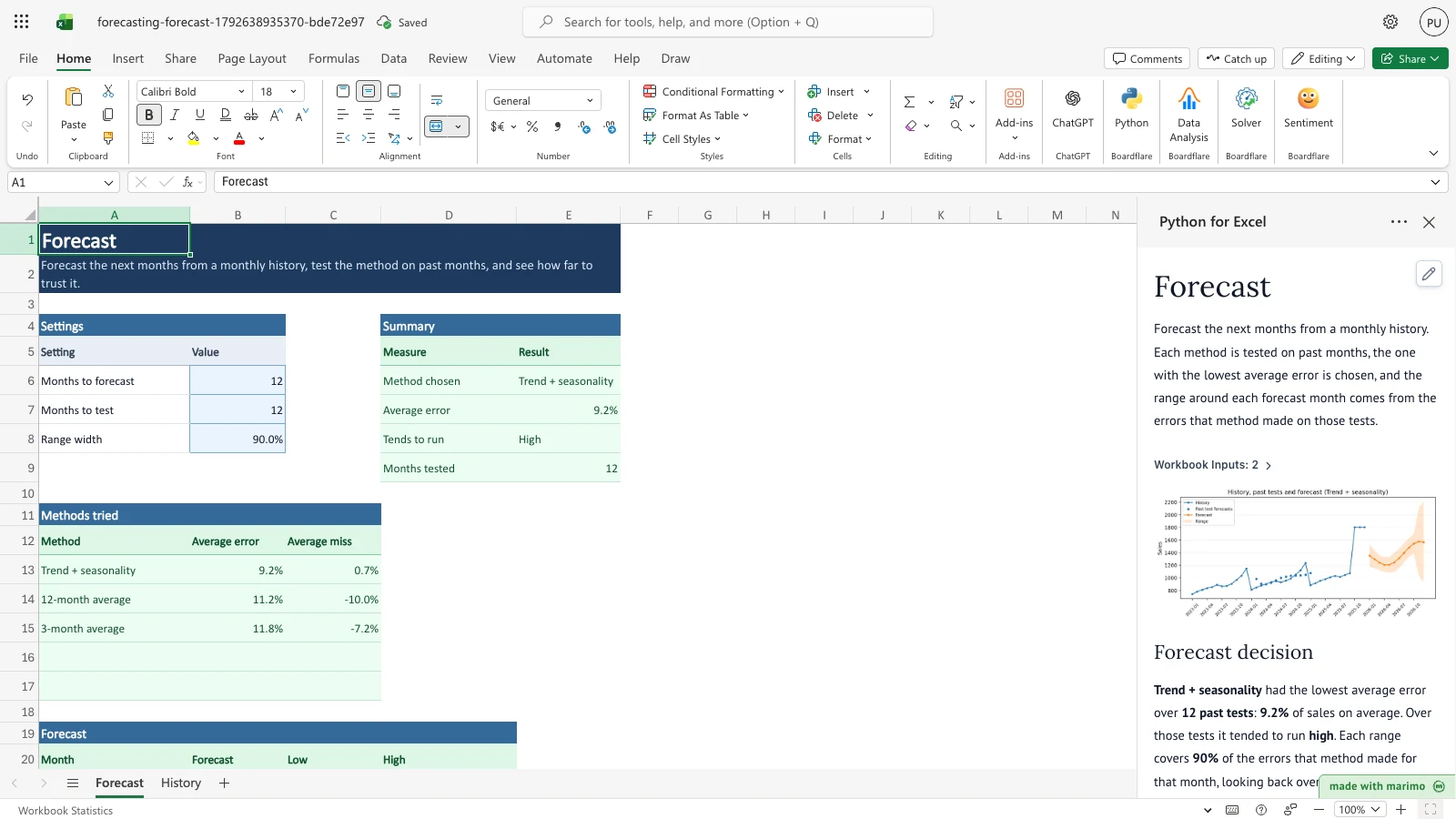
Notice the Average error in the Summary and the decision text in the task pane. The first forecast month moves up to 1351.84 in the Forecast table, which is below this view.
Change the months to forecast
- On the Forecast sheet, set Months to forecast (
B6) to 1. - The Forecast table keeps one row, 2026-01. Its Low is 956.41, and the rows below it are empty.
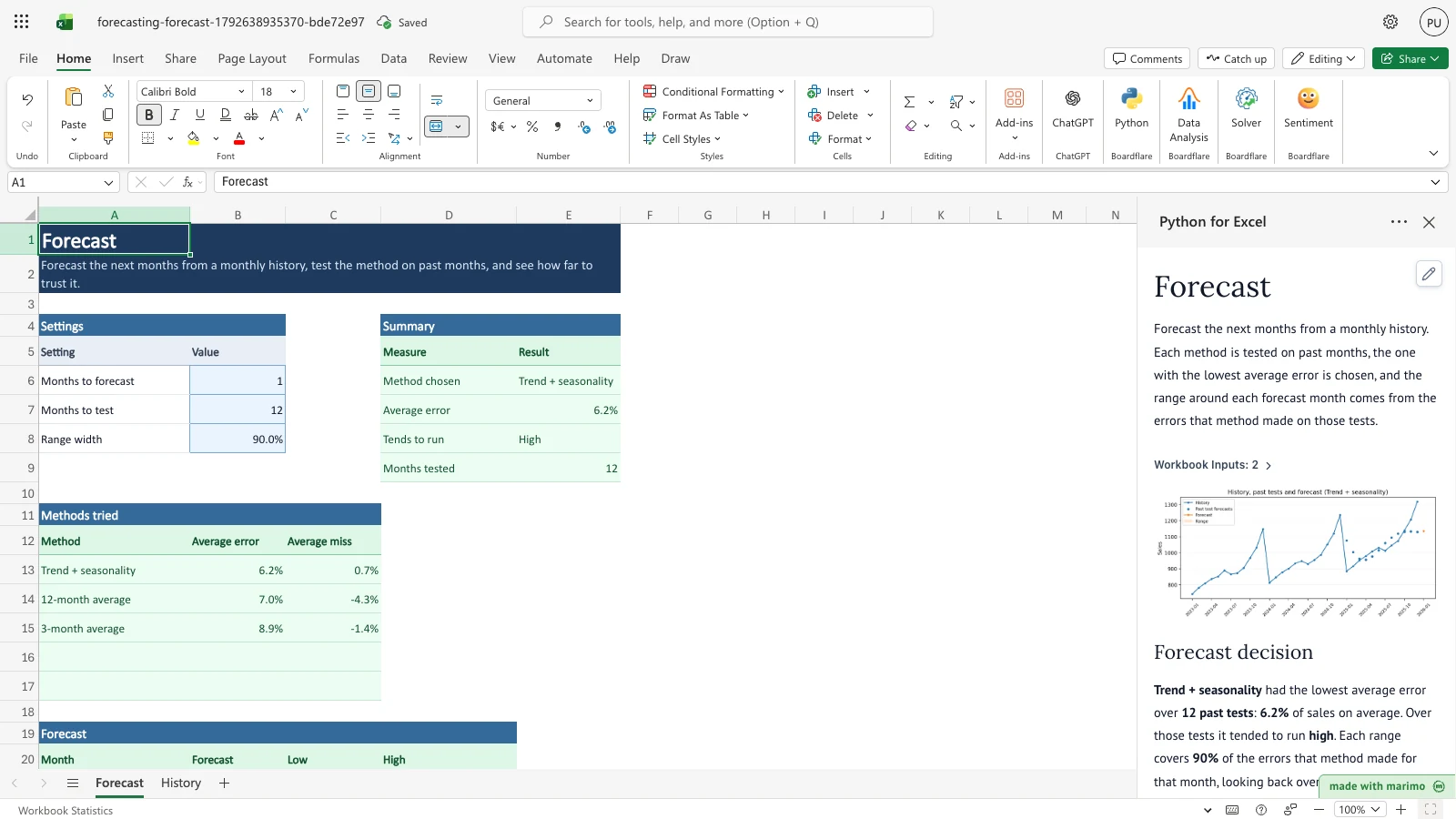
Notice that Months to forecast reads 1 and that the Forecast table, below this view, has a single row.
Change the months to test
- On the Forecast sheet, set Months to test (
B7) to 6. - Months tested in the Summary now reads 6. The average error and the method chosen are worked out from the six most recent past tests.
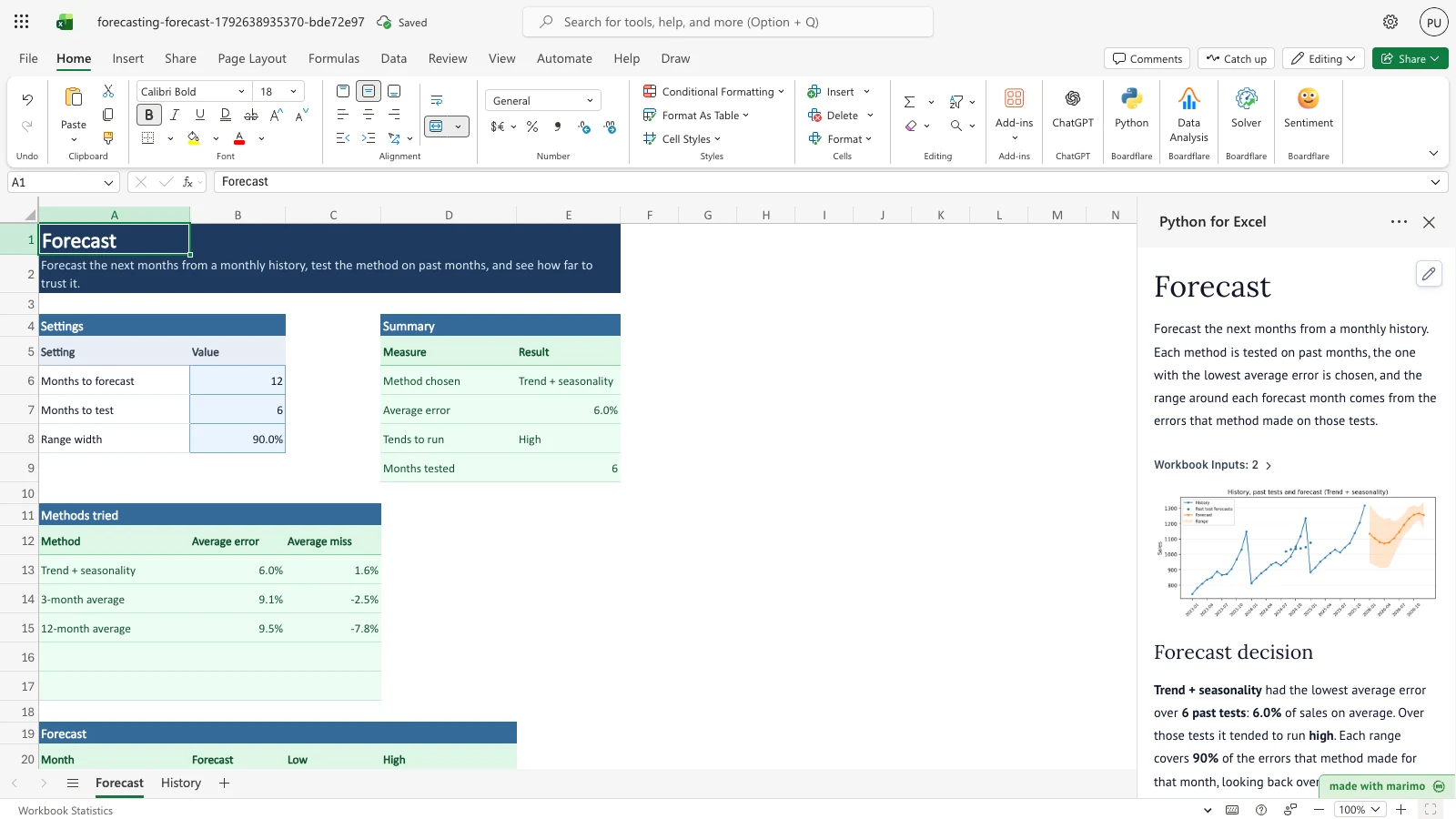
Notice that Months tested now reads 6. The average error changes because fewer past tests are counted.
Change the range width
- On the Forecast sheet, set Range width (
B8) to 95%. You can type 95% or 0.95. - The Low and High columns widen. The January 2026 range becomes 944.77 to 1325.16, where it was 951.51 to 1318.42 at 90%.
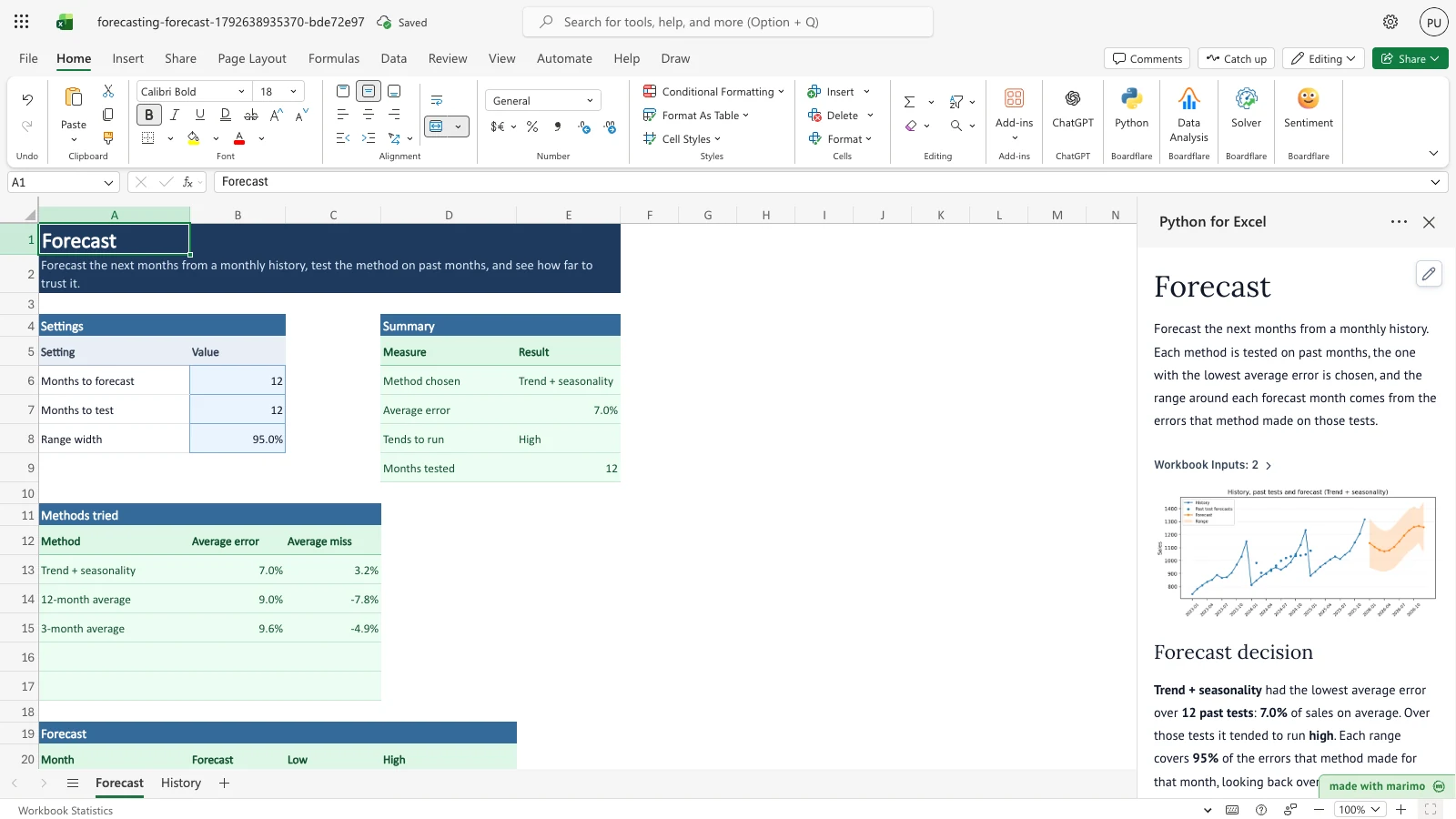
Notice that the decision text now says each range covers 95% of past errors. The January 2026 Low and High move outward in the Forecast table.
Inputs and settings
The notebook finds each setting by its label in column A, so keep the labels as they are.
- Months to forecast (
Forecast!B6). Default 12. Allowed whole numbers from 1 to 12. A fraction is rounded to the nearest month. This sets how many rows the Forecast table fills, one for each month after the last History month. It also limits the past tests, because each test needs that many months of actual sales after its start. - Months to test (
Forecast!B7). Default 12. Allowed whole numbers from 1 to 36. This sets how many of the most recent possible past tests are run. Fewer tests change the average error and can change which method is chosen. The sample history fits 13 possible tests at the default 12-month forecast, so a setting above 13 runs 13 and says so. - Range width (
Forecast!B8). Default 90%. Allowed values from 50% to 99%. This is the share of past errors each range covers. A wider width gives a wider Low-to-High band. You can type 90% or 0.9. - Month and Sales (
History!A6:B200, editable columns). Month is text inyyyy-mmform. Sales is a number of zero or more. Each change to a sale can change the method comparison, the forecast level, and the range.
How results are calculated
The notebook applies these rules in order:
- It reads the History rows, sorts them by month, and checks the months and sales.
- It runs the past tests. Each test takes a starting month, uses only the months before it to forecast the next Months to forecast months, and compares the forecast with the sales that actually followed. The tests use the most recent starting points, up to Months to test.
- It scores each method. Average error is the total size of the misses across all tests, divided by the total actual sales in those tests. Average miss uses the same total with the sign kept, so a positive value means the method tended to run high.
- It chooses the method with the lowest average error. If two methods tie, the one listed first in the rules wins.
- It forecasts the future months with the chosen method, using the full history. A forecast below zero is shown as zero.
- It sets the range for each forecast month from the misses the chosen method made at that distance into the future. Low is the forecast minus that size, not below zero. High is the forecast plus that size.
The three methods are:
- 3-month average: the average of the last three months, repeated for each forecast month.
- 12-month average: the average of the last twelve months, repeated for each forecast month.
- Trend + seasonality: a straight-line trend plus a repeating yearly pattern, fitted to the whole history.
Worked example with the sample data
With the sample history and the default settings, the three methods score as follows over 12 past tests:
| Method | Average error | Average miss | Result |
|---|---|---|---|
| Trend + seasonality | 7.03% | +3.24% | Chosen. Tends to run high. |
| 12-month average | 9.00% | -7.77% | Tends to run low. |
| 3-month average | 9.61% | -4.90% | Tends to run low. |
Trend + seasonality is chosen because it has the lowest average error. Its forecast for 2026-01 is 1,134.97, with a range from 951.51 to 1,318.42. The range is about 183 above and below the forecast, which is the size of the misses the method made one month ahead at the 90% level. The forecast for 2026-02 is 1,105.60, with a range from 963.01 to 1,248.19.
Reading the results
- Summary (
Forecast!D5:E9), with Measure and Result columns.- Method chosen (
E6) names the method with the lowest average error. - Average error (
E7) is the share of sales the method missed on average across the past tests, shown as a percentage. - Tends to run (
E8) reads High when the average miss is above zero, which means the forecasts were above the actual sales on average, and Low otherwise. - Months tested (
E9) is the number of past tests actually run.
- Method chosen (
- Methods tried (
Forecast!A12:C15), with Method, Average error, and Average miss for each method, lowest error first. The task pane shows the same comparison with a Chosen column. - Forecast (
Forecast!A20:D32), with Month, Forecast, Low, and High. Values are in the same unit as the History sales, shown to two decimal places. Low is never below zero. - Task pane. The Forecast decision text names the method, its average error, its direction, the range coverage, and any notes. Below it, a chart shows the history, the past test forecasts, the forecast, and the range.
What to check if a value looks wrong:
- If Months tested is lower than Months to test, the history is too short for that many tests. The task pane explains how many fit.
- If a Month or Sales cell caused an error, the message names its row. Correct that row first.
- If the range looks too narrow or too wide, check Range width, and remember that a few past tests make the range depend heavily on the largest misses.
Saving, sharing and App mode
- What persists. The History rows and the three settings are ordinary cells, so they are saved with the workbook and read back when it opens. The Summary, Methods tried, and Forecast values are produced again each time the notebook runs, so they are not stored separately.
- Per-user state. Nothing is kept per user. Anyone who opens the workbook sees the same settings and the same results.
- App mode. This template has no App mode settings. It is used as a workbook. For how App mode works in general, see the Boardflare Notebook Reference.
Errors, empty states and limits
| Message in the task pane | Cause | Fix |
|---|---|---|
| Months to forecast is missing or out of range, so the default 12 is used. | The value is blank, text, or outside 1 to 12. | Enter a whole number from 1 to 12. |
| Months to test is missing or out of range, so the default 12 is used. | The value is blank, text, or outside 1 to 36. | Enter a whole number from 1 to 36. |
| Range width is missing or out of range, so the default 0.9 is used. Type it as 90% or 0.9. | The value is blank, text, or outside 50% to 99%. | Enter a value from 50% to 99%. |
| History row n needs a month such as 2026-01 in Month. | The Month cell is blank or not a month. | Enter the month as yyyy-mm. |
| History row n needs a number in Sales. | The Sales cell is blank or text. | Enter a number. |
| History row n needs Sales of zero or more. | The Sales cell is negative. | Enter zero or a positive number. |
| History needs at least n monthly rows for a m-month forecast with two past tests. | Too few months. | Add months, or lower Months to forecast. |
| History has more than one row for yyyy-mm. Keep one row per month. | A month appears twice. | Remove the repeated row. |
| History months must be consecutive with no gaps. Fill any missing month. | A month is missing between two others. | Add the missing month with its sales. |
| Past tests need positive sales to measure error. | The sales in the tested months add up to zero or less. | Check the recent sales. |
| Only n past tests fit this history, so m were not all run. | The history is shorter than Months to test requires. | This is a note, not an error. Add history or lower Months to test. |
Empty state: the workbook opens with the sample history and results. If you clear the History months, the task pane shows the “History needs at least” message until you enter enough months.
Hard limits:
- History is read from row 6 to row 200, so it holds at most 195 months.
- Months to forecast is 1 to 12. Months to test is 1 to 36. Range width is 50% to 99%.
- Sales cannot be negative. Forecast and Low are never below zero.
Limitations and when to use this
- These are simple methods, not a full forecasting suite.
- The range comes from a small number of past tests, so it is only as steady as that history. Each test needs the full forecast length of actual sales after its start, so a long forecast uses fewer tests than you asked for, and the Summary reports the count used.
- Weekly or daily series, several series at once, promotions, holidays, and stockouts are not modeled.
Use this template when you need a forecast for a single monthly series, and you want to see how far to trust it before you plan against it.
Developer reference
Notebook implementation
The notebook reads two bound ranges from the workbook. The History range holds the monthly rows, and the settings range holds the three settings by label.
inputs = bf.inputs(
    history=bf.ref("History!A5:B200", headers=True),
    settings=bf.ref("Forecast!A5:B8", headers=True),
)
Settings are looked up by the label in column A, and a missing or out-of-range value falls back to the default from the “Edit these rules” block, with a message. History rows are read in order, with the first data row at sheet row 6. Each row is parsed as a month and a number, and the rows are sorted by month before the checks run.
The past tests loop over the candidate starting points for each method in METHODS. The scoring builds a backtest table with one row per method, starting point, and forecast step. The chosen method’s per-step misses set the range. A chart and the Forecast decision text are shown in the task pane. The notebook then publishes three tables:
publication = bf.publish(outputs={"summary": summary, "methods": methods, "forecast": forecast})How the calculation/model works
- Starting points. Candidate starting points run from the 12th month (
MIN_TRAIN_MONTHS) to the last point that leaves room for the forecast length. The last Months to test of them are used. - Methods. Each method takes the training series and a number of steps and returns that many values. Each forecast is clipped at zero.
- Scores. Average error is the sum of absolute errors over all tests and steps, divided by the sum of actual values in those tests. Average miss is the same with the sign kept. The chosen method has the lowest average error. The sort is stable, so ties go to the method listed first.
- Range. For each forecast step h, the radius is the Range width quantile of the absolute errors at step h across the tests, using linear interpolation. Low is the point forecast minus the radius, floored at zero. High is the point forecast plus the radius.
- Reading the range. The range is an empirical band from the past misses. It is not a guaranteed coverage interval. With few tests, the largest misses set its edges.
Validation / expected results
| Check | Expected outcome |
|---|---|
| Default run on the sample history | Trend + seasonality is chosen, with an average error of 7.03%, a tendency to run high, and 12 months tested. |
| Default run, 2026-01 forecast | 1,134.97, with a range from 951.51 to 1,318.42. |
| Default run, other methods | 12-month average 9.00%. 3-month average 9.61%. |
| Late-2025 sales set to 1800 | 2026-01 forecast 1,351.84, with an average error of 9.2%. |
| Months to forecast set to 1 | One forecast row, 2026-01, with a Low of 956.41. |
| Months to test set to 6 | Months tested reads 6, with an average error of 5.97%. |
| Range width set to 95% | 2026-01 range from 944.77 to 1,325.16, wider than at 90%. |
Architecture
- The Summary, Methods tried, and Forecast blocks are written by output formulas at
Forecast!D5,Forecast!A12, andForecast!A20. Each block spills from that cell, so keep nothing else in the spill area. The Summary is two columns by five rows, the Methods tried block is three columns with a header and three method rows, and the Forecast block is four columns with a header and up to 12 rows. - Settings are matched by the exact labels in
Forecast!A6:A8. Renaming a label makes the notebook fall back to its default and show a message. - The notebook reads
History!A5:B200andForecast!A5:B8. Moving either block means updating the bound ranges in the notebook.
Changelog
2026-10-23
- Standards review and documentation audit: fixed developer reference heading hierarchy to H3/H4, verified currency escaping in tables, and refreshed workbook release artifacts.
2026-10-21
- Rewrote the guide in the user-guide layout (Issue #143). The workbook and the calculation are unchanged.
2026-10-19
- Initial release with a 36-month sample history, three forecast methods tested on past months, a range from past test errors, and published summary, methods, and forecast tables (Issue #21).