Capital Budgeting Optimization
Overview
Capital Budgeting Optimization selects the highest-value portfolio of capital investment projects subject to simultaneous resource and budget ceilings. In corporate planning, research and development (R&D), and public-sector infrastructure programming, project proposals compete for limited pools of capital across multiple years, engineering hours, lab facilities, and regulatory oversight bandwidth. The optimization routine evaluates candidate projects and identifies which subset to fund to maximize total net present value (NPV) or utility without exceeding any resource limit.
The template ships with an authentic scientific benchmark from the operations research literature: Problem 5 of the OR-Library mknap1 test set (C.C. Petersen, 1967; J.E. Beasley, 1990). The benchmark models 28 candidate projects competing across 10 resource constraints, with a proven global optimum of 12,400.
Before you start
Requirements. Microsoft Excel with Python for Excel enabled. The model solves locally within the spreadsheet workbook using SciPy’s HiGHS mixed-integer linear programming (MILP) solver and requires no external web services, add-in logins, or database connections.
Data shape. The model is structured as a practitioner capital-budgeting tableau: - Rows: Candidate projects (Project 1 through Project 28, with capacity for up to 30 projects). - Columns: Expected project return or NPV in the Value column, followed by resource consumption across up to 10 resource columns (Resource 1 through Resource 10). - Resource ceilings: Placed in the Available Budget row directly below the table header. - Time limit: Configurable solve time limit (default 20 seconds) in the Optimization Settings block.
Roles. The financial or operations analyst edits project names, expected values, resource requirements, and budget limits on the Model sheet. Python for Excel automatically computes the optimal funding portfolio and publishes the results, project selection flags, and resource slack metrics on the Results sheet.
Workbook tour
| Sheet and range | Description | Role |
|---|---|---|
Results (A5:C12, A14:D44, A47:F57) |
Solution dashboard displaying optimization KPIs with per-solve checks (MIP gap and largest limit violation), project selection flags, value contributions, and resource utilization metrics. | Output |
Model (A5:B6) |
Optimization settings: solve time limit in seconds (default 20 s, maximum 50 s). | Editable input |
Model (A9:L40) |
Capital-budgeting tableau: resource limits in row 10, candidate projects in rows 11 to 40, values in column B, and resource usage in columns C to L. | Editable input |
Validation (A5:E19, F5:H19) |
14 benchmark cross-checks verifying published optimum (12,400), zero MIP gap, binary project selection, and resource feasibility. | Verification |
Using the template
1. Inspect the baseline benchmark solution
- Open the workbook. Python for Excel executes the model and settles on the Results sheet.
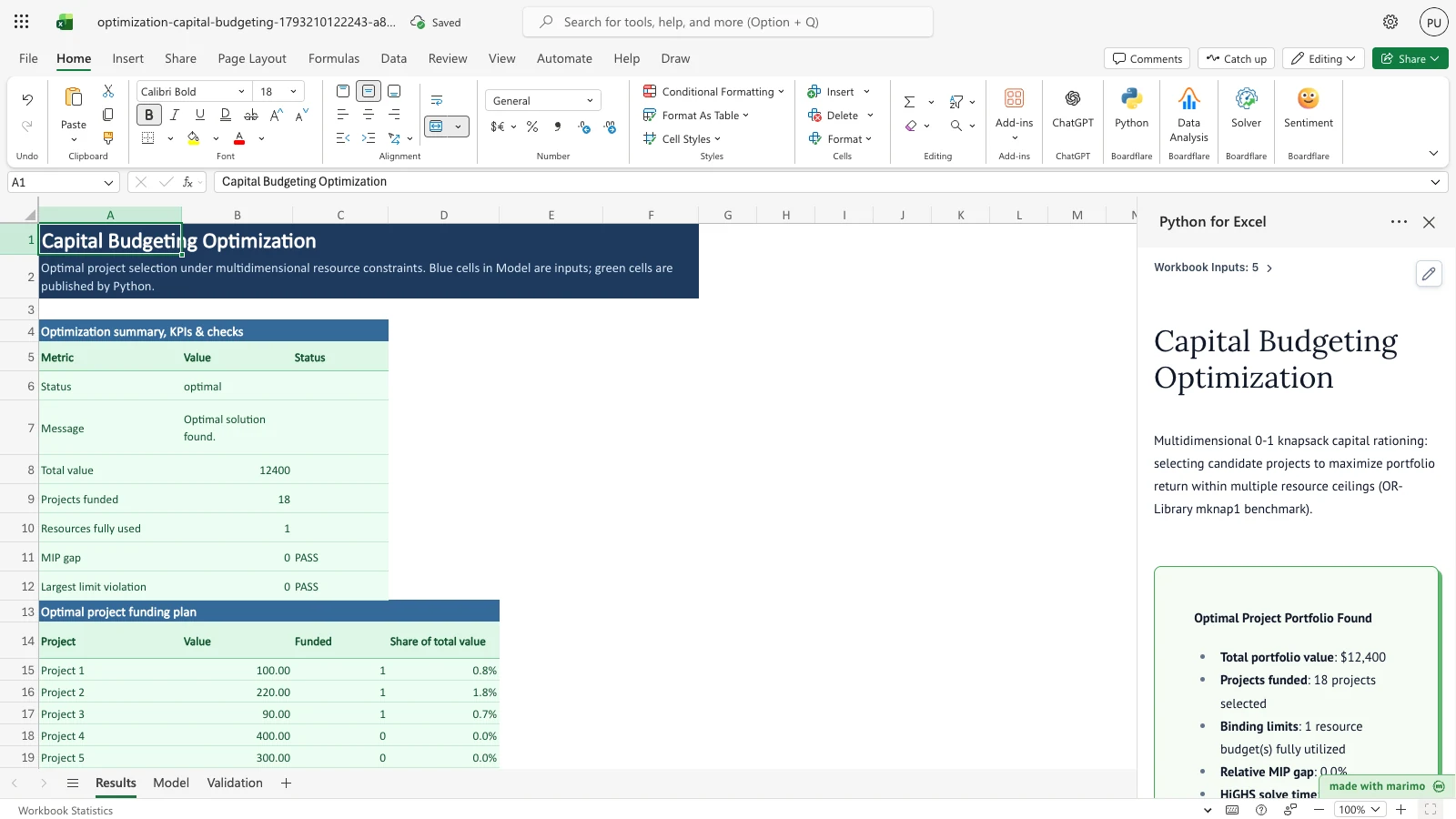
- Review the Optimization summary, KPIs & checks table (
Results!A5:C12):- Status:
optimal - Total value: 12,400
- Projects funded: 18 of 28 candidate projects
- Resources fully used: 1 binding constraint (Resource 10)
- MIP gap: 0.0% (proven global optimum),
PASS - Largest limit violation: 0.0,
PASS
- Status:
- Examine the Optimal project funding plan (
Results!A14:D44):- Projects 1, 2, 3, 9, 14, 15, 16, 17, 18, 19, 20, 21, 22, 23, 25, 26, 27, and 28 are selected (
Funded = 1). - Project 21 contributes the largest individual return (3,100, or 25.0% of total portfolio value), followed by Project 20 (2,550, or 20.6%).
- Projects 1, 2, 3, 9, 14, 15, 16, 17, 18, 19, 20, 21, 22, 23, 25, 26, 27, and 28 are selected (
- Check Resource capacity utilization & limits (
Results!A47:F57):- Resource 10 operates at exactly 100.0% utilization (490 used of 490 limit, slack = 0, status
Binding). - The other nine resources operate with positive slack (for example, Resource 1 uses 815 of 930 limit, with 115 slack).
- Resource 10 operates at exactly 100.0% utilization (490 used of 490 limit, slack = 0, status
2. Evaluate a budget reduction
- Navigate to the Model sheet.
- Locate cell
Model!L10(the Available Budget limit forResource 10, which is the single binding constraint at baseline). - Reduce the limit from 490 to 483.
- Return to the Results sheet:
- Python for Excel recalculates the integer programming problem.
- Total portfolio value drops from 12,400 to 12,350.
- Resource 10 remains strictly binding at exactly 483 units used with 0 slack (funding 16 projects).
3. Exclude or drop a project
- On the Model sheet, set the value in cell
Model!B19(Project 9) to0or clear its row. - Return to the Results sheet:
- Total portfolio value adjusts to 12,380.
- The solver reallocates the freed resource capacity to alternative projects, funding 15 projects in total.
Inputs and settings
Model sheet inputs
- Time limit (seconds) (
Model!B6): Caps the maximum search time allocated to SciPy’s HiGHS branch-and-bound solver. Defaults to 20.0 seconds; capped at 50.0 seconds. In live gate runs, HiGHS proved optimality for the 28-project, 10-resource benchmark problem in roughly 0.1 s (about 70-80 ms on the baseline). - Available Budget row (
Model!C10:L10): Numeric ceilings \(b_i\) for each resource (\(i = 1 \dots 10\)). Must be non-negative numbers. Blank, non-numeric, or negative budget limits produce an input error naming the cell. - Project Name (
Model!A11:A40): Text identifier for each candidate project (e.g.,Project 1,Project 2). Rows with both name and numbers blank are ignored. A row with a project name but a blank, non-numeric, or negative value produces an input error naming the cell. - Value (
Model!B11:B40): Expected return, net present value, or strategic score gained if the project is funded. Must be a non-negative number for each named candidate project. - Resource requirement matrix (
Model!C11:L40): Units of resource \(i\) consumed by project \(j\) if funded. Must be non-negative numbers. Blank cells in this matrix default to 0 (zero resource consumption). Non-numeric or negative entries produce an input error naming the cell.
How results are calculated
The model formulates capital budgeting as a multidimensional 0-1 knapsack problem (MKP):
\[\max \sum_{j=1}^{n} v_j x_j\]
subject to:
\[\sum_{j=1}^{n} r_{i,j} x_j \le b_i \quad \forall i \in \{1, \dots, m\}\]
\[x_j \in \{0, 1\} \quad \forall j \in \{1, \dots, n\}\]
where: - \(n \le 30\) is the number of candidate projects. - \(m \le 10\) is the number of resource categories. - \(v_j\) is the expected return or value of project \(j\). - \(r_{i,j} \ge 0\) is the consumption of resource \(i\) by project \(j\). - \(b_i \ge 0\) is the total available budget or capacity for resource \(i\). - \(x_j\) is the binary decision variable: \(1\) if project \(j\) is funded, and \(0\) if rejected.
The model is solved using SciPy’s scipy.optimize.milp backed by the HiGHS solver engine.
Worked example (Petersen 1967 benchmark)
For the baseline sample problem: - 28 candidate projects with values ranging from 60 to 3,100. - 10 resource limits ranging from 240 (Resource 7) to 1,210 (Resource 2). - At the optimal solution, 18 projects are funded with total return: \[\text{Total Value} = 100 + 220 + 90 + 160 + 1300 + 650 + 320 + 480 + 80 + 60 + 2550 + 3100 + 1100 + 950 + 300 + 220 + 200 + 520 = 12,400\] - Resource consumption for the binding limit (Resource 10): \[\sum_{j \in \text{funded}} r_{10,j} = 3 + 8 + 9 + 10 + 120 + 20 + 20 + 22 + 7 + 3 + 50 + 60 + 55 + 25 + 25 + 15 + 10 + 28 = 490\] - Actual usage exactly meets the limit of 490, yielding 0 slack.
Reading the results
- Optimization summary, KPIs & checks (
Results!A5:C12): columns Metric, Value, and Status. The Status column is filled only for the two checks; every other row leaves it blank.- Status: Optimization termination condition (
optimalortime_limit_feasiblefor solved models;Readyfor an empty Model;errorfor input errors). Theinfeasiblevalue is defensive only and is not reachable from valid inputs (see Errors, empty states and limits). - Message: Plain-English explanation of solver outcome.
- Total value: Maximized cumulative return across all funded projects.
- Projects funded: Total count of projects selected for investment.
- Resources fully used: Count of resource limits operating with zero slack (
Binding). - MIP gap: Relative gap that HiGHS reports between the best integer solution found and its proven bound (the solver’s
mip_gap). Status isPASSwhen the gap is at most 1e-6, the same tolerance as the Validation sheet’s proof-of-optimality check, andFAILotherwise. A MILP has no duality gap, so none is shown. Blank when no solution is found. - Largest limit violation: The largest violation of any resource limit, variable bound, or whole-number requirement in the solution, computed by
check_solutionon your own data. Status isPASSwhen the solution is feasible (violation within 1e-6) andFAILotherwise. Blank when no solution is found. The check does not repeat the Resource capacity table: that table shows slack per resource, while this check confirms every limit together with the bounds and integrality. - The Validation sheet’s
HiGHS proof of optimalityrow checks the fixed published benchmark, not the model you have edited. The MIP gap check on Results applies to your data.
- Status: Optimization termination condition (
- Optimal project funding plan (
Results!A14:D44):- Lists each project, its input value, binary funding flag (
1 = Funded,0 = Not funded), and percentage contribution to the total portfolio value.
- Lists each project, its input value, binary funding flag (
- Resource capacity utilization & limits (
Results!A47:F57):- Displays each resource name, budget limit, actual usage by funded projects, leftover slack, utilization percentage, and binding status.
Saving, sharing and App mode
- Persistence: All inputs in the Model sheet (candidate projects, values, limits, and settings) persist with the Excel
.xlsxworkbook when saved. - Published results: Python for Excel dynamically refreshes and writes output tables to the Results sheet upon workbook open or input modification.
- App mode: In App mode, non-analyst stakeholders can view the Results dashboard, review project allocations, and inspect resource utilization without modifying Python code.
Errors, empty states and limits
- Empty state: If the Model sheet is fully blank (no budget ceilings in row 10 and no project rows), or budget ceilings are entered with no projects, the task pane displays an informational callout:
"Ready. Enter candidate projects, values, and resource budgets in the Model sheet."The Results summary showsReady, and output tables are cleared to prevent stale numbers. A blank budget cell is an input error, not an empty state, whenever any other input is entered: for example, a project row with a blank budget cell in row 10 produces an error naming that cell (such asModel!C10). - Infeasible state: Not reachable from workbook inputs. Negative or non-numeric budgets and requirements raise an input error naming the cell instead. With non-negative inputs, selecting no projects always satisfies every limit, so the solver never reports
infeasible. The workbook therefore does not add a limit-repair block; theinfeasiblebranch innotebook.pyis defensive only. - Capacity limits: The template supports up to 30 projects (rows 11 to 40) and up to 10 resource columns (columns C to L). Dedicated overflow probes monitor cell
Model!A41(31st project row) and cellModel!M9(11th resource column); entering data in either cell raises an error callout in the task pane and clears the Results sheet.
Limitations and when to use this
- No shadow prices: In mixed-integer linear programming (MILP), classical simplex dual variables and shadow prices do not possess valid marginal economic interpretations because decisions are discrete (0 or 1). Consequently, shadow prices are omitted.
- Independent projects: The basic knapsack formulation assumes candidate projects can be selected independently. Dependent projects (e.g., “Project B requires Project A”) can be incorporated by adding mutual dependency constraints.
- Deterministic returns: Project values and resource estimates are treated as deterministic single-point numbers.
Free alternatives
Excel Solver, built into desktop Excel (it is not available in Excel for the web), and the free OpenSolver add-in for Windows Excel (a COIN-OR CBC add-in with no stable release since 2020) can both solve this same capital budgeting model as a 0-1 integer program. The sample’s 28 binary project decisions and 10 resource constraints fit within Excel Solver’s Simplex LP limit of 200 decision variables and 100 constraints. This workbook solves the model with HiGHS through SciPy’s scipy.optimize.milp, running in the browser. What it adds is the project and resource layout, live recalculation when a budget or project value changes, independent resource-feasibility and binary checks, and a Validation sheet that checks the proven optimum of 12,400 from Petersen’s (1967) benchmark.
Developer reference
Notebook implementation
The reactive Marimo notebook reads inputs through boardflare:
inputs = bf.inputs(
    settings=bf.ref("Model!A5:B6", headers=True),
    tableau=bf.ref("Model!A9:L40", headers=True),
    checks=bf.ref("Validation!A5:E19", headers=True),
    overflow=bf.ref("Model!A41"),
    overflow_col=bf.ref("Model!M9"),
)
The model parses the tableau into objective vector \(c\), constraint matrix \(A_{ub}\), and right-hand side limit vector \(b_{ub}\), then invokes the core solver:
sol = solve(
    c=c_obj,
    A_ub=A_mat,
    b_ub=b_vec,
    bounds=[(0.0, 1.0)] * n_vars,
    integrality=[1] * n_vars,
    sense="max",
    time_limit=time_limit,
)
The Results summary checks recompute the solution against the same data, bounds, and whole-number requirement:
limit_check = check_solution(
    c=c_obj,
    A_ub=A_mat,
    b_ub=b_vec,
    bounds=[(0.0, 1.0)] * n_vars,
    integrality=[1] * n_vars,
    x=sol.x,
)
limit_check.max_violation fills Largest limit violation, and limit_check.is_feasible sets its PASS or FAIL status. MIP gap uses sol.mip_gap against the 1e-6 tolerance.
Outputs are published to workbook anchors:
bf.publish(
    outputs={
        "summary": summary_table,
        "plan": plan_table,
        "resources": resources_table,
        "validation": validation_table,
    }
)
How the calculation/model works
The optimization core relies on SciPy’s HiGHS solver implementation (scipy.optimize.milp), which applies branch-and-cut algorithms with presolve reductions, cut generation (Gomory, MIR, clique), and primal heuristics to prove global optimality within the specified time limit.
Validation / expected results
Validation is conducted against the published Petersen (1967) R&D project selection benchmark:
| Check | Target quantity | Expected value | Tolerance | Status |
|---|---|---|---|---|
| Published benchmark optimum | Total value | 12,400.0 | 0.0 | PASS |
| HiGHS proof of optimality | Optimality gap | 0.0 | 1e-6 | PASS |
| Binary decision variables | Non-binary count | 0.0 | 0.0 | PASS |
| Funded projects portfolio | Projects funded | 18.0 | 0.0 | PASS |
| Resource 1 budget limit | Resource 1 usage | 815.0 | 0.0 | PASS |
| Resource 2 budget limit | Resource 2 usage | 1,204.0 | 0.0 | PASS |
| Resource 3 budget limit | Resource 3 usage | 173.0 | 0.0 | PASS |
| Resource 4 budget limit | Resource 4 usage | 370.0 | 0.0 | PASS |
| Resource 5 budget limit | Resource 5 usage | 443.0 | 0.0 | PASS |
| Resource 6 budget limit | Resource 6 usage | 469.0 | 0.0 | PASS |
| Resource 7 budget limit | Resource 7 usage | 146.0 | 0.0 | PASS |
| Resource 8 budget limit | Resource 8 usage | 323.0 | 0.0 | PASS |
| Resource 9 budget limit | Resource 9 usage | 453.0 | 0.0 | PASS |
| Resource 10 budget limit | Resource 10 usage | 490.0 | 0.0 | PASS |
Primary source citation: - OR-Library data file: mknap1.txt - Benchmark info page: mknapinfo.html - C.C. Petersen (1967), “Computational experience with variants of the Balas algorithm applied to the selection of R&D projects”, Management Science 13(9), pp. 736–750. - J.E. Beasley (1990), “OR-Library: Distributing test problems by electronic mail”, Journal of the Operational Research Society 41(11), pp. 1069–1072.
Changelog
2026-10-28
- Results summary now has a Status column (
Results!A5:C12). The optimality gap row is renamed MIP gap and shows PASS or FAIL against 1e-6. A new Largest limit violation row shows thecheck_solutionmaximum violation (bounds and whole-number requirement included) with PASS or FAIL. Both checks are blank when no solution is found. - Checked whether any sheet input can make the model infeasible. None can (negative and blank inputs are rejected with cell-named errors, and selecting no projects satisfies non-negative limits), so no limit-repair block was added.
- Scenario expectations updated for the new rows and status cells, including blank Status cells in the error and empty states.
2026-10-26 (round 3)
- Empty state: a fully blank Model now shows a Ready callout with cleared outputs instead of a budget error. A blank budget cell with projects entered still errors and names the cell.
- Shortened the empty-state summary message so it fits the Results row height in the runtime row-fit check.
- Time-limit callout now reads “Feasible Solution (Time Limit)” and states that the incumbent is not proven optimal.
- Documented that the
infeasiblestatus is defensive only, since negative or non-numeric inputs raise input errors instead. - Corrected the solve-time note in Model sheet inputs to observed HiGHS timings.
- Added scenario
blank-modelcovering the fully blank Model empty state.
2026-10-26
- Replaced skeleton-generated template with hand-crafted, field-authentic capital budgeting tableau (Issue #240).
- Implemented authentic project-by-resource matrix with dedicated Available Budget ceiling row.
- Added 14 scientific benchmark cross-checks on the Validation sheet against Petersen (1967) / OR-Library mknap1 problem 5.
- Removed retired spec.py generator dependencies.
- Added strict cell-addressed validation for non-numeric, blank, and negative values and budget limits with immediate result clearing.
- Upgraded overflow probes for 31st project and 11th resource to trigger error callouts across all solver states.
- Realigned scenario suite with binding resource limit changes and validation honesty assertions.