Task Assignment Optimization
Overview
Task Assignment Optimization solves the classical operations research assignment problem: assigning a pool of workers to a set of tasks at minimum total cost, subject to the rule that each task receives exactly one worker and each worker takes on at most one task.
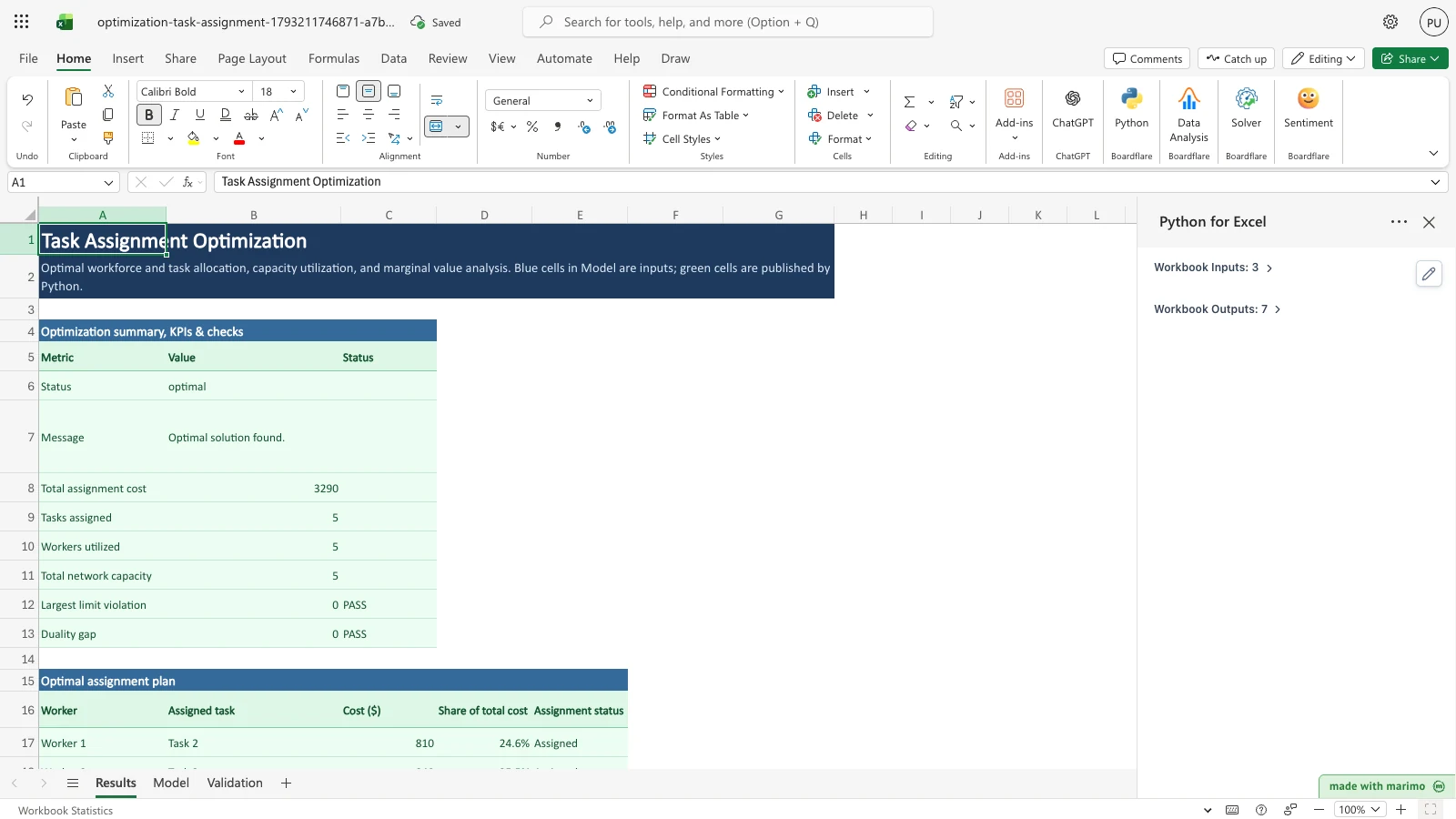
The workbook accepts data in the standard Hungarian method matrix layout: workers down the rows, tasks across the columns, unit costs in the grid cells, worker capacity limits at the right edge, and task demand requirements along the bottom edge. Incompatible or disallowed assignments are marked with an explicit forbidden flag (M or -), or left blank, preventing the solver from selecting those pairings.
The template ships with the published 5x5 Hungarian method benchmark problem from the Indian Institute of Technology Kanpur (IIT Kanpur) CS 245 seminar notes. The problem includes an explicit dummy task column and forbidden M entries, solving to the exact published optimum of $3,290.
Before you start
Requirements and prerequisites: - Microsoft Excel with Python for Excel enabled. - No external Python packages or database drivers are required; the model runs entirely in-memory using SciPy HiGHS. - Have ready your list of workers, available tasks, and cost matrix (which can represent dollars, labor hours, travel distance, or risk weights). - Identify any disallowed pairings (e.g., missing certifications, security clearance gaps, or scheduling conflicts) and mark them as M or -, or leave them blank.
Workbook tour
The workbook contains three functional sheets:
| Sheet and range | What it holds | Kind |
|---|---|---|
Results, A5:C13 |
Optimization summary KPIs: solver status, status message, total cost, assigned tasks count, utilized workers, and total network capacity, then two per-solve checks: Largest limit violation and Duality gap, each with a PASS or FAIL status. | Output block (summary) |
Results, A16:E21 |
Optimal assignment plan: worker, assigned task, route cost ($ ), percentage share of total cost, and assignment status. | Output block (plan) |
Results, A24:G30 |
Worker capacity & utilization: capacity limits, assigned tasks, idle capacity, utilization percentage, status, and capacity savings ($ ). | Output block (workers) |
Results, A33:G39 |
Task fulfillment & marginal costs: required demand, assigned count, unmet demand, fulfillment rate, status, and marginal task cost ($ ). | Output block (tasks) |
Results, A42:F47 |
Binary assignment matrix grid (1 = assigned, 0 = unassigned) visualizing the matching pattern across workers and tasks. | Output block (grid) |
Results, A50:E61 |
Suggested limit changes for infeasible models: the limit, its type, current value, suggested value and change, with a total absolute change in the last row. Shows a no-changes row when the model is feasible, and is blank when not solved. | Output block (repair) |
Model, A5:G10 |
Worker cost matrix and capacity limits: task headers (B5:F5), worker labels (A6:A10), task cost cells (B6:F10), and the worker capacity column (G5 header, G6:G10 values). |
Editable input |
Model, A11:F11 |
Task demand requirements (B11:F11). |
Editable input |
Model, A14:G17 |
In-workbook modification guide explaining how to edit costs, forbid pairings, and add workers or tasks. | Documentation note |
Validation, A5:E15 |
Benchmark specifications and constraint validation tests against published literature and mathematical invariants. This table is display text: the expected values and tolerances are fixed in notebook.py, so editing a cell here does not change any status. |
Reference table |
Validation, F5:H15 |
Live validation test results: actual value, difference from expected, and pass/fail status. | Output block (validation) |
Validation, A18:E20 |
Repository test evidence documenting offline verification against the OR-Library assign100 benchmark (integrality within 1e-6 and exact cost match 305, from assignopt.txt; the instance is assign100.txt). Only Validation!A16 is scanned for stray data (it must be blank); this note sits outside that cell, and editing it does not change results. |
Documentation note |
Using the template
1. Review the baseline solution
- Open the workbook. Python runs automatically on load in App mode, reading the Model sheet and populating the Results dashboard.
- Verify that Results displays
Status: optimal,Total assignment cost: 3,290.00, and PASS on both checks in rows 12 and 13 (Largest limit violation and Duality gap). - Check the Optimal assignment plan (
A16:E21) to inspect the allocated worker-task pairings. - Switch to the Validation sheet to confirm that all 10 checks report
PASS. On the published model every check runs; if you edit the Model, the benchmark rows shown/a (model edited)instead (see Validation below).
2. Enter your custom workforce and task data
- Navigate to the Model sheet.
- Edit the task headers in
B5:F5and worker labels inA6:A10to reflect your workforce and project tasks. - Update the cost values in cells
B6:F10. - To forbid any pairing, enter
Mor-, or clear the cell. Markers are matched regardless of capitalization or surrounding spaces. A blank cell is forbidden, not zero. - If worker capacities or task demands differ from 1, enter the numbers in cells
G6:G10orB11:F11. Blank capacity or demand cells are not read as 1. - Return to Results to view the updated assignment plan and cost breakdown.
Inputs and settings
All user inputs reside on the Model sheet:
- Worker cost matrix (
B6:F10): The cost incurred when a worker performs a task. Costs must be non-negative numbers in any consistent unit (dollars, hours, distance). - Forbidden assignment markers (
M,-, or blank): Marks an assignment as strictly disallowed. The solver fixes the corresponding decision variable \(x_{ij} = 0\), guaranteeing the pairing is excluded. Blank cells are forbidden too, never read as cost 0. Markers are matched case- and whitespace-insensitively. - Worker capacity limits (
G6:G10): Maximum number of tasks each worker may be assigned. Enter a number for every worker. A blank is not read as 1. - Task demand requirements (
B11:F11): Number of workers required for each task. Enter a number for every task. A blank is not read as 1.
How results are calculated
The template formulates the problem as a linear programming assignment model:
\[\min \sum_{i=1}^m \sum_{j=1}^n c_{ij} x_{ij}\]
subject to: - \(\sum_{j=1}^n x_{ij} \le \text{limit}_i \quad \forall i \in \{1, \dots, m\}\) (worker capacity constraint) - \(\sum_{i=1}^m x_{ij} = \text{demand}_j \quad \forall j \in \{1, \dots, n\}\) (task requirement constraint) - \(0 \le x_{ij} \le 1 \quad \forall (i, j) \text{ allowed}\) - \(x_{ij} = 0 \quad \forall (i, j) \text{ forbidden}\)
Because the constraint matrix of an assignment problem with integer capacities and demands is totally unimodular, the continuous linear programming relaxation solved by HiGHS is guaranteed to produce an integer-valued vertex solution (\(x_{ij} \in \{0, 1\}\)). The workbook enforces the integer condition: worker capacities (Model!G6:G10) and task demands (Model!B11:F11) must be whole numbers of 0 or more, and any other value stops the run with an error naming the cell. Costs may be fractional.
Worked example
Consider the baseline 5x5 IIT Kanpur benchmark matrix: - Workers 1 and 2 have identical costs: [820, 810, 840, 960, 0]. - Workers 3 and 4 have identical costs: [800, 870, M, 920, 0] (Task 3 forbidden). - Worker 5 has costs: [740, 900, 810, 840, M] (Dummy column 5 forbidden).
One optimal assignment is: - Worker 1 \(\to\) Task 2: $810 - Worker 2 \(\to\) Task 3: $840 - Worker 3 \(\to\) Task 1: $800 - Worker 4 \(\to\) Task 5 (Dummy): $0 (Worker 4 is assigned to the dummy task at cost $0) - Worker 5 \(\to\) Task 4: $840
Total cost: \(\$810 + \$840 + \$800 + \$0 + \$840 = \$3,290\).
Because Workers 1 & 2 tie on Tasks 2 & 3, and Workers 3 & 4 tie on Tasks 1 & 5, exactly 4 alternate optimal allocations exist that achieve this identical minimum cost.
Reading the results
- Optimization summary KPIs (
A5:C13): High-level health check. Confirms optimal status, reports total assignment cost, and displays counts of assigned tasks and active workers. Rows 12 and 13 are per-solve checks on your own data, each with a value and a status:- Largest limit violation (row 12) is the largest amount by which the solution breaks a worker limit, a task demand or a variable bound (forbidden pairs are bounds, so they are included). It shows PASS when that amount is at most 0.000001.
- Duality gap (row 13) is the gap between the LP primal and dual objectives. It shows PASS when the gap is at most 0.00001. This template solves an LP, so the row is always a duality gap. When the model solves, each row shows PASS or FAIL. When there is no optimum (infeasible, error or blank input), both the value and the status are blank.
- Optimal assignment plan (
A16:E21): Itemized list of assigned worker-task pairs, their individual costs, and their proportional contribution to the overall expense. - Worker capacity & utilization (
A24:G30): Summarizes task assignments per worker. The Capacity savings ($ ) column is the reduction in total cost from giving that worker one more unit of capacity (the shadow price of the worker limit, reported as a saving). - Task fulfillment & marginal costs (
A33:G39): Verifies that each task demand is fully satisfied. The Marginal cost ($ ) column is the cost saved per unit of that task’s demand removed (the shadow price of the requirement, shown as a positive saving; for example, +800 for Task 1 means removing one Task 1 unit lowers the optimum by $800). At the baseline, total capacity equals total demand, so demand can only be lowered without becoming infeasible; the value is exact for a one-unit decrease. - Assignment matrix grid (
A42:F47): Visual 5x5 binary tableau showing1for assigned worker-task combinations and0otherwise. - Suggested limit changes (
A50:E61): Shown when the model is infeasible. Each row is one limit the repair changes, in plain words:- Limit names it:
Capacity: <worker>for a worker limit orDemand: <task>for a task demand. - Type reads
Worker capacity (at most)for a worker limit,Task demand (exactly)for a task demand, orOther limitfor anything else. - Current is the value now, Suggested is the value that makes the model feasible, and Change is suggested minus current.
- Total absolute change (last row) adds the absolute changes shown. The repair minimises a weighted total, where each change is divided by the size of its limit, so it prefers changing large limits over small ones. The block has room for all 10 limits (5 worker and 5 task), so no changed limit is cut off. More than one set of changes can reach the same minimum total, and the block shows one of them. When the model is feasible, the first row reads
No changes needed - all demands can be metand the total is 0.0. When it is not solved, the rows and the total are blank.
- Limit names it:
Saving, sharing and App mode
- The workbook operates in App mode by default. Workbook users can modify input cells on Model without needing Python scripting access.
- When saved and reopened, all Excel cell data, formats, and Python-published blocks persist normally.
- Colleagues opening the workbook without Python for Excel installed can view the saved results, tables, and notes statically.
Errors, empty states and limits
- Infeasible problem: If total task demand (
Model!B11:F11) exceeds total worker capacity (Model!G6:G10), the Results status reportsinfeasibleand the message names both ranges and the shortfall, for exampleTotal task demand (Model!B11:F11) is 6, but total worker capacity (Model!G6:G10) is 5: a shortfall of 1 task.The total cost, tasks assigned and workers utilized are blank, and so are the two checks. The Suggested limit changes block (Results!A50:E61) names the limits to change: for this example,Demand: Task 1, from 2.0 to 1.0, a change of -1.0, and a total absolute change of 1.0. Another change of the same size, such as adding one unit to a worker limit, would also restore feasibility; the block shows one of them. The task pane repeats the message and the same limits. If forbidden entries (M,-, or blank) block a task, the status is alsoinfeasible, with the solver’s message. The repair then names the blocked demand, for exampleDemand: Task 3, from 1.0 to 0.0, because no worker can take it. - Empty state: If the whole model is blank (
B6:G10andB11:F11), the page shows the Ready message with no error text, and every status and validation cell readsnot run. If only every worker-task cost cell (B6:F10) is blank, no assignment is solved. Results show one status,not run, in the summary (B6), the workers table (F25) and the tasks table (F34), and the two checks stay blank, with the message “No assignment solved: enter worker-task costs on the Model sheet.” The task pane shows the Ready message, which is informational rather than an error. - Invalid entries: Only documented markers (
M,-, and blank) represent forbidden pairings. Any other text, including a typo like84O, the textnan, orinf, raises a parse error naming the offending cell, such asInvalid cost entry '84O' at Model!E10. Use a number, M, - or blank.Results are cleared and no plan is published. - Commas: A cost, capacity or demand cell that contains a comma, such as
1,5or1,500, is rejected rather than read as a decimal or thousands separator. The error names the cell:Model!C7 contains a comma ('1,5'). Enter the number without commas, for example 1500 or 1.5.For a capacity or demand cell it readsModel!G7 contains a comma ('1,5'). Enter a whole number without commas, for example 1500.Results are cleared. - Blank names: A worker name (
Model!A6:A10) or task name (Model!B5:F5) is blank if the cell is empty or holds the textNone,nan, or a pandas placeholderUnnamed: n. A blank name raises an error naming the cell, such asModel!A8 is blank: enter a worker or task name.This also applies when a whole worker row (A8:G8) is cleared while other rows still hold data: the row is reported as blank, not treated as an empty slot. Only a fully blank model is the empty state. Results are cleared. - Invalid capacity or demand: Each worker capacity (
Model!G6:G10) and task demand (Model!B11:F11) must be a whole number of 0 or more. A blank, fractional or negative value raises an error naming the first bad cell, such asModel!G7 must be a whole number of tasks, 0 or more; found 0.5.Results are cleared. - Range overflow: The model scans
Model!A1:AZ60for non-blank cells. The supported cells are the worker-task blockModel!A5:G10, the demand rowModel!A11:F11, and the authored titles and notes inA1,A2,A4,A13andA14. Any other non-blank cell in that window is a stray cell, and the error names the first one (for exampleModel!AA12), with a count if there are more. The capacity headerModel!G5must still readWorker Capacity (tasks), andValidation!A16must be blank. Any failure clears the results and the task pane lists the locations, for exampleData outside the supported range: Model!AA12. Results cleared.Cells beyond column AZ or row 60 are not read, so data placed there is not detected. - Capacity limits: The Results tables reserve room for 5 assignment rows, 6 worker rows, and 6 task rows (
PLAN_CAPACITY,WORKERS_CAPACITY, andTASKS_CAPACITYin the notebook rules cell). The Suggested limit changes block has 10 rows (REPAIR_LIMIT_ROWSin the notebook), enough for every worker and task limit on the 5 by 5 layout. To scale up to larger rosters, follow the authoring guide below.
Limitations and when to use this
- Single-skill assignment: This template models standard single-task allocation. If workers can take variable time-slices across multiple ongoing jobs, a generalized assignment or project scheduling model is appropriate.
- Alternate optima: In degenerate networks where multiple workers share identical costs, several assignment plans may achieve the same minimum cost. The solver reports one optimal vertex.
- Unbalanced networks: If the number of workers exceeds tasks, unassigned workers are assigned 0 tasks (or routed to an explicit dummy task). If tasks exceed workers, the problem is infeasible unless worker capacities are raised; the Suggested limit changes block on Results lists the limits to change.
- Fixed grid dimensions: The input block is fixed at five worker rows (
A6:A10) and five task columns (B5:F5), with the capacity column atG. The overflow scan described above flags any non-blank cell inModel!A1:AZ60outside the supported block, and clears results until the layout or the scan window is updated.
Free alternatives
Excel Solver, built into desktop Excel (it is not available in Excel for the web), and the free OpenSolver add-in for Windows Excel (a COIN-OR CBC add-in with no stable release since 2020) can both solve this same assignment model. The 5 by 5 sample has 25 assignment variables, well inside Excel Solver’s Simplex LP limit of 200 decision variables and 100 constraints. This workbook solves the linear program with HiGHS through SciPy’s scipy.optimize.linprog, running in the browser, and relies on the total unimodularity of the assignment constraints for whole-number assignments. What it adds is the worker and task layout, live recalculation when capacities, demands or costs change, capacity savings and marginal costs with stated meanings, a plain-language list of the limits to change when an assignment is infeasible (the smallest weighted change that restores feasibility), per-solve checks of the largest limit violation and the duality gap on Results, and a Validation sheet against the IIT Kanpur CS 245 Hungarian-method example with its optimum of $3,290.
Developer reference
Notebook implementation
The notebook reads inputs via bf.inputs using subscript notation, with the overflow probe ranges defined once in the rules cell:
inputs = bf.inputs(
    matrix=bf.ref("Model!A5:G11", headers=True),
    overflow_model=bf.ref(OVERFLOW_PROBES["model"]),
    overflow=bf.ref(OVERFLOW_PROBES["checks"]),  # reads Validation!A16 only; the Validation table is not an input
)
The parsing block converts matrix cells into numeric floats, treats M, -, and blank cells as forbidden, and passes the network parameters to solve_assignment:
res = solve_assignment(
    cost=cost_matrix,
    worker_names=worker_names,
    task_names=task_names,
    worker_limits=worker_limits,
    task_demands=task_demands,
)
Finally, results are formatted into DataFrames and published to the workbook:
bf.publish(
    outputs={
        "summary": summary_table,
        "plan": plan_table,
        "workers": workers_table,
        "tasks": tasks_table,
        "grid": grid_table,
        "repair": repair_table,
        "validation": validation_table,
    }
)
How the calculation/model works
The mathematical formulation uses forms/assignment.py, which maps the cost matrix and capacity constraints to a standard linear programming problem solved by core.solve (SciPy HiGHS). Solution feasibility is independently re-verified using check_solution before publishing. The notebook passes the variable bounds (forbidden pairs fixed to 0) so the Largest limit violation covers them, and duality_gap supplies the Duality gap row. When the status is infeasible, forms/assignment.py calls elastic_repair on the same constraint arrays the solve used and returns the changed limits as AssignmentResult.repair. The up-front capacity-shortfall check also builds and solves the real model, so it is repaired on the same arrays.
Validation / expected results
Checks are matched to the Validation sheet by position, not by label, so renaming a label does not change results. The expected values and tolerances are fixed constants in notebook.py (_VAL_EXPECTED and _VAL_TOL); the sheet’s Expected column is display text, and editing it cannot change a status. Each check compares live solver output with the published IIT Kanpur CS 245 values, and the forbidden-pair and duality-gap checks are model-independent:
- On the published benchmark model (same costs, one task per worker, unit demands), every check runs and must report
PASS. - If the Model is edited, the benchmark rows show
n/a (model edited)with no status. The forbidden-pair compliance and LP duality-gap checks still run. - If no optimum is found (infeasible or blank input), every row shows
not run. A model that is merely infeasible is never reported as FAIL.
The duality gap is computed (LP primal and dual objectives), not a published figure. The table below shows the published-model results:
| Check | Target quantity | Expected value | Tolerance | Status |
|---|---|---|---|---|
| IIT Kanpur CS 245 benchmark | Total assignment cost ($ ) | 3290.0 | 0.01 | PASS |
| Task 1 fulfillment | Task 1 assigned count | 1.0 | 0.01 | PASS |
| Task 2 fulfillment | Task 2 assigned count | 1.0 | 0.01 | PASS |
| Task 3 fulfillment | Task 3 assigned count | 1.0 | 0.01 | PASS |
| Task 4 fulfillment | Task 4 assigned count | 1.0 | 0.01 | PASS |
| Task 5 (Dummy) fulfillment | Task 5 assigned count | 1.0 | 0.01 | PASS |
| Worker capacity constraint | Max tasks per worker | 1.0 | 0.01 | PASS |
| Forbidden pair compliance | Forbidden assignments used | 0.0 | 0.01 | PASS |
| Total task coverage | Total tasks assigned | 5.0 | 0.01 | PASS |
| LP optimality condition | Duality gap | 0.0 | 1e-5 | PASS |
Architecture
The template follows Boardflare’s modular optimization architecture: - Shared solver core: templates/optimization/engine/core.py - Dedicated assignment builder: templates/optimization/engine/forms/assignment.py - Infeasibility repair: templates/optimization/engine/repair.py (elastic_repair), with the Results block built in notebook.py - Offline benchmark test suite: templates/optimization/engine/forms/test_assignment.py - Primary source benchmark fixture: templates/optimization/engine/forms/assignment_hungarian_iitk.json - In-notebook sync: Marimo engine synchronization via sync_engine.py
Changelog
2026-10-28
- Added infeasibility repair: when the model is infeasible, the Results sheet’s Suggested limit changes block (
A50:E61) names the worker and task limits to change, with type, current value, suggested value, change and a total absolute change. The task pane lists the same limits. - Added per-solve checks on the Results summary: Largest limit violation (
check_solution, with variable bounds) and Duality gap (duality_gap), each with PASS or FAIL, and blank when not solved. - Results rows moved to make room for the checks and the repair block: summary
A5:C13, planA16:E21, workersA24:G30, tasksA33:G39, gridA42:F47. - A capacity shortfall detected before the solve now runs the real model, so the repair uses the same arrays as the solve. Scenarios cover the checks, the empty states and a capacity shortfall with the repair total equal to the shortfall.
2026-10-26
- Rebuilt from skeleton generator into a field-authentic assignment template (Issue boardflare/templates#240).
- Hand-crafted cost matrix layout with worker capacities and task demand edge, matching the standard Hungarian method tableau.
- Added native support for explicit forbidden assignment markers (
Mor-), with blank cells also forbidden. - Shipped the published IIT Kanpur CS 245 Hungarian method 5x5 benchmark dataset with dummy column and forbidden entries verbatim, reproducing the published $3,290 minimum cost.
- Created independent formulation builder
forms/assignment.pywith offline OR-Libraryassign100benchmark verification. - Implemented comprehensive Validation sheet with 10 live benchmark checks and duality gap verification.
- Commas in cost, capacity and demand cells are rejected with the cell named, not read as thousands separators;
forms/assignment.pyrejects them too. - Worker and task names share one blank rule (empty,
None,nan,Unnamed: n); blank names are published as empty text, nevernan, and unset capacities and demands are published blank, never NaN. - Validation expected values and tolerances are fixed in the notebook; the sheet’s Expected column and the
checksinput were removed. - Marginal cost is documented as the cost saved per unit of demand removed; a
-0.0result is normalised to0.0. - Scenario coverage added for comma cost and capacity, a fully cleared worker row, and Validation expected and note cell edits.