Design of Experiments (DOE)
Overview
Design of Experiments (DOE) provides a practitioner-grade two-level full and fractional factorial screening studio directly within Excel, powered by Python. Engineers, quality scientists, and process chemists can define 2 to 8 experimental factors, configure fractional generators, specify replicates and centre points, and immediately obtain an authentic randomized run sheet alongside a complete alias and resolution structure.
Once responses are recorded, the studio evaluates main effects and two-factor interactions, computes Lenth’s pseudo standard error (PSE) and margin of error (ME) for unreplicated screening designs, performs ANOVA and a formal curvature test when an independent error estimate or centre points exist, and visualizes active effects across native Excel normal probability, half-normal, and Pareto charts.
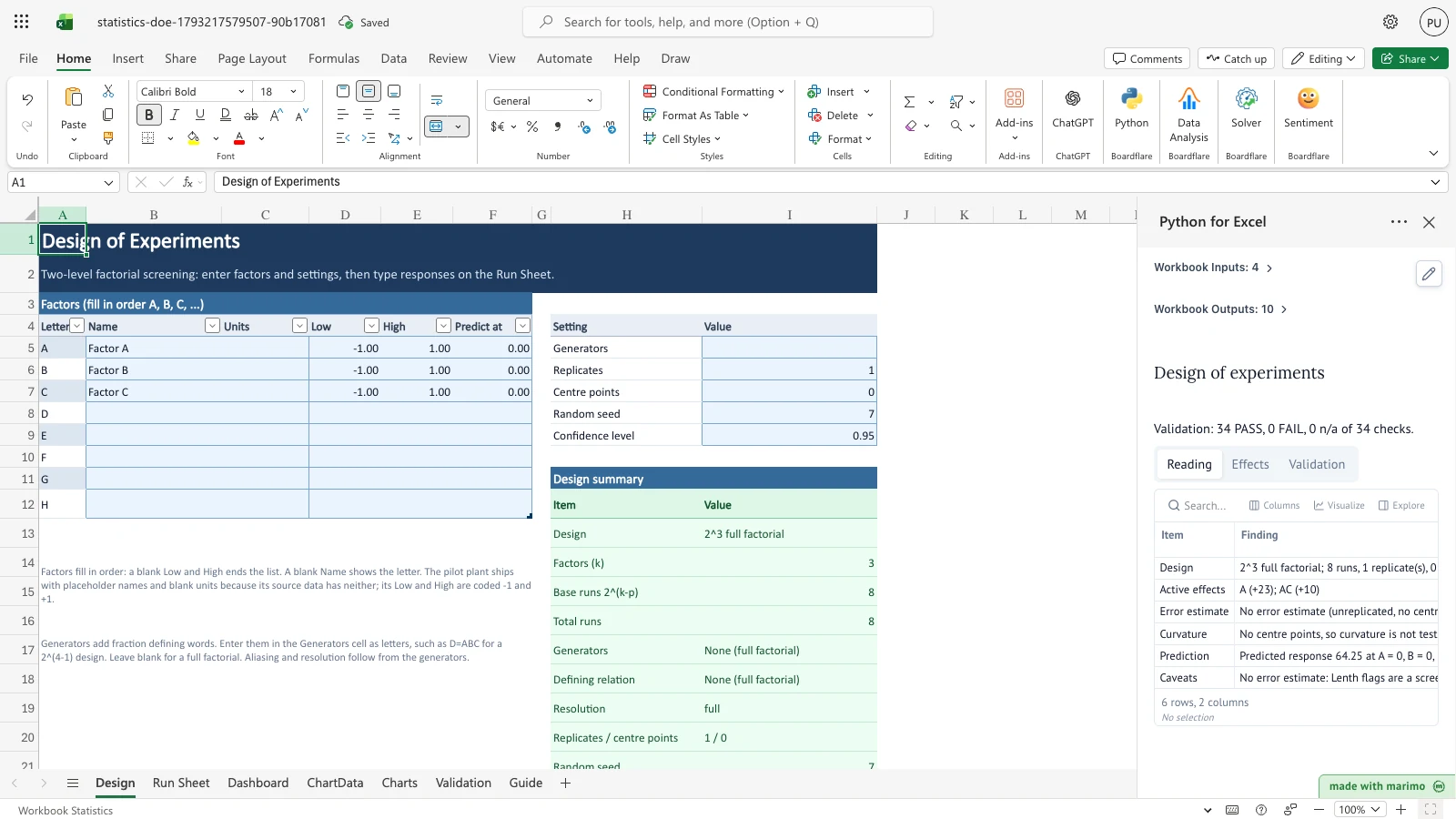
The workbook comes pre-populated with the classic Box-Hunter-Hunter \(2^3\) pilot plant investigation (Box, Hunter & Hunter, 2nd ed., p. 177). Factor A (+23.0) and interaction AC (+10.0) emerge as the primary active drivers against a factorial mean of 64.25, verified by 34 live benchmark checks against NIST and literature standards.
Before you start
- Prerequisites: Microsoft Excel with Python for Excel enabled.
- Experimental design: Enter factor letters, names, physical units, low (-1) and high (+1) levels, and target prediction coordinates on the Design sheet.
- Run order: The Run Sheet generates a seeded random execution sequence. Record experiment responses keyed by Standard order in column V (
RunResponsestable). - Sample data: Shipped with the 8-run Box-Hunter-Hunter pilot plant dataset with responses
[60, 72, 54, 68, 52, 83, 45, 80].
Workbook tour
The workbook contains seven structured worksheets:
| Sheet | Content | Nature |
|---|---|---|
| Design | FactorTable (factors A–H, names, units, low/high, predict at), SETTINGS (generators, replicates, centre points, random seed, confidence level), design summary, and alias structure |
Editable input & Python outputs |
| Run Sheet | Generated experimental design in seeded random run order with coded and natural levels, plus the RunResponses table keyed by standard order |
Editable input & Python outputs |
| Dashboard | Plain-language executive finding, model summary metrics, ANOVA table, curvature and prediction tests, and detailed effects table with Lenth flags | Output (published by Python) |
| ChartData | Plotting coordinates for normal/half-normal probability plots, Pareto of |effects|, and main-effects response lines | Output (chart helper) |
| Charts | Native Excel scatter charts: Normal probability plot, Half-normal plot, Pareto chart with Lenth ME threshold, and Main-effects plot | Visual presentation |
| Validation | 34 literature benchmark checks comparing live engine calculations against published standards (BHH, NIST §5.3.3.4.1–4, §5.5.9) | Verification audit |
| Guide | Practitioner guide covering resolution (III/IV/V), aliasing, Lenth PSE, curvature interpretation, and free alternatives | Documentation |
Using the template
1. Configure your factors and design
- Go to the Design sheet.
- In the
FactorTable(A4:F12), specify factor letters, natural names, measurement units, and your Low and High experimental settings. - In
SETTINGS(H4:I9), enter any fraction generators (e.g.,D=ABCfor a \(2^{4-1}\) half-fraction). Leave blank for a full factorial. - Set desired replicates, centre points, and random seed.
- Review the Design summary and Alias structure (
H12:I60) to confirm model resolution and confounded terms.
2. Execute runs and record responses
- Go to the Run Sheet.
- Follow the randomized execution sequence in column A (Run order).
- Type each observed experimental response in column V (Response in the
RunResponsestable), aligning with the appropriate Standard order in column U.
3. Review findings on the Dashboard
- Open the Dashboard sheet.
- Review the Plain-language reading for active effects and candidates identified beyond Lenth’s margin of error.
- Check the Curvature test if centre-point runs were included to determine if quadratic curvature is present.
- Inspect the Charts sheet to visually verify effect significance on the Pareto and half-normal probability plots.
Inputs and settings
The controls in SETTINGS on the Design sheet configure the experiment:
| Setting | Allowed Values | Default | Effect |
|---|---|---|---|
| Generators | Comma/space-separated equations (e.g., D=ABC, E=BCD) |
Blank | Defines fractional factorial fraction words and confounding structure. Blank yields a full $2^k$ factorial |
| Replicates | Integer \(\ge 1\) | 1 | Multiplies the design matrix, generating pure-error degrees of freedom for formal ANOVA \(F\)-tests and confidence intervals |
| Centre points | Integer \(\ge 0\) | 0 | Adds runs with all factors at midpoint (0 coded level) to compute pure error and test for non-linear curvature |
| Random seed | Integer \(\ge 0\) | 7 | Seeds the deterministic pseudorandom permutation of run execution order |
| Confidence level | 0.50 to 0.99 | 0.95 | Sets nominal coverage for effects confidence intervals and Lenth decision boundaries |
How results are calculated
- Two-Level Matrix Generation: Full designs construct a \(2^k\) matrix in standard Yates order where factor A alternates every run (\(-1, +1\)), factor B alternates every two runs, and so on. Fractional factorial columns are generated by multiplying coded sign vectors according to the user-entered defining generator relations.
- Effects Estimation: For each term \(j\), the effect is calculated as the contrast difference between high and low response means: \[\text{Effect}_j = \bar{y}_{j+} - \bar{y}_{j-}, \quad \text{Coefficient}_j = \frac{\text{Effect}_j}{2}\] Sum of squares follows \(\text{SS}_j = n_{\text{factorial}} \times \text{Coefficient}_j^2\).
- Lenth Screening for Unreplicated Designs: When no independent error estimate exists, Lenth’s method estimates pseudo standard error without requiring replicate runs: \[s_0 = 1.5 \times \text{median}(|\text{Effect}_j|)\] \[\text{PSE} = 1.5 \times \text{median}(\{|\text{Effect}_j| : |\text{Effect}_j| < 2.5 s_0\})\] Effects exceeding the margin of error (\(\text{ME} = t_{1 - \alpha/2, d} \times \text{PSE}\)) are flagged as candidates; those exceeding simultaneous margin of error (\(\text{SME} = t_{[1 + (1-\alpha)^{1/m}]/2, d} \times \text{PSE}\)) are flagged as active.
- Curvature Assessment: When centre-point runs are included, overall non-linear curvature is tested by comparing the centre-point mean \(\bar{y}_{\text{centre}}\) against the factorial mean \(\bar{y}_{\text{factorial}}\): \[\text{Curvature} = \bar{y}_{\text{factorial}} - \bar{y}_{\text{centre}}, \quad \text{SS}_{\text{curvature}} = \frac{n_f n_c}{n_f + n_c} (\text{Curvature})^2, \quad F = \frac{\text{SS}_{\text{curvature}}}{\text{MS}_{\text{centre}}}\]
Reading the results
- Plain-Language Reading (
Dashboard!A5:B11): Synthesizes the active effects, candidate terms, error source, curvature findings, and point prediction into clear prose findings. - Summary Metrics (
Dashboard!A14:B25): Reports the design type, factors, runs analysed, factorial intercept mean, model terms, \(R^2\), and Lenth PSE, ME, and SME boundaries. - ANOVA Table (
Dashboard!A28:F31): Details Model, Error (pure error or model residual), and Total degrees of freedom, sums of squares, mean squares, and \(F\)/\(p\) values when error degrees of freedom exist. - Tests and Prediction (
Dashboard!A34:B41): Reports curvature test results (\(F\), \(p\)), model \(F\) and \(p\) values, and the configured confidence level. - Effects Table (
Dashboard!A44:J107): Lists all estimated terms with Effect, Coefficient, SS, % contribution, \(t\)-statistic, \(p\)-value, confidence intervals, and activity flags.
Saving, sharing and App mode
- All computed tables and native Excel scatter charts are saved directly into the
.xlsxworkbook and display cleanly in standard Excel without requiring an active Python session. - In App mode, users can view results, filter tables, and edit responses without altering underlying cell formulas or script definitions.
- App mode provides an optimized presentation surface and does not restrict file security or access controls.
Errors, empty states and limits
- Missing responses: If any required run in
RunResponsesis blank, the Dashboard halts with a clear banner:Missing N response(s): Run Sheet!V6. Enter a Response for every run in Run Sheet column V. - Non-numeric responses: Any non-numeric entry in column V halts calculation and identifies the offending cell and value.
- Capacity limits: The Run Sheet accommodates up to 64 runs and 2 to 8 factors. Entering responses beyond the active design run count produces an informational warning on stray responses.
- Generators format: Generators must specify single capital letters separated by an equals sign (e.g.,
D=ABC). Malformed generators report syntax errors on the Design sheet.
Limitations and when to use this
- Two-level screening scope: Designed for two-level full and regular fractional factorial screening designs (\(2^k\) and \(2^{k-p}\)).
- Higher-order models: Does not generate axial star points for full response surface methodology (RSM) or central composite designs (CCD); when significant curvature is detected, follow-on RSM designs are recommended.
- Unreplicated designs: Lenth’s method is an objective screening heuristic; flagged active effects should be verified with confirmation runs.
- Disclaimer: This workbook is an educational and engineering productivity tool. It does not certify compliance with specific audited quality standards.
Developer reference
Notebook implementation
The reactive Marimo notebook reads workbook tables and settings via boardflare:
inputs = bf.inputs(
    factors=bf.ref("Design!A4:F12", headers=True),
    settings=bf.ref("Design!H4:I9", headers=True),
    responses=bf.ref("Run Sheet!U5:V69", headers=True),
    checks=bf.ref("Validation!A4:F38", headers=True),
)
The notebook generates the factorial design matrix, computes aliasing via defining relation group theory, evaluates contrasts, Lenth limits, ANOVA, and curvature, and publishes ten structured outputs:
bf.publish(
    outputs={
        "design_summary": design_summary,
        "aliases": aliases,
        "run_sheet": run_sheet,
        "reading": reading,
        "summary": summary,
        "anova": anova,
        "tests": tests,
        "effects": effects,
        "chart_data": chart_data,
        "validation": validation,
    }
)
How the calculation/model works
The mathematical routines are implemented in templates/statistics/engine/doe.py. Standard Yates run orders are computed through binary bitwise expansions. Fractional defining relations use group multiplication of generator words to determine resolution (III, IV, V) and confounding patterns. Lenth margins use precomputed studentized critical values for \(d = m/3\).
Validation / expected results
The template continuously verifies 34 literature benchmark checks on the Validation sheet. If any check fails, the status callout highlights the count of failed items:
| Benchmark Reference | Target Quantity | Expected Value | Tolerance | Source Category |
|---|---|---|---|---|
| Box-Hunter-Hunter Pilot Plant | Factorial Mean (Intercept) | 64.25 | 1e-6 |
Published primary (BHH 2nd ed. p. 177) |
| Box-Hunter-Hunter Pilot Plant | Effect A | 23.0 | 1e-6 |
Published primary (BHH 2nd ed. p. 177) |
| Box-Hunter-Hunter Pilot Plant | Effect B | -5.0 | 1e-6 |
Published primary (BHH 2nd ed. p. 177) |
| Box-Hunter-Hunter Pilot Plant | Effect AC | 10.0 | 1e-6 |
Published primary (BHH 2nd ed. p. 177) |
| Box-Hunter-Hunter Pilot Plant | Lenth PSE | 2.25 | 1e-6 |
Engine regression guard |
| Box-Hunter-Hunter Pilot Plant | Lenth ME (\(\alpha = 0.05\)) | 8.469277 | 1e-6 |
Engine regression guard |
| Box-Hunter-Hunter Pilot Plant | Lenth SME (\(\alpha = 0.05\)) | 20.268691 | 1e-6 |
Engine regression guard |
| Defective Springs (§5.5.9) | Effect A | 23.0 | 1e-6 |
NIST/SEMATECH e-Handbook |
| NIST Half-Fraction (§5.3.3.4.1) | Fraction Effect A | 8.0 | 1e-6 |
NIST/SEMATECH e-Handbook |
| NIST 2^(8-3) Resolution IV | Defining Words Count | 7.0 | Exact | NIST/SEMATECH e-Handbook |
Changelog
1.0.0(2026-10-28): Initial release of the Phase 2 DoE Factorial Design Studio with full \(2^k\) and fractional \(2^{k-p}\) factorial design, randomized run sheet, alias structure, Pareto/probability charts, Lenth PSE screening, ANOVA curvature test, and 34 literature benchmark checks.