Independent Group Comparison Studio
Overview
The Independent Group Comparison Studio provides an end-to-end, practitioner-grade workbench for comparing two or more experimental groups or treatment batches directly in Microsoft Excel, powered by Python. Rather than forcing users into restrictive assumptions, the studio implements modern statistical best practices: Welch’s unequal-variance tests (Welch’s t-test and Welch ANOVA) are presented as the primary default, accompanied side-by-side by classical equal-variance tests (Student’s t-test and Fisher’s one-way ANOVA) and non-parametric rank methods (Mann-Whitney U and Kruskal-Wallis).
Diagnostic checks (Shapiro-Wilk normality and Levene’s Brown-Forsythe median test) provide transparency without automatically toggling test selection. When significant group differences are observed across three or more groups, comprehensive pairwise post-hoc procedures (Games-Howell for unequal variances, Tukey HSD for equal variances, and Dunn’s test with Holm-Bonferroni rank adjustment) reveal which specific group pairs drive the divergence.
In addition, the Plan your study sheet integrates prospective statistical power calculations and sample size curves powered by power.py, allowing researchers to plan balanced experiments with target power (e.g. 80% or 90%) and visualize power curves on a native Excel chart. All engine routines are validated against 25 numerical benchmarks from NIST StRD and peer-reviewed literature.
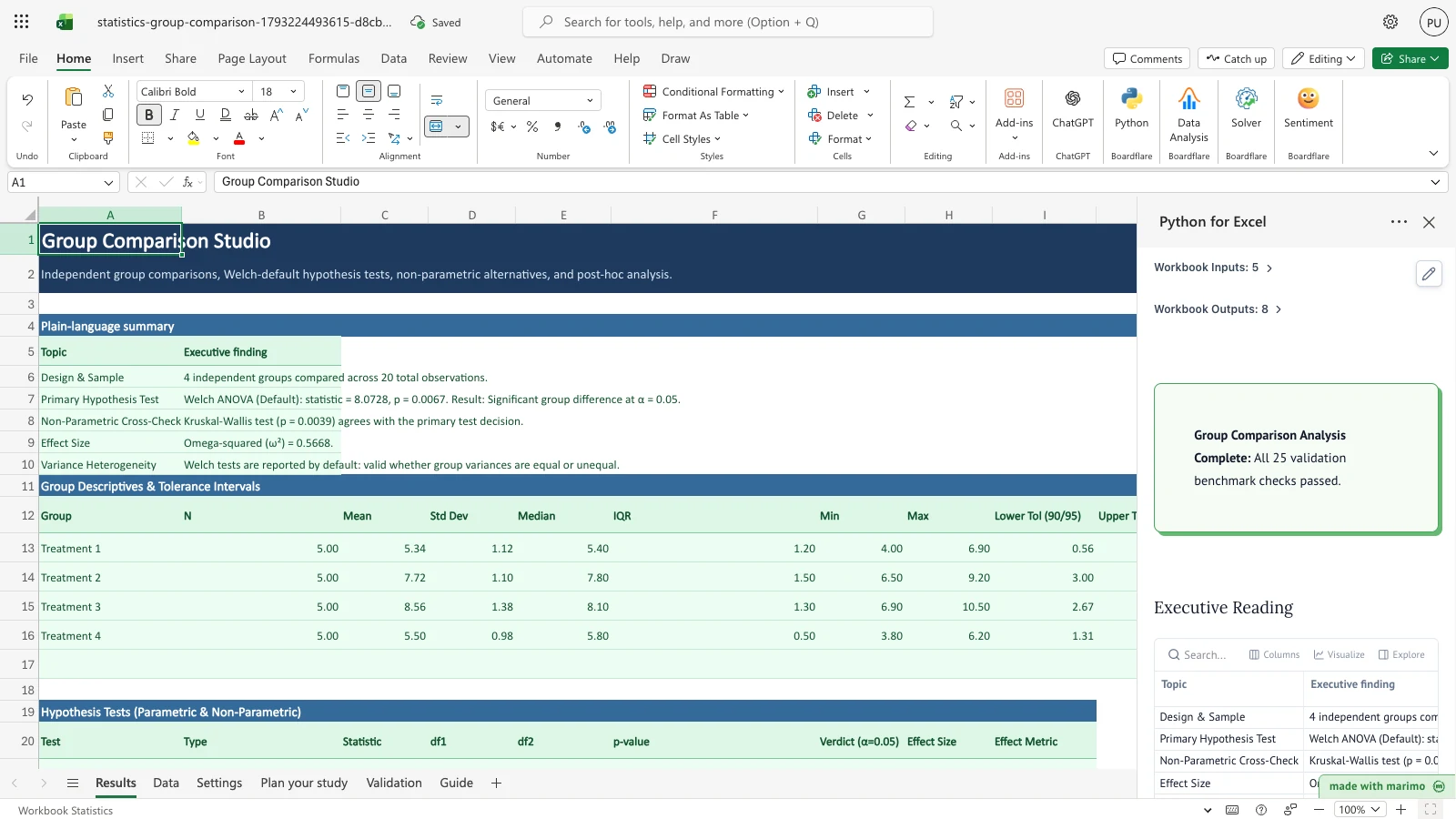
Before you start
- Prerequisites: Microsoft Excel with Python for Excel enabled.
- Data input: Enter group names and numeric observations in the two-column table on the Data sheet. Any number of groups ($k $) and observation counts are supported.
- Settings: Adjust the nominal significance level $$ (default 0.05), confidence level (default 0.95), and two-sided normal tolerance interval parameters on the Settings sheet.
- Study planning: Specify expected effect sizes (Cohen’s $d$ or $f$), target power, and group counts on the Plan your study sheet to calculate required sample sizes.
Workbook tour
Results sheet
The Results sheet provides an executive briefing followed by detailed tabular analytical blocks:
- Plain-language summary: Synthesizes the primary hypothesis test verdict, non-parametric agreement, effect size metric, and variance heterogeneity conclusions into clear English.
- Group Descriptives & Tolerance Intervals: Tabulates group sample size $N$, mean, sample standard deviation, median, interquartile range (IQR), minimum, maximum, and two-sided normal tolerance intervals at 90% coverage with 95% confidence.
- Hypothesis Tests: Presents Welch’s test (unequal variances, default), Student’s or Fisher’s parametric test (equal variances), and non-parametric rank test (Mann-Whitney or Kruskal-Wallis) with exact statistics, degrees of freedom, $p$-values, verdicts at $= 0.05$, and effect sizes (Hedges’ $g$, $^2$, $^2$, or $^2$).
- Assumption Diagnostics: Reports Shapiro-Wilk normality per group and Levene’s Brown-Forsythe test across all groups.
- Pairwise Post-Hoc Comparisons: When $k $, provides Games-Howell, Tukey-Kramer HSD, and Dunn-Holm pairwise mean differences, standard errors, simultaneous confidence intervals, and significance flags.
Data sheet
Contains the primary observations in an Excel table named Data. The studio is pre-populated with the classic NIST §7.4.7.1 4-treatment experiment (20 observations across Treatments 1 through 4), demonstrating significant treatment divergence with Welch ANOVA $F = 8.0728$ ($p = 0.0067$) and Kruskal-Wallis $H = 13.3658$ ($p = 0.0039$).
Plan your study sheet
A dedicated study design workbench:
- Parameters table: Configures design kind (ANOVA or two-sample t), expected effect size (Cohen’s $f$ or $d$), target power (e.g. 0.80), significance level $$, and group count $k$.
- Recommendation card: Solves for required observations per group and total sample size $N$, with exact achieved power.
- Power Curve: Generates a 20-point power grid mapped dynamically to a native Excel scatter/line chart.
Validation sheet
Executes 25 numerical verification checks against benchmark reference fixtures: - NIST StRD ANOVA dataset (SiRstv Instrument): Between SS, Within SS, $F$ statistic, $R^2$, residual SD. - NIST/SEMATECH e-Handbook §1.3.5.10 (GEAR.DAT): Levene Brown-Forsythe median test statistic and $p$-value. - Cushny & Peebles (1905) sleep trial: Welch $t$, degrees of freedom, Student $t$, Mann-Whitney $U$, and Hedges’ $g$. - NIST §7.4.7.1 Tukey example: Pairwise differences and confidence bounds. - Statistical power benchmarks: Cohen (1988) two-sample sample sizes and WebPower ANOVA sample sizes.
All 25 checks pass within numerical tolerances.
Guide sheet
Provides practitioner guidance on test selection, Welch’s t vs Student’s t, variance heterogeneity implications, and effect size interpretation.
Using the template
1. Enter your group observations
- Go to the Data sheet.
- Enter your experimental observations in the
Datatable (Data!A4:B304). - In column A (Group), specify categorical identifiers for each group (e.g.,
Control,Treatment A,Batch 1). - In column B (Response), enter the corresponding continuous numeric measurement. Blank cells are safely ignored.
2. Review hypothesis tests and diagnostics
- Switch to the Results sheet.
- Read the Plain-language summary (
Results!A5:B10) for the primary test conclusion at nominal $= 0.05$. - Check the Hypothesis Tests table (
Results!A20:I25) to review Welch ANOVA, classical one-way ANOVA, and Kruskal-Wallis results. - Inspect the Assumption Diagnostics table (
Results!A28:F35) to assess group normality via Shapiro-Wilk and variance homogeneity via Levene’s Brown-Forsythe test. - Review the Pairwise Post-Hoc Comparisons table (
Results!A38:I50) to examine specific pairwise differences with Games-Howell (unequal variances) and Tukey HSD (equal variances).
3. Plan follow-on studies
- Open the Plan your study sheet.
- In
StudyParameters(Plan your study!A5:B10), chooseanovaortwo_sampleunder Design kind. - Specify expected effect size (Cohen’s $f$ for ANOVA or $d$ for two-sample), target statistical power (e.g., 0.80 or 0.90), significance level $$, and number of groups $k$.
- Review the required sample size per group and total sample size in
sample_size_recommendation(Plan your study!D5:E12). - Examine the interactive Power Curve scatter chart to evaluate statistical sensitivity across different group sample sizes.
Inputs and settings
The controls on the Settings and Plan your study sheets configure analytical behavior:
| Setting | Worksheet Location | Default | Allowed Values | Description |
|---|---|---|---|---|
| Confidence level | Settings!B5 |
0.95 |
0.50 to 0.999 |
Nominal confidence level for difference intervals and post-hoc simultaneous intervals |
| Alternative hypothesis | Settings!B6 |
two-sided |
two-sided, greater, less |
Directionality of the two-sample comparison hypothesis test |
| Tolerance coverage (p) | Settings!B7 |
0.90 |
0.50 to 0.999 |
Proportion of population covered by the two-sided normal tolerance interval |
| Tolerance confidence (gamma) | Settings!B8 |
0.95 |
0.50 to 0.999 |
Confidence level for normal tolerance interval factor calculation |
| Alpha significance | Settings!B9 |
0.05 |
0.001 to 0.20 |
Significance decision threshold for all hypothesis tests and diagnostic checks |
| Design kind | 'Plan your study'!B6 |
anova |
anova, two_sample |
Study design family for prospective power analysis |
| Expected effect size | 'Plan your study'!B7 |
0.25 |
> 0 |
Standardized effect magnitude (Cohen’s $f$ for ANOVA, Cohen’s $d$ for two-sample t) |
| Target power | 'Plan your study'!B8 |
0.80 |
0.50 to 0.999 |
Desired probability of rejecting the null hypothesis when a true effect exists |
How results are calculated
- Descriptive Statistics and Tolerance Intervals: For each group $g$, sample size $n_g$, arithmetic mean ${x}_g$, sample standard deviation $s_g$, median, IQR, minimum, and maximum are computed using
summary.py. Two-sided normal tolerance intervals follow: \[\text{Lower} = \bar{x}_g - k \cdot s_g, \quad \text{Upper} = \bar{x}_g + k \cdot s_g\] where tolerance factor $k$ is determined via exact non-central t inversion (normal_tolerance_factor). - Welch’s Unequal-Variance ANOVA: Computes group weights $w_g = n_g / s_g^2$ and weighted mean ${x}’ = w_g {x}_g / w_g$. The Welch $F$ statistic follows: \[F = \frac{\frac{1}{k - 1} \sum_{g=1}^k w_g (\bar{x}_g - \bar{x}')^2}{1 + \frac{2(k - 2)}{k^2 - 1} \sum_{g=1}^k \frac{(1 - w_g / W)^2}{n_g - 1}}\] with numerator degrees of freedom $k - 1$ and Satterthwaite-adjusted denominator degrees of freedom.
- Classical One-Way ANOVA: Sums of squares between groups ($SS_{}$) and within groups ($SS_{}$) are computed from group means and pooled residual variance. Effect sizes $^2$ (eta-squared) and $^2$ (omega-squared) quantify explained variance.
- Non-Parametric Rank Tests: Mann-Whitney $U$ and Kruskal-Wallis $H$ compute average rank sums across all observations, evaluated against exact or asymptotic chi-squared distributions with epsilon-squared ($^2$) rank effect sizes.
- Pairwise Post-Hoc Tests: Games-Howell evaluates Welch-Satterthwaite pairwise differences without pooled variance assumptions; Tukey-Kramer HSD computes studentized range critical values under equal variances; Dunn’s test applies rank sum z-tests with Holm-Bonferroni multiplicity control.
- Prospective Power & Sample Size: Solves non-central t and non-central F root equations via
power.pyusing NIST-verified numerical routines.
Reading the results
- Plain-language summary (
Results!A5:B10): Explains the central statistical finding in non-technical language. Identifies whether group means differ significantly and states whether non-parametric alternatives confirm the result. - Group Descriptives (
Results!A12:J17): Allows direct comparison of group central tendencies, variability, and tolerance bounds. - Hypothesis Tests (
Results!A20:I25): Compares Welch (default), Fisher, and Kruskal-Wallis test statistics, degrees of freedom, and exact $p$-values side-by-side. - Assumption Diagnostics (
Results!A28:F35): Flags whether normal distribution assumptions and equal variance assumptions hold. - Post-Hoc Analysis (
Results!A38:I50): Pinpoints which specific treatment pairs exhibit statistically significant differences under both unequal-variance (Games-Howell) and equal-variance (Tukey HSD) assumptions. - Study Planning (
Plan your study!D5:E12): Recommends the minimum balanced group size required to achieve target statistical power.
Saving, sharing and App mode
- The workbook runs fully locally in Microsoft Excel using Python for Excel.
- Excel Online and desktop Excel recalculate results dynamically whenever the Data table or Settings are updated.
- Results and charts can be shared with colleagues without requiring them to install third-party statistical software or R packages.
- The workbook operates cleanly in standard interactive spreadsheet mode or full-screen App mode.
Errors, empty states and limits
- Fewer than 2 groups: When the Data table contains fewer than 2 distinct groups, the Results summary displays
Insufficient groups: Enter at least 2 distinct groups in the Data sheetand hypothesis tests displayInsufficient data. - Single observation per group: Each group requires at least 2 observations for variance estimation. If any group has $n < 2$, post-hoc and ANOVA tables report informative guidance.
- Non-numeric values: Non-numeric or blank entries in column B are safely ignored without halting analysis.
- Capacity limits: The Data table accommodates up to 300 observations. Overflow rows beyond row 304 trigger an overflow warning banner.
- Power analysis constraints: Target power must be strictly between 0.50 and 0.999. Effect sizes must be positive real numbers.
Limitations and when to use this
- Independent groups: Designed for between-subjects, independent-group experimental designs. Paired or repeated-measures designs are not supported in this studio.
- Single categorical factor: Supports one-way multi-group designs on a single factor. For multi-factor factorial experiments with interaction terms, use the Design of Experiments (DOE) studio.
- Normality diagnostics: Shapiro-Wilk and Levene tests are diagnostic indicators; because Welch ANOVA is robust to moderate skewness and severe heteroscedasticity, it is recommended even when diagnostic tests report mild departures.
- Disclaimer: This workbook is an engineering and scientific productivity tool. It does not certify compliance with regulatory auditing bodies.
Developer reference
Notebook implementation
The reactive Marimo notebook reads workbook tables and parameters via boardflare:
inputs = bf.inputs(
    data=bf.ref("Data!A4:B304", headers=True),
    settings=bf.ref("Settings!A4:B9", headers=True),
    plan=bf.ref("'Plan your study'!A5:B10", headers=True),
    checks=bf.ref("Validation!A5:D29", headers=True),
    overflow="Data!A305",
)
The notebook processes group descriptives, hypothesis tests, diagnostics, post-hoc contrasts, and power curves, publishing eight structured outputs:
bf.publish(
    outputs={
        "reading": reading_df,
        "group_summary": group_summary_df,
        "hypothesis_tests": hypothesis_tests_df,
        "assumptions": assumptions_df,
        "posthoc": posthoc_df,
        "sample_size_recommendation": sample_size_recommendation_df,
        "power_curve": power_curve_df,
        "validation": validation_df,
    }
)
How the calculation/model works
Core statistical functions are implemented in templates/statistics/engine/: - group_tests.py: Welch’s t-test, Student’s t-test, Mann-Whitney U, Welch ANOVA, Kruskal-Wallis, Shapiro-Wilk normality, Levene’s Brown-Forsythe test, and Hedges’ $g$. - anova.py: Fisher’s one-way ANOVA with complete SS and MS decomposition. - posthoc.py: Games-Howell, Tukey-Kramer HSD, and Dunn’s test with Holm multiplicity adjustment. - summary.py: Descriptive moments and exact two-sided normal tolerance factors. - power.py: Statistical power and sample size determination for two-sample t and one-way ANOVA designs.
Validation / expected results
The template continuously verifies 25 literature benchmark checks on the Validation sheet. If any check fails, the status callout highlights the count of failed items:
| Benchmark Reference | Target Quantity | Expected Value | Tolerance | Source Category |
|---|---|---|---|---|
| NIST StRD SiRstv ANOVA | Between SS | 0.051146 | 1e-4 |
NIST StRD Certified Dataset |
| NIST StRD SiRstv ANOVA | Within SS | 0.216637 | 1e-4 |
NIST StRD Certified Dataset |
| NIST StRD SiRstv ANOVA | F statistic | 1.180462 | 1e-4 |
NIST StRD Certified Dataset |
| NIST StRD SiRstv ANOVA | R-squared | 0.190999 | 1e-4 |
NIST StRD Certified Dataset |
| NIST StRD SiRstv ANOVA | Residual SD | 0.104076 | 1e-4 |
NIST StRD Certified Dataset |
| NIST §1.3.5.10 GEAR.DAT | Levene W (median) | 1.70591 | 1e-3 |
NIST/SEMATECH e-Handbook |
| NIST §1.3.5.10 GEAR.DAT | Levene p-value | 0.09908 | 1e-3 |
NIST/SEMATECH e-Handbook |
| Cushny & Peebles (1905) | Welch t statistic | -1.860813 | 1e-4 |
Published sleep data (Student 1908) |
| Cushny & Peebles (1905) | Welch df | 17.7765 | 1e-2 |
Published sleep data |
| Cushny & Peebles (1905) | Welch p-value | 0.079394 | 1e-4 |
Published sleep data |
| Cushny & Peebles (1905) | Mann-Whitney U | 25.5 | 1e-3 |
Exact rank sum |
| Cushny & Peebles (1905) | Hedges g | -0.797019 | 1e-4 |
Hedges (1981) correction |
| NIST §7.4.7.1 Tukey | Mean Diff $_2 - _1$ | -2.38 | 1e-2 |
NIST/SEMATECH e-Handbook |
| NIST §7.4.7.1 Tukey | CI Lower $_2 - _1$ | -4.467368 | 1e-2 |
NIST/SEMATECH e-Handbook |
| NIST §7.4.7.1 Tukey | CI Upper $_2 - _1$ | -0.292632 | 1e-2 |
NIST/SEMATECH e-Handbook |
| Power Two-Sample | $n$ unrounded ($d=0.5, =0.8$) | 63.77 | 1e-2 |
R pwr package pwr.t.test |
| Power Two-Sample | $n$ per group ceiling | 64.0 | Exact | Cohen (1988) sample size |
| Power ANOVA | Total $N$ ($f=0.25, k=4, =0.8$) | 178.3971 | 1e-3 |
R WebPower wp.anova |
| Power ANOVA | $n$ per group ceiling | 45.0 | Exact | WebPower balanced ceiling |
Changelog
1.0.0(2026-10-28): Initial release of the Phase 2 Independent Group Comparison Studio with Welch-default testing, classical ANOVA, non-parametric alternatives (Mann-Whitney, Kruskal-Wallis), Games-Howell/Tukey/Dunn post-hoc comparisons, tolerance intervals, prospective power analysis with native scatter chart, and 25 literature benchmark checks.