Survival Analysis
Overview
Survival Analysis provides comprehensive time-to-event statistical analysis directly within Excel using Python. Practitioners in clinical trials, reliability engineering, and customer retention paste observation follow-up times, event indicators, and treatment groups into a single table to generate Kaplan-Meier product-limit curves with step-function visualization, an aligned number-at-risk table, Mantel-Haenszel log-rank tests across groups, and semi-parametric Cox proportional hazards regression models.
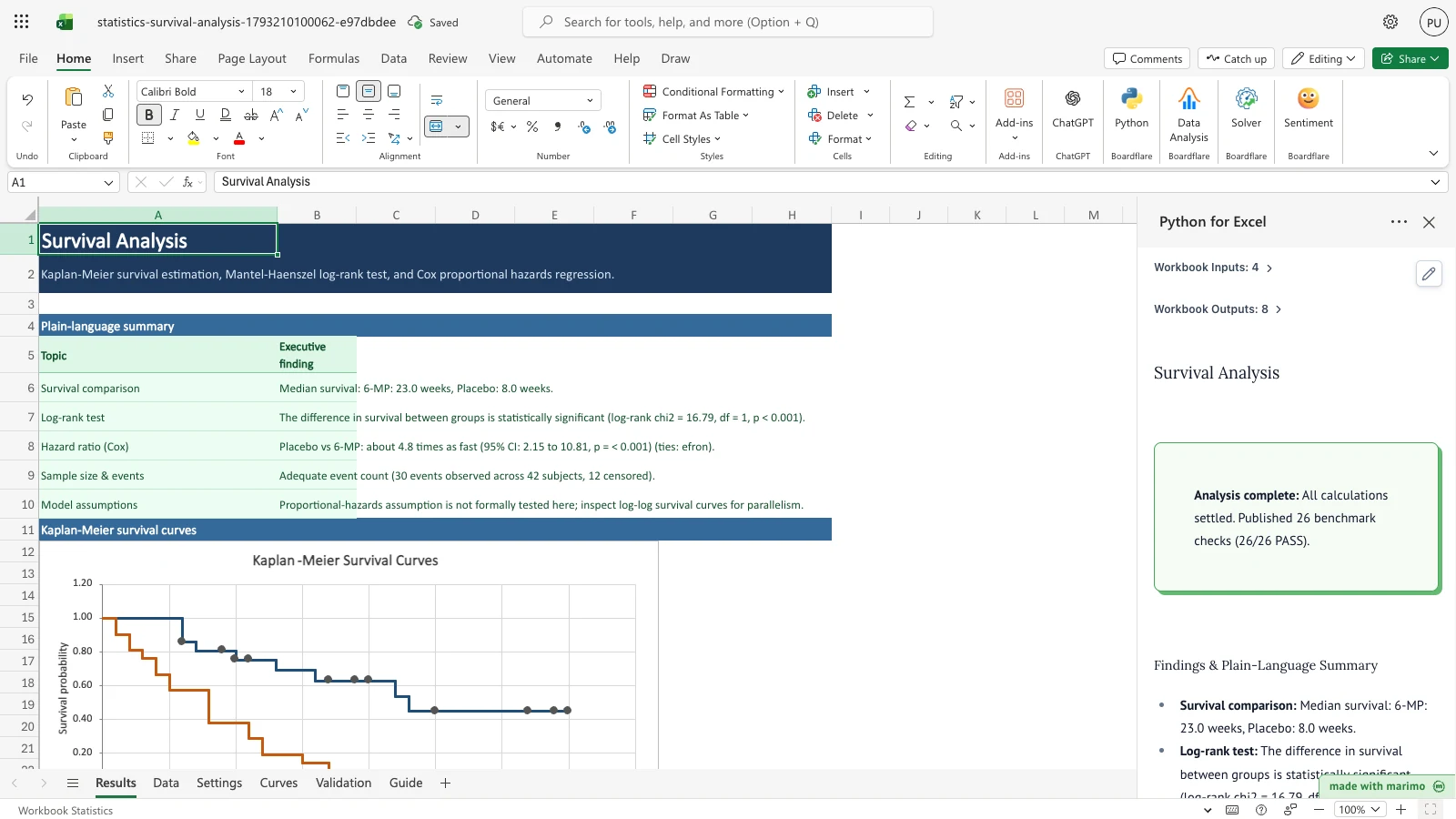
The workbook opens pre-populated with the classic leukemia remission trial data from Freireich et al. (1963). Patients receiving 6-mercaptopurine (6-MP) achieved a median remission of 23.0 weeks compared to 8.0 weeks for those receiving placebo, confirmed by a log-rank test (\(\chi^2 = 16.79\), \(p < 0.001\)) and a Cox hazard ratio of 4.82 under Efron tie handling.
Before you start
- Prerequisites: Microsoft Excel with Python for Excel enabled.
- Data expectations: A single observation table with one row per subject. Follow-up time must be non-negative numeric values, and the event indicator must be binary (1 for an observed event, 0 for right-censoring; Excel TRUE and FALSE values are read as 1 and 0). Group labels identify comparative cohorts.
- Sample data: Pre-seeded with 42 patient records from the Freireich et al. (1963) trial (21 subjects on 6-MP and 21 on placebo).
- Roles: The workbook user enters time-to-event data on the Data sheet and configures analysis settings on the Settings sheet. Technical authors maintain the underlying Python calculation engine and benchmark suites.
Workbook tour
The workbook contains six structured worksheets:
| Sheet | Content | Nature |
|---|---|---|
| Results | Executive plain-language summary, native Kaplan-Meier scatter chart, number-at-risk table, cohort summary statistics, log-rank test, and Cox proportional hazards regression outputs | Output (published by Python) |
| Data | StudyData table containing subject identifier, follow-up time, event indicator, cohort group, and optional numeric covariate columns |
Editable input (sized for 500+ rows) |
| Settings | ModelSettings table containing confidence levels, confidence interval transformation methods, tie handling, time units, risk step intervals, and column mappings |
Editable input |
| Curves | Chart step-function coordinates (curve_points) for up to 4 groups plus censored marks, and complete Kaplan-Meier life tables (km_table) |
Output (spill data for chart and audit) |
| Validation | 26 published benchmark checks and regression guards evaluated against historical references on every calculation cycle | Input references & Python PASS/FAIL audit |
| Guide | Practitioner guidance covering data formatting, censoring principles, interpretation of hazard ratios, and model assumptions | Documentation reference |
The chart legend and the curve_points columns are labelled Group 1 to Group 4, in sorted group order. The real group names are in the Results cohort summary, in the same order.
Using the template
Analyze your own cohort data
- Open the Data sheet.
- Clear the sample data rows in the
StudyDatatable and paste your own subject records underSubject,Time,Event, andGroup. - If analyzing multivariate effects, enter numeric covariate values under columns such as
Ageor additional covariate fields. - Open the Settings sheet to verify column mappings match your table headers, and adjust confidence levels or risk table intervals as needed.
- Review the Results sheet: the Kaplan-Meier chart, risk table, log-rank test, Cox regression table, and plain-language interpretation settle automatically.
Inputs and settings
The ModelSettings table on the Settings sheet controls the statistical routines:
| Setting | Allowed Values | Default | Effect |
|---|---|---|---|
| Confidence level | 0.50 to 0.99 | 0.95 | Sets the nominal coverage for Kaplan-Meier confidence intervals and Cox hazard ratio limits. A blank cell uses 0.95. Any other value outside 0.50 to 0.99, or text, stops the analysis with a Data Error banner |
| Confidence interval method | log-log, log, plain |
log-log |
Selects the Greenwood variance transformation. log-log guarantees bounds remain strictly within \([0, 1]\) |
| Cox tie handling | efron, breslow |
efron |
Specifies partial likelihood tie resolution. Efron provides closer approximation to the exact marginal likelihood |
| Time unit label | Any text | weeks |
Sets the time-axis label on charts, summary tables, and executive summaries |
| Risk table interval | Positive number | 10 | Tick step for the number-at-risk table beneath the chart. The table shows up to seven ticks, starting at 0 |
| Time column name | Column header | Time |
Specifies the follow-up time column in StudyData |
| Event column name | Column header | Event |
Specifies the event indicator column (1 = event, 0 = censored) in StudyData. Event rule: 0/1; TRUE/FALSE are read as 1/0 |
| Group column name | Column header or blank | Group |
Specifies the comparative cohort column. Leaving blank calculates a single pooled survival curve. If the named column is not found, all subjects are analysed as one group and the Results cautions say so |
| Cox covariate columns | Comma-separated names or blank | (blank) | Names additional numeric covariates in StudyData to include alongside treatment groups |
| Cox reference group | Group name or blank | (blank) | Establishes the baseline group for hazard ratio calculations (defaults to first alphabetically) |
How results are calculated
- Kaplan-Meier Estimation: At each distinct event time \(t_{(j)}\), the product-limit survival probability is calculated as \(S(t_{(j)}) = \prod_{i=1}^j (1 - d_i / n_i)\), where \(d_i\) is the number of events and \(n_i\) is the count of subjects at risk just prior to \(t_i\). Standard errors use Greenwood’s formula: \(\text{se}(S(t)) = S(t) \sqrt{\sum d_i / (n_i (n_i - d_i))}\). The life table’s Censored count covers censored subjects from one event time up to the next. The last row covers censored subjects after the final event time. Subjects censored before the first event time do not appear in any row.
- Pointwise Confidence Intervals: The default
log-logtransformation applies \(S(t)^{\exp(\pm z \cdot \text{se} / \lvert\ln S(t)\rvert)}\), strictly enforcing \([0, 1]\) probability boundaries. - Mantel-Haenszel Log-Rank Test: Evaluates pooled hypergeometric variances across all event times across \(k\) cohorts, computing \(\chi^2 = (\mathbf{O} - \mathbf{E})^T \mathbf{V}^{-1} (\mathbf{O} - \mathbf{E})\) with \(k - 1\) degrees of freedom.
- Cox Proportional Hazards: Fits semi-parametric proportional hazard models \(h(t \mid X) = h_0(t) \exp(X \beta)\) using partial likelihood with Efron or Breslow tie correction, producing regression coefficients, standard errors, hazard ratios \(\exp(\beta)\), and Wald tests. Model discrimination is assessed via Harrell’s concordance index (\(C\)-index).
Worked Example (Freireich 6-MP Arm): With 21 subjects on 6-MP, events occur at weeks 6 (3 events, 21 at risk), 7 (1 event, 17 at risk), 10 (1 event, 15 at risk), 13 (1 event, 12 at risk), 16 (1 event, 11 at risk), 22 (1 event, 7 at risk), and 23 (1 event, 6 at risk). At week 6, \(S(6) = 1 - 3/21 = 0.857143\), with Greenwood standard error \(0.076360\). The estimated median remission time is 23.0 weeks.
Reading the results
- Plain-language summary (
Results!A5:B10): Translates computed statistics into clear findings, highlighting median remission differences, statistical significance, relative hazard ratios, and small-sample cautions when fewer than 10 events occur. - Kaplan-Meier Survival Curves (
Results!A12): Native Excel scatter chart displaying true step functions for each cohort, with censored subjects highlighted as marker points along the survival curves. - Number at Risk (
Results!A32:H37): ATimerow gives the tick values in columnst1tot7, starting at 0 and stepping by the Settings risk table interval. Each group row then counts the subjects whose follow-up reaches that tick. The table shows up to four groups, in sorted order. With more groups, a caution says that only the first four are shown. - Cohort Summary (
Results!A40:G46): Reports total sample size (\(N\)), observed events, censored counts, censoring percentage, median survival time, and interquartile ranges (\(25^{\text{th}}\) to \(75^{\text{th}}\) percentiles). - Log-Rank Test (
Results!A49:G54): Details observed (\(O\)) vs expected (\(E\)) event counts per group, \((O-E)^2/E\) contributions, overall \(\chi^2\) statistic, degrees of freedom, and asymptotic \(p\)-value. - Cox Proportional Hazards Model (
Results!A57:H65): Displays covariate coefficients (\(\beta\)), standard errors, hazard ratios (\(\exp(\beta)\)), confidence bounds headed with the Settings confidence level (for example Lower 95% and Upper 95%), Wald \(z\)-scores, \(p\)-values, log-likelihood, likelihood-ratio tests, global Wald tests, and concordance index. The plain-language Cox reading states the confidence level used.
Saving, sharing and App mode
- Calculated outputs and native charts are saved directly into the
.xlsxpackage and viewable in standard Excel even without active Python sessions. - In App mode, users can review results and modify table entries without altering underlying Python cells or layout structures.
- App mode alters presentation and does not enforce security or access permissions.
Errors, empty states and limits
- Missing or invalid columns: If mapped column names do not exist in
StudyData, the summary table displays a descriptive error naming the missing field. - Non-numeric, infinite or negative time: The first offending row stops the analysis. A Data Error banner on Results names the worksheet row and the value, for example
Row 5: Time must be a non-negative number, got 'inf'. - Invalid event values: Any event value other than exactly 0 (censored) or 1 (event), such as 0.5, 2 or text, stops the analysis with a Data Error banner naming the first offending row.
- Invalid confidence level: A value outside 0.50 to 0.99, or text, stops the analysis with a Data Error banner. A blank cell uses 0.95.
- Group column not found: If the Settings group column name does not match a header in
StudyData, all subjects are analysed as one group and the Results cautions say so. - Fewer than 2 events: Survival estimation requires at least two events; datasets with fewer events pause with an explanatory notice.
- Non-numeric covariates: Categorical or text covariates in the Cox model are flagged by name.
- Limits: Sized for exports of at least 500 rows and up to 8 additional covariates within the snapshot cell budget.
Limitations and when to use this
- Scope: Designed for right-censored, time-to-event single-record survival analysis with fixed baseline covariates.
- Non-informative censoring: Assumes censoring is independent of failure risk.
- Proportional hazards assumption: The model does not include automated score tests for proportional hazards; practitioners should visually evaluate log-log curves for parallelism.
- Covariate scale: The Cox fit standardises each covariate internally, so small-spread or offset columns (for example values near \(10^{6}\) that vary by \(10^{-2}\)) are fitted correctly. A covariate whose hazard ratio or hazard-ratio limits cannot be represented in floating point, as happens for a very small-scale column with a non-trivial effect, stops the analysis with a “too large to report” error. Rescale such columns (for example to per-unit values) before analysis.
- Out of scope: Left truncation, time-varying covariates, competing risks, stratified Cox models, and parametric accelerated failure time models are not supported.
- Disclaimer: This template is an analytical software tool for teaching and exploratory data analysis. It does not claim regulatory, diagnostic, or clinical-device certification.
Developer reference
Notebook implementation
The reactive Marimo notebook reads inputs through boardflare:
inputs = bf.inputs(
    data=bf.ref("Data!A4:L504", headers=True),
    settings=bf.ref("Settings!A4:B14", headers=True),
    checks=bf.ref("Validation!A5:E31", headers=True),
    overflow="Data!A505",
)
Data parsing strips trailing blank rows, requires finite non-negative times and events that are exactly 0 or 1, and checks covariate values before calling the synchronized survival engine functions (kaplan_meier, survival_at, number_at_risk, logrank_test, and cox_ph). Outputs are published back to their respective workbook anchors:
bf.publish(
    outputs={
        "reading": reading_df,
        "risk_table": risk_table_df,
        "summary": summary_df,
        "logrank": logrank_df,
        "cox": cox_df,
        "curve_points": curve_points_df,
        "km_table": km_table_df,
        "validation": validation_df,
    }
)
How the calculation/model works
The module templates/statistics/engine/survival.py provides pure-Python routines backed by NumPy, SciPy, and statsmodels PHReg. Kaplan-Meier curves and Greenwood variances are evaluated in sorted time order. Log-rank tests construct the full hypergeometric covariance matrix across discrete event times. Cox regression estimates log hazard ratios via partial likelihood maximization with exact Efron or Breslow tie weighting.
Validation / expected results
The template verifies 26 benchmark checks on the Validation sheet on every calculation. If any check fails, the Results status callout changes to a warning that gives the count. The table below lists 10 of the 26 checks as examples.
| Benchmark Reference | Target Quantity | Expected Value | Tolerance | Source Category |
|---|---|---|---|---|
| Freireich 6-MP Arm | Week 6 Survival \(S(6)\) | 0.857143 | 1e-5 |
Published primary (O’Brien Minitab/SAS) |
| Freireich 6-MP Arm | Week 6 Greenwood SE | 0.076360 | 1e-5 |
Published primary (O’Brien Minitab/SAS) |
| Freireich 6-MP Arm | Plain 95% Lower Limit | 0.707479 | 1e-4 |
Published primary (O’Brien Minitab/SAS) |
| Freireich 6-MP Arm | Median Remission Time | 23.0 weeks | Exact | Published primary (O’Brien Minitab/SAS) |
| Freireich Placebo Arm | Median Remission Time | 8.0 weeks | Exact | Published primary (O’Brien Minitab/SAS) |
| Freireich Trial | Log-rank \(\chi^2\) (1 df) | 16.7929 | 1e-3 |
Published primary (O’Brien Minitab/SAS) |
| Freireich Cox Model | Breslow Coefficient | 1.5092 | 1e-3 |
Engine regression (verified against statsmodels) |
| Freireich Cox Model | Efron Coefficient | 1.5721 | 1e-3 |
Engine regression (verified against statsmodels) |
| Ovarian Cancer Trial | rx Coefficient | -0.9145 | 1e-3 |
Engine regression (survival::ovarian) |
| Ovarian Cancer Trial | Partial Log-Likelihood | -26.4633 | 1e-3 |
Engine regression (survival::ovarian) |
Editing the confidence level from 0.95 to 0.90 narrows confidence intervals and updates lower bounds. Switching tie handling to Breslow adjusts the Cox coefficient to 1.5092. Setting the Cox reference group to Placebo flips the 6-MP coefficient to -1.5721. Setting the risk table interval to 5 moves the ticks to 0, 5, 10 and so on. Reclassifying an event to censored updates total events and recalculates log-rank statistics.
Changelog
2026-10-26
- Initial release of the Survival Analysis template (Issue #249).
- Shipped with Freireich et al. (1963) leukemia trial data and 26 benchmark validation checks.
- Review fixes: Event and Time must be exactly 0 or 1 and finite, and non-negative, with a Data Error banner for the first bad row. Confidence level must be 0.50 to 0.99 (blank uses 0.95). The Results status callout warns when a benchmark check fails. A missing group column is noted in the cautions. The Cox reference group setting is now read from Settings!B14. The Cox fit now flags a constant covariate using a relative tolerance. Curve columns are generic (Group 1 to Group 4), and the number-at-risk table has a Time row with up to seven ticks.