Time Series Forecasting
Overview
Time Series Forecasting provides a practitioner-grade univariate forecasting studio directly in Excel, powered by Python and statsmodels. Demand planners, operations analysts, and financial modellers can specify and evaluate candidate models across autoregressive integrated moving average (ARIMA/SARIMA) and exponential smoothing (ETS) architectures, perform empirical out-of-sample backtesting against a reserved holdout sample, and produce point forecasts accompanied by prediction intervals.
The studio incorporates automated diagnostic evaluations to confirm whether residual errors satisfy white-noise properties: - Ljung-Box Q Test: Evaluates residual autocorrelation across multiple horizons, removing degrees of freedom for fitted ARMA parameters. - Autocorrelation (ACF) & Partial Autocorrelation (PACF): Assesses residual structure against standard 95% white-noise bounds. - Augmented Dickey-Fuller (ADF) Test: Evaluates unit-root non-stationarity to identify whether differencing is necessary.
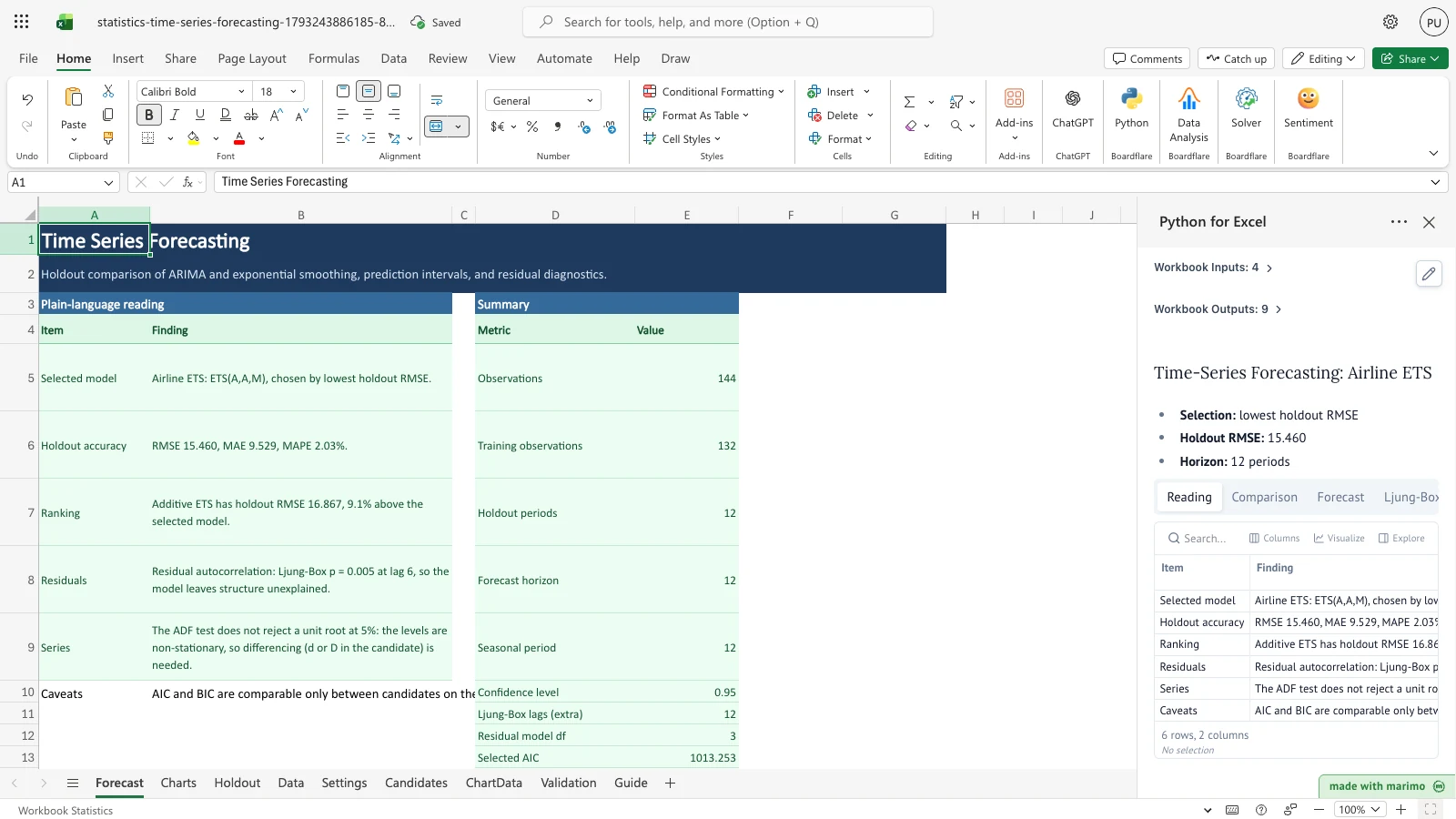
Shipped with the Box-Jenkins Series G international airline passengers benchmark (144 monthly observations from 1949 to 1960), the workbook illustrates candidate model ranking across multiplicative ETS, additive ETS, seasonal ARIMA, simple ARIMA, and a naive baseline.
Before you start
- Prerequisites: Microsoft Excel with Python for Excel enabled.
- Data layout: Enter chronological time periods (dates such as
1949-01or sequential integers) and numeric observations on the Data sheet. - Holdout selection: Configure the holdout length on the Settings sheet to reserve out-of-sample periods for empirical model ranking.
- Candidates: Enter up to 8 candidate model specifications on the Candidates sheet.
Workbook tour
The workbook contains nine structured worksheets:
| Sheet | Content | Nature |
|---|---|---|
| Forecast | Plain-language executive finding, model summary metrics, and point forecasts with prediction intervals | Output (published by Python) |
| Charts | Native Excel chart visualizing historical observations, holdout predictions, and future forecasts with 95% confidence bands | Visual presentation |
| Holdout | Out-of-sample backtest comparison table (RMSE, MAE, MAPE, AIC, BIC), Ljung-Box test, ADF test, and ACF/PACF residual table | Output (published by Python) |
| Data | Historical sequential time series observations (DataTable, up to 300 observations) |
Editable input |
| Settings | Holdout length, forecast horizon, seasonal period, confidence level, Ljung-Box lags, and model selection mode | Editable input |
| Candidates | Up to 8 candidate model specifications across ARIMA, ETS, and Naive architectures (CandidatesTable) |
Editable input |
| ChartData | Plotting coordinates for historical data, holdout backtest, and future forecasts | Output (chart helper) |
| Validation | 40 benchmark verification checks against NIST e-Handbook Series F and Box-Jenkins Series G published standards | Output (verification) |
| Guide | Practitioner guide covering backtesting principles, ARIMA vs. ETS dynamics, and residual diagnostic interpretation | Reference guide |
Using the template
1. Enter historical time series data
- Open the Data sheet.
- In the
DataTable(A4:B304), enter your sequential periods in column A and numeric values in column B. - Leave the period blank to end the series.
2. Configure forecast and holdout settings
- Open the Settings sheet.
- Enter the desired Holdout length (e.g., 12 periods reserved for out-of-sample accuracy ranking).
- Specify the Forecast horizon (e.g., 12 future periods).
- Enter the Seasonal period (e.g., 12 for monthly data, 4 for quarterly data, or 1 for non-seasonal data).
- Set the Confidence level for prediction bounds (e.g., 0.95).
- Set Use model to
Autoto select the lowest holdout RMSE candidate, or type a specific candidate label to override model choice.
3. Review candidate models and results
- Open the Candidates sheet to review or add model specifications (ARIMA/SARIMA orders, ETS trend and seasonal options).
- Open the Holdout sheet to view candidate rankings and residual diagnostics.
- Open the Forecast sheet to inspect the plain-language executive reading and the final future forecast values.
- Inspect the Charts sheet to visually verify model projections against historical actuals.
Inputs and settings
The controls in Settings configure forecasting behavior:
| Setting | Allowed Values | Default | Description |
|---|---|---|---|
| Holdout length | Integer \(\ge 2\) | 12 | Number of most recent observations reserved for out-of-sample backtesting |
| Forecast horizon | Integer 1 to 60 | 12 | Number of future periods to project beyond the historical series |
| Seasonal period | Integer \(\ge 1\) | 12 | Primary seasonal cycle length (e.g., 12 for monthly, 4 for quarterly, 1 for non-seasonal) |
| Confidence level | 0.01 to 0.99 | 0.95 | Nominal coverage for prediction intervals |
| Ljung-Box lags | Integer \(\ge 1\) | 12 | Extra lag horizon for the Ljung-Box residual autocorrelation test |
| Use model | Auto or candidate label |
Auto |
Selects lowest holdout RMSE candidate when Auto, or forces a specific candidate |
How results are calculated
- Holdout Partitioning: The series of length \(n\) is split into training (\(1 \dots n - h\)) and holdout (\(n - h + 1 \dots n\)) sets.
- Model Estimation: Candidate ARIMA/SARIMA models are fitted via innovations maximum likelihood; ETS models are fitted via maximum likelihood state-space equations using
statsmodels. - Out-of-Sample Accuracy: Each fitted candidate generates forecasts for the holdout period. Accuracy metrics are computed: \[\text{RMSE} = \sqrt{\frac{1}{h} \sum_{t=1}^h (y_t - \hat{y}_t)^2}, \quad \text{MAE} = \frac{1}{h} \sum_{t=1}^h |y_t - \hat{y}_t|, \quad \text{MAPE} = \frac{100\%}{h} \sum_{t=1}^h \left|\frac{y_t - \hat{y}_t}{y_t}\right|\]
- Final Refitting & Projection: The selected candidate is refitted on all \(n\) observations and projected across the future forecast horizon \(H\) with prediction intervals at level \(1 - \alpha\).
- Residual Diagnostics: Residuals from the full refit are tested for white noise via Ljung-Box \(Q\) statistics and augmented Dickey-Fuller stationarity.
Reading the results
- Plain-Language Reading (
Forecast!A4:B9): Executive synthesis detailing the selected model, holdout accuracy, ranking margins, residual behavior, and stationarity status. - Summary Metrics (
Forecast!D4:E15): Observations count, training count, holdout periods, horizon, seasonal period, confidence level, and information criteria (AIC/BIC). - Forecast Table (
Forecast!A18:D42): Point forecasts alongside lower and upper prediction interval boundaries for each future period. - Model Comparison (
Holdout!A4:J13): Ranked leaderboard showing RMSE, MAE, MAPE, in-sample AIC/BIC, and selection status. - Diagnostics (
Holdout!A16:M41): Ljung-Box \(Q\) statistics and \(p\)-values, ADF test results, and ACF/PACF residual autocorrelation table.
Saving, sharing and App mode
- All computed values, prediction intervals, and native Excel charts are saved into the standard
.xlsxformat and remain visible without an active Python connection. - In App mode, users can view predictions, evaluate rankings, and adjust settings while safeguarding core calculations.
- App mode provides an optimized presentation surface and does not restrict file security or access controls.
Errors, empty states and limits
- Short series: At least 10 observations are required; holdout length must leave at least 10 observations for training.
- Non-positive values with log or multiplicative models: Log-transformed ARIMA and multiplicative ETS require strictly positive observations (\(y > 0\)).
- Missing or non-numeric inputs: Non-numeric or blank values in the middle of the time series halt calculations with a targeted cell reference.
- Candidate limits: Up to 8 candidate models can be specified on the Candidates sheet.
Limitations and when to use this
- Univariate focus: Designed for single univariate time series; does not incorporate exogenous regressors (ARIMAX).
- Model families: Covers ARIMA/SARIMA, ETS, and Naive baselines; complex machine-learning or deep-learning architectures are outside scope.
- Free alternatives: Native Excel’s
FORECAST.ETSprovides Holt-Winters exponential smoothing for single models, and the Analysis ToolPak provides simple moving averages, but neither supports candidate model comparison, out-of-sample backtesting, ARIMA/SARIMA specifications, or automated residual diagnostics. This studio provides automated holdout comparison, ARIMA and ETS candidate ranking, prediction intervals, and residual diagnostics directly in Excel. - Disclaimer: This workbook is an analytical tool for forecasting and decision support. Real-world projections should incorporate domain expertise and external operational context.
Developer reference
Notebook implementation
The reactive Marimo notebook reads series observations, settings, and candidate specifications via boardflare:
inputs = bf.inputs(
    data_rows=bf.ref("Data!A4:B304", headers=True),
    settings_data=bf.ref("Settings!A4:B10", headers=True),
    candidates_data=bf.ref("Candidates!A4:L12", headers=True),
    overflow="Data!A305",
)
The notebook executes model estimation and holdout backtests, evaluates diagnostics, and publishes nine structured outputs:
bf.publish(
    outputs={
        "reading": [HDR_READING, *reading_rows],
        "summary": [HDR_SUMMARY, *summary_rows],
        "comparison": [HDR_COMPARISON, *comparison_rows],
        "forecast": [HDR_FORECAST, *forecast_rows],
        "chart_data": [HDR_CHART, *chart_rows],
        "ljung": [HDR_LJUNG, *ljung_rows],
        "acf": [HDR_ACF, *acf_rows],
        "adf": [HDR_ADF, *adf_rows],
        "validation": [HDR_VALIDATION, *validation_rows],
    }
)
How the calculation/model works
Core time series routines are implemented in templates/statistics/engine/timeseries.py, delegating parameter estimation to statsmodels.tsa.arima.model.ARIMA and statsmodels.tsa.exponential_smoothing.ets.ETSModel. Backtests fit candidates on training slices and compute holdout accuracy metrics. Prediction intervals for ETS models without closed-form intervals use seeded simulation (ETS_SIMULATION_SEED = 0) to guarantee deterministic reproducibility.
Validation / expected results
The template verifies 40 independent benchmarks on the Validation sheet against NIST e-Handbook Series F (AR(2) Yule-Walker) and Box-Jenkins Series G (Airline ARIMA and multiplicative ETS):
| Benchmark Reference | Target Quantity | Expected Value | Tolerance | Source Category |
|---|---|---|---|---|
| Box-Jenkins Series G | ARIMA ma1 | -0.4018 | 5e-5 |
Published secondary (Hedibert slide 25) |
| Box-Jenkins Series G | ARIMA sma1 | -0.5569 | 5e-5 |
Published secondary (Hedibert slide 25) |
| Box-Jenkins Series G | ARIMA Log-likelihood | 244.7 | 0.05 |
Published secondary (Hedibert slide 25) |
| Box-Jenkins Series G | ARIMA AIC | -483.4 | 0.05 |
Published secondary (Hedibert slide 25) |
| NIST e-Handbook Series F | AR(2) phi1 | -0.3198 | 5e-5 |
Published primary (NIST §6.4.4.9) |
| NIST e-Handbook Series F | AR(2) phi2 | 0.1797 | 5e-5 |
Published primary (NIST §6.4.4.9) |
| NIST e-Handbook Series F | Forecast t=71 | 60.6405 | 5e-5 |
Published primary (NIST §6.4.4.9) |
| Box-Jenkins Series G | ETS(A,A,M) log-likelihood | -543.557145 | 1e-6 |
Engine regression guard |
| Box-Jenkins Series G | ETS(A,A,M) AIC | 1123.114291 | 1e-6 |
Engine regression guard |
Changelog
1.0.0(2026-10-28): Initial release of the Phase 2 Time Series Forecasting Studio with holdout backtesting across ARIMA/SARIMA, ETS, and Naive models, prediction intervals, residual diagnostics (Ljung-Box, ACF/PACF, ADF), and 40 benchmark verification checks.